Field Validations and BuiltIn Fields Django Models (original) (raw)
Last Updated : 2 May, 2026
Field validations in Django make sure that only correct and properly formatted data is saved in the database.
- Django automatically enforces type-level validation based on the field type. While this handles basic data integrity, developers can add custom validators.
- Each field has its own rules, such as IntegerField allowing only whole numbers, CharField limiting text length and DateField requiring a valid date.
- If data does not match the required format, Django raises validation errors when validation is triggered through forms, admin interface or by calling full_clean() explicitly.
Understanding Django Field Validation
Consider a project named 'geeksforgeeks'having an appnamed 'geeks'. In geeks/models.py:
Python `
from django.db import models
class GeeksModel(models.Model): geeks_field = models.IntegerField()
def __str__(self):
    return str(self.geeks_field)
`
After running makemigrations and migrate, Django creates the corresponding database table with an integer column.
Opening Django Shell
Validation can be tested interactively by opening the Django shell:
python manage.py shell
This allows creating model instances and checking how Django responds to valid and invalid input.
Invalid Case: Passing a String
If a string value like 'GfG is Best' is used for geeks_field, Django’s validation system will raise an error, as only integers are allowed.
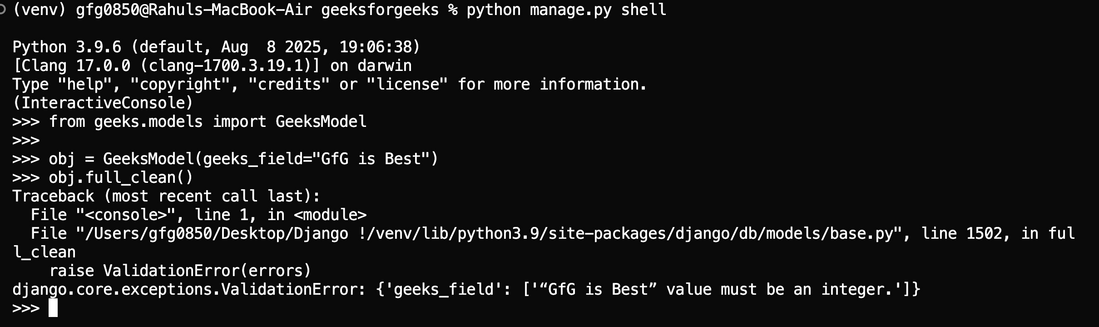
ValidationError
This confirms that Django prevents incorrect data from being saved.
Valid Case: Passing a Correct Integer
Values that satisfy the rules of IntegerField will not raise any ValidationError.
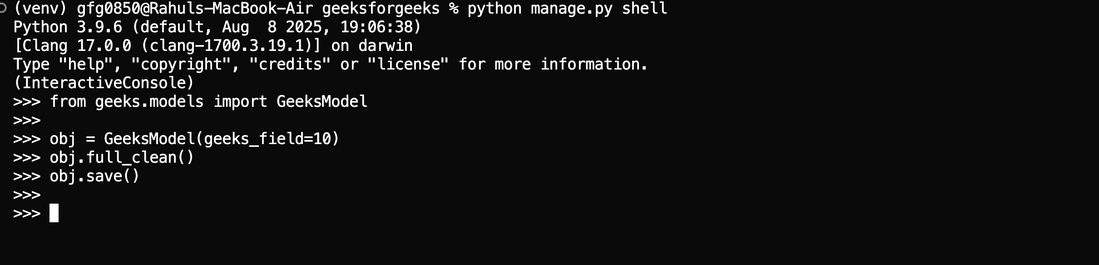
IntegerField
Django admin interface can be used to verify that non-numeric input is automatically rejected, as each field enforces its own built-in validation.
Django provides fields for almost every type of data, such as IntegerField for numbers and CharField for text. In addition, there are built-in validations that can be applied to these fields to enforce extra rules. Some of the most used validations are listed below:
| Field Options | Description |
|---|---|
| Null | If True, Django will store empty values as NULL in the database. Default is False. |
| Blank | If True, the field is allowed to be blank. Default is False. |
| db_column | The name of the database column to use for this field. If this isn’t given, Django will use the field’s name. |
| Default | The default value for the field. This can be a value or a callable object. If callable it will be called every time a new object is created. |
| primary_key | If True, this field is the primary key for the model. If not defined on any field, Django automatically adds a primary key field (typically BigAutoField in modern Django versions). |
| editable | If False, the field will not be displayed in the admin or any other ModelForm. They are also skipped during model validation. Default is True. |
| error_messages | The error_messages argument lets you override the default messages that the field will raise. Pass in a dictionary with keys matching the error messages you want to override. |
| help_text | Extra “help” text to be displayed with the form widget. It’s useful for documentation even if your field isn’t used on a form. |
| verbose_name | A human-readable name for the field. If the verbose name isn’t given, Django will automatically create it using the field’s attribute name, converting underscores to spaces. |
| validators | A list of validators to run for this field. See the validators documentation for more information. |
| Unique | If True, this field must be unique throughout the table. |