Custom Field Validations in Django Models (original) (raw)
Last Updated : 15 Nov, 2025
Custom field validations ensure that data entered into a model field meets specific rules before being saved to the database. They extend Django’s built-in validations, allowing developers to enforce additional rules.
- Can verify formats, length limits, or complex conditions (such as ensuring an email belongs to a certain domain).
- Run automatically when creating or updating model instances.
- Help maintain clean and consistent data without adding extra validation logic in forms or views.
- Builds on Django’s built-in field validations.
Syntax
field_name = models.Field(validators=[validator_function1, validator_function2])
- **validators is a list of validator functions that will be executed when the field value is set.
- Each validator function accepts a single argument, value, which is the data entered for the field.
Understanding Django Custom Field Validation
Consider a project named 'geeksforgeeks' having an app named 'geeks'. Let’s create a custom validator that accepts only email addresses ending with ****@gmail.com.**
1. Define the Model
In models.py, start with a simple model having a CharField for email:
Python `
from django.db import models from django.db.models import Model
class GeeksModel(Model): geeks_mail = models.CharField(max_length = 200)
`
2. Create a Validator Function
Create a custom validator function that will check whether the email address ends with @gmail.com. If it doesn't, the function will raise a ValidationError.
Python `
from django.core.exceptions import ValidationError
def validate_geeks_mail(value): if not value.endswith("@gmail.com"): raise ValidationError("This field accepts only Gmail addresses.")
`
3. Attach the Validator to the Model Field
Attach this validator function to the **geeks_mail field in model using the validators parameter.
Python `
from django.db import models from django.core.exceptions import ValidationError
def validate_geeks_mail(value): if not value.endswith("@gmail.com"): raise ValidationError("This field accepts only Gmail addresses.")
class GeeksModel(models.Model): geeks_mail = models.CharField(max_length=200, validators=[validate_geeks_mail])
`
- The custom validator ensures that the **geeks_mail field only accepts email addresses ending with ****@gmail.com**.
- Any email address **not ending with @gmail.com will trigger a **ValidationError.
- This approach allows applying **any type of custom validation to a field’s value.
After every change in **models.py, run these commands makemigrations and migrate commands to update the changes in database.
Opening Django Shell
Validation can be tested interactively by the Django shell:
python manage.py shell
This allows creating model instances and checking how Django responds to valid and invalid input.
Invalid Case : Passing a non-Gmail address
If a value like "abc@geeksforgeeks.org" is used for geeks_mail, the custom validation system will raise an error, as only addresses ending with @gmail.com are allowed.
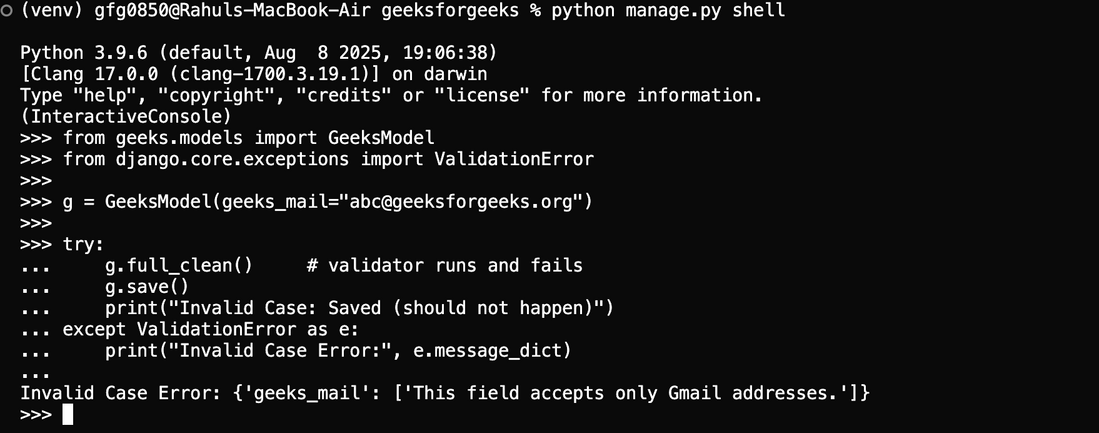
Custom Validation Error
Valid Case: Passing a Correct Gmail Address
Values that satisfy the custom validator (ending with @gmail.com) will not raise any ValidationError.
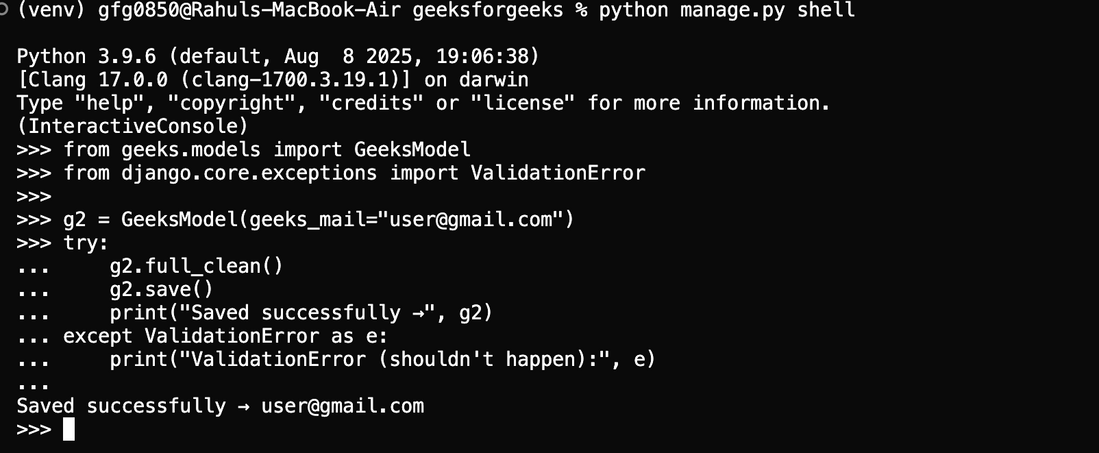
Valid Gmail Input
The Django admin interface can be used to verify that non-Gmail email addresses are automatically rejected, as the custom validator enforces the required validation rule.