Create Cricket Score API using Web Scraping in Flask (original) (raw)
Last Updated : 23 Jul, 2025
Web scraping is the process of extracting data from websites automatically. It allows us to collect and use real-time information from the web for various applications.
In this project, we'll understand web scraping by building a Flask app that fetches and displays live cricket scores from an online sports website. This will help us see how to extract specific data using Python and present it in a user-friendly way.
Installation and Setup
To create a basic flask app, refer to- Create Flask App
After creating and activating a virtual environment install Flask and other libraries required in this project using these commands-
pip install requests
pip install beautifulsoup4
- **requests: Helps **fetch web page content by sending **HTTP requests, allowing us to retrieve HTML data from websites.
- **beautifulsoup4: Parses and **extracts specific data from **HTML or **XML documents, making web scraping easier and more efficient.
Getting the Data
We would use the NDTV Sports Cricket Scorecard to fetch the data. Following are the steps for Scraping data from the Web Page. To get the HTML text from the web page;
html_text = requests.get('https://sports.ndtv.com/cricket/live-scores').text
To represent the parsed object as a whole we use the BeautifulSoup object,
soup = BeautifulSoup(html_text, "html.parser")
Note: It is recommended to run and check the code after each step to know the difference and thoroughly understand the concepts.
Let's look at how to fetch and parse the HTML content of from our taget website:
Python `
from bs4 import BeautifulSoup import requests
html_text = requests.get('https://sports.ndtv.com/cricket/live-scores').text soup = BeautifulSoup(html_text, "html.parser") print(soup)
`
**Output:
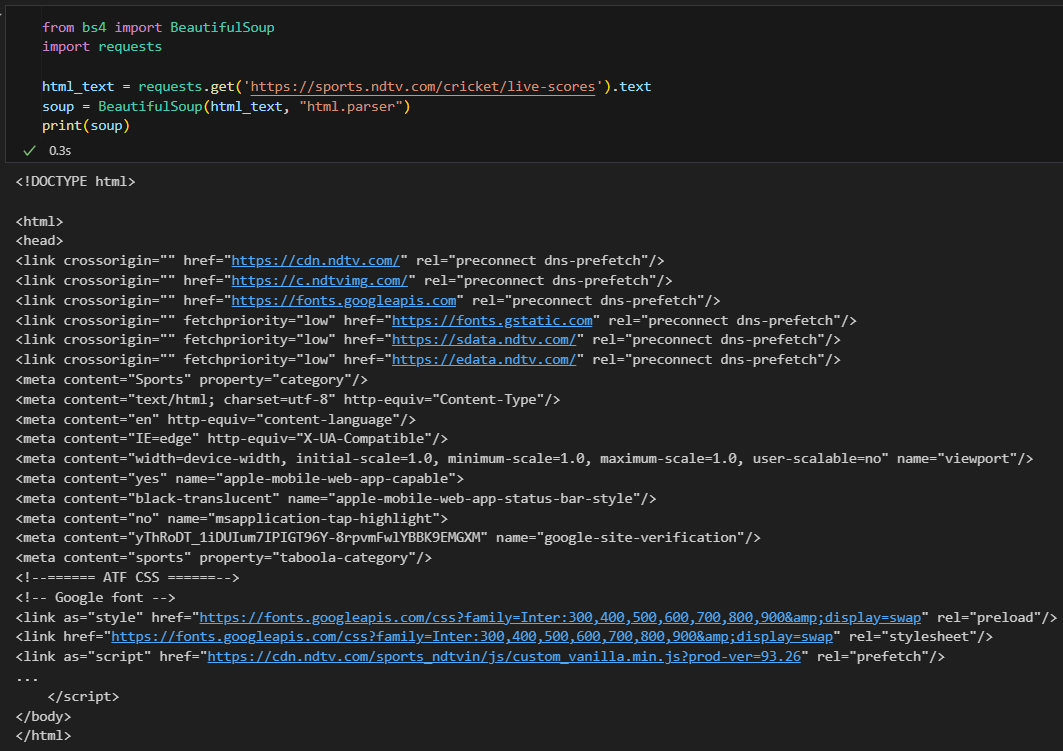
Html content received from the request
**Explanation:
- **requests.get(url).text sends an HTTP request to the given URL and retrieves the raw HTML content of the page as text.
- **BeautifulSoup(html_text, "html.parser") converts the raw HTML into a structured format that can be navigated easily.
- **print(soup) displays the entire HTML content of the webpage.
Now that we have a basic idea of how to fetch live data from a a URL we can proceed to create a flask app and implement it get the live cricket scores.
Creating app.py
This file will contain the code for our main Flask application, we are going to scrape live cricket scores from NDTV Sports using BeautifulSoup and display them in **json format.
Fetching Live Cricket Scores
In this part, we will fetch live cricket scores from the NDTV Sports website using requests and BeautifulSoup. This will allow us to extract match details from the webpage.
Python `
import requests from bs4 import BeautifulSoup
Fetch HTML content from the live scores page
url = 'https://sports.ndtv.com/cricket/live-scores' response = requests.get(url)
Check if request was successful
if response.status_code != 200: print("Failed to fetch data from NDTV Sports") exit()
soup = BeautifulSoup(response.text, "html.parser")
Extract relevant match sections
sect = soup.find_all('div', class_='sp-scr_wrp ind-hig_crd vevent')
If no live matches found
if not sect: print("No live matches available right now") exit()
Access the first match section
section = sect[0]
`
**Explanation
- ****requests.get(url)**- Sends a request to the website and fetches the HTML content.
- **response.status_code- Checks if the request was successful (status 200 means OK).
- ****BeautifulSoup(response.text, "html.parser")**- Parses the HTML content.
- ****soup.find_all('div', class_='sp-scr_wrp ind-hig_crd vevent')**- Finds all match sections in the webpage.
- **sect[0]- Selects the first available match (if any).
Extracting Match Information
Now that we have fetched the HTML content, we will extract important match details such as teams, scores, location, and match status.
Python `
Extract required details safely
description = section.find('span', class_='description') location = section.find('span', class_='location') current = section.find('div', class_='scr_dt-red') link = section.find('a', class_='scr_ful-sbr-txt')
Convert extracted data to text safely
result = { "Description": description.text if description else "N/A", "Location": location.text if location else "N/A", "Current": current.text if current else "N/A", "Full Scoreboard": f"https://sports.ndtv.com/%7Blink.get('href')}" if link else "N/A", "Credits": "NDTV Sports" }
`
**Explanation
- ****find('span', class_='description')**- Extracts match description.
- ****find('span', class_='location')**- Extracts match location.
- ****find('div', class_='scr_dt-red')**- Extracts the current match status (e.g., "Live", "Stumps").
- ****find('a', class_='scr_ful-sbr-txt')**- Extracts the link to the full scoreboard.
- ****Safe Extraction (if description else "N/A")**- Prevents errors if elements are missing.
Extracting Team Scores and Creating an API
In the final part, we will extract the teams’ names and scores, then return all the match details as a JSON API using Flask.
Python `
from flask import Flask, jsonify
app = Flask(name)
@app.route('/') def cricgfg(): try: status = section.find_all('div', class_="scr_dt-red")[1].text block = section.find_all('div', class_='scr_tm-wrp')
    if len(block) >= 2:
        team1_block = block[0]
        team2_block = block[1]

        result.update({
            "Status": status,
            "Team A": team1_block.find('div', class_='scr_tm-nm').text if team1_block else "N/A",
            "Team A Score": team1_block.find('span', class_='scr_tm-run').text if team1_block else "N/A",
            "Team B": team2_block.find('div', class_='scr_tm-nm').text if team2_block else "N/A",
            "Team B Score": team2_block.find('span', class_='scr_tm-run').text if team2_block else "N/A"
        })
except Exception as e:
    result["Status"] = "Match details unavailable"
    result["Error"] = str(e)

return jsonify(result)
if name == "main": app.run(debug=True)
`
**Explanation
- ****Flask API (Flask(__name__))**- Creates a Flask web app to return JSON responses.
- ****@app.route('/')**- Defines the home route ****(/)** where match data will be shown.
- **find_all('div', class_="scr_dt-red")[1]- Extracts the match status.
- ****find_all('div', class_='scr_tm-wrp')**- Finds blocks containing team information.
- **len(block) >= 2- Ensures at least two teams exist before accessing data.
- j****sonify(result)**- Converts match details into a **JSON response for easy API access.
Complete app.py code
Python `
import requests from bs4 import BeautifulSoup from flask import Flask, jsonify
app = Flask(name)
@app.route('/') def cricgfg(): # Fetch HTML content from the live scores page url = 'https://sports.ndtv.com/cricket/live-scores' response = requests.get(url)
# Check if request was successful
if response.status_code != 200:
    return jsonify({"error": "Failed to fetch data from NDTV Sports"})

soup = BeautifulSoup(response.text, "html.parser")

# Extract relevant match sections
sect = soup.find_all('div', class_='sp-scr_wrp ind-hig_crd vevent')

# If no live matches found
if not sect:
    return jsonify({"message": "No live matches available right now"})

# Safely access the first match section
section = sect[0]

# Extract required details safely
description = section.find('span', class_='description')
location = section.find('span', class_='location')
current = section.find('div', class_='scr_dt-red')
link = section.find('a', class_='scr_ful-sbr-txt')

# Convert extracted data to text safely
result = {
    "Description": description.text if description else "N/A",
    "Location": location.text if location else "N/A",
    "Current": current.text if current else "N/A",
    "Full Scoreboard": f"https://sports.ndtv.com/%7Blink.get('href')}" if link else "N/A",
    "Credits": "NDTV Sports"
}

# Extract team details safely
try:
    status = section.find_all('div', class_="scr_dt-red")[1].text
    block = section.find_all('div', class_='scr_tm-wrp')

    if len(block) >= 2:
        team1_block = block[0]
        team2_block = block[1]

        result.update({
            "Status": status,
            "Team A": team1_block.find('div', class_='scr_tm-nm').text if team1_block else "N/A",
            "Team A Score": team1_block.find('span', class_='scr_tm-run').text if team1_block else "N/A",
            "Team B": team2_block.find('div', class_='scr_tm-nm').text if team2_block else "N/A",
            "Team B Score": team2_block.find('span', class_='scr_tm-run').text if team2_block else "N/A"
        })
except Exception as e:
    result["Status"] = "Match details unavailable"
    result["Error"] = str(e)

return jsonify(result)
if name == "main": app.run(debug=True)
`
Running th Application
To run the application, use this command in the terminal-
python app.py
And then visit the developmeent URL- "**http://127.0.0.1:5000".
Deploying API on Heroku
**Step 1: You need to create an account on Heroku.
**Step 2: Install Git on your machine.
**Step 3: Install Heroku on your machine.
**Step 4: Login to your Heroku Account
heroku login
**Step 5: Install gunicorn which is a pure-Python HTTP server for WSGI applications. It allows you to run any Python application concurrently by running multiple Python processes.
pip install gunicorn
**Step 6: We need to create a profile which is a text file in the root directory of our application, to explicitly declare what command should be executed to start our app.
web: gunicorn CricGFG:app

**Step 7: We further create a requirements.txt file that includes all the necessary modules which Heroku needs to run our flask application.
pip freeze >> requirements.txt
**Step 8: Create an app on Heroku, click here.

**Step 9: We now initialize a git repository and add our files to it.
git init
git add .
git commit -m "Cricket API Completed"

**Step 10: We will now direct Heroku towards our git repository.
heroku git:remote -a cricgfg
**Step 11: We will now push our files on Heroku.
git push heroku master
Finally, our API is now available on https://cricgfg.herokuapp.com/
