Ecommerce Website using Django (original) (raw)
Build an e-commerce website using Django that enables users to browse products, manage a shopping cart and place orders through an online system.
- Browse and select products from the available catalog.
- Manage cart items, including adding, removing and updating quantities.
- Complete checkout with secure user authentication and order processing.
ER Diagram of Website
**Customer Interface
- Customer shops for a product
- Customer changes quantity
- The customer adds an item to the cart
- Customer views cart
- Customer checks out
- Customer sends order
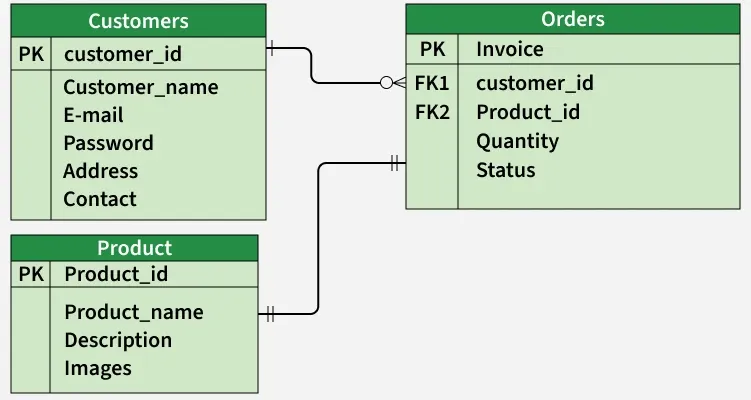
ER-diagram for Customer
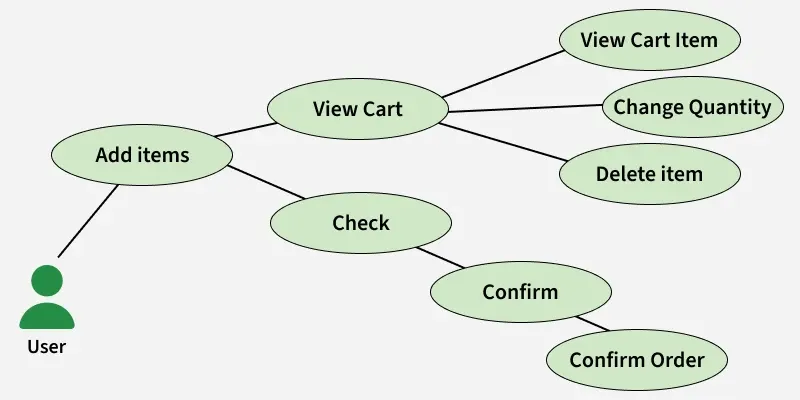
Use-Case diagram for Customer
**Admin Interface
- Admin logs in
- Admin inserts item
- Admin removes item
- Admin modifies item
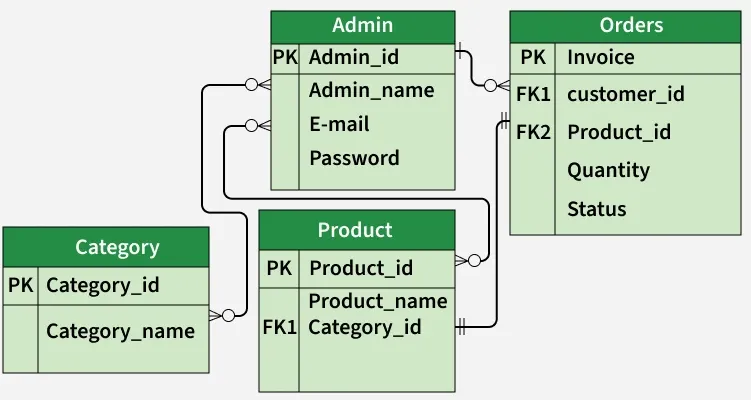
ER-diagram for Admin
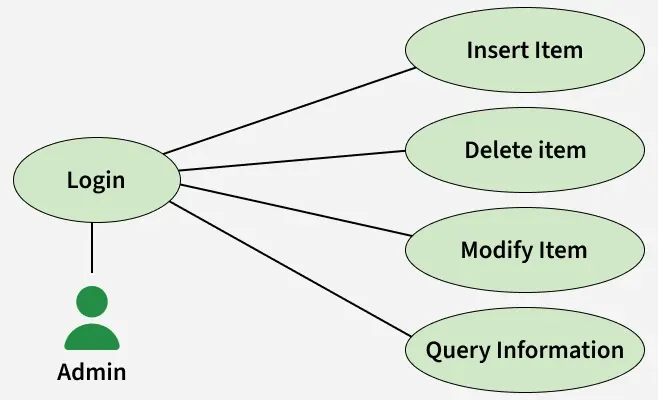
Use-Case diagram for Admin
Step by Step Implementation
**1. Create Project: Create a new project in your IDE by selecting File -> New Project.
**2. Install Django: Now, install Django using the below command in the terminal
python -m pip install django
**3. Verify Installation: To verify, check the installed Django version using below command
python -m django --version
**4. Create Django Project: Now, to create a new Django project use below command
django-admin startproject project_name
**5. Run Development Server: To run and start the Django server enter following command in the terminal
python manage.py runserver
The application will be available at http://127.0.0.1:8000/. Open this URL in a browser to view the output.
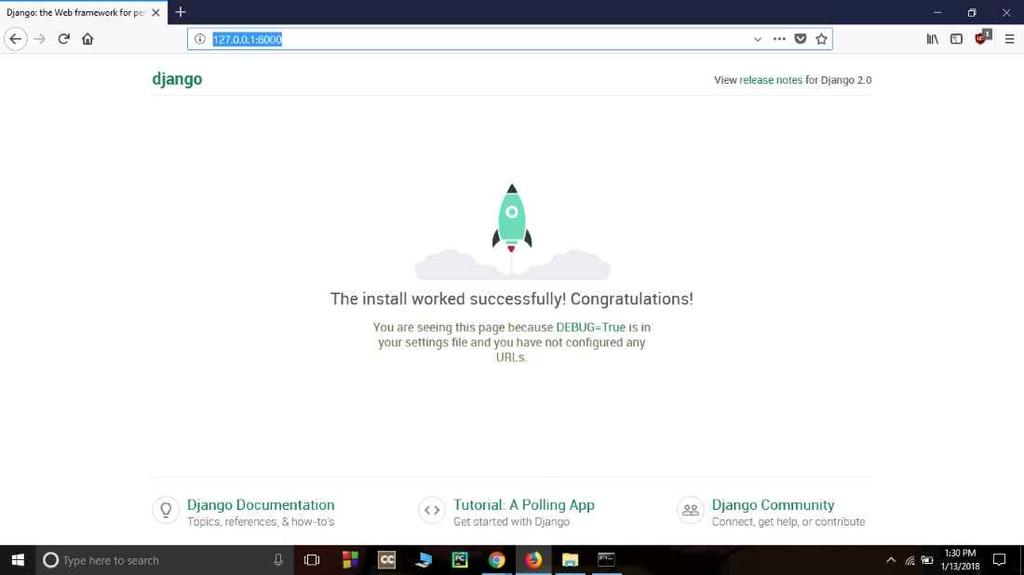
Output
Project Directory
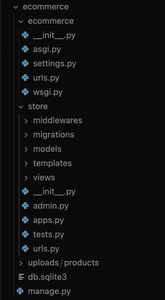
Project Structure
Project Configuration
Now add store app in E-commerce website in settings.py.
Python `
INSTALLED_APPS = [ 'django.contrib.admin', 'django.contrib.auth', 'django.contrib.contenttypes', 'django.contrib.sessions', 'django.contrib.messages', 'django.contrib.staticfiles', 'store', ]
`
**ecommerce/urls.py: This file contains all the URL patterns used by the website
Python `
from django.contrib import admin from django.urls import path, include from django.conf import settings from django.conf.urls.static import static
urlpatterns = [ path('admin/', admin.site.urls), path('', include('store.urls')), ] + static(settings.MEDIA_URL, document_root=settings.MEDIA_ROOT)
`
Models
**models.py: The below screenshot shows the required models that we will need to create. These models are tables that will be stored in the SQLite database.
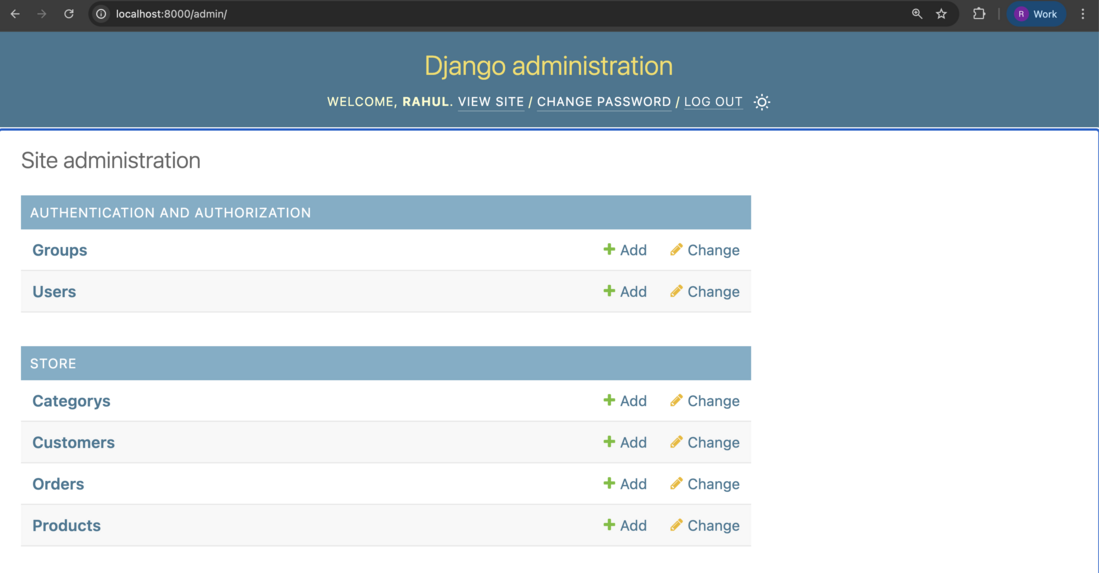
Django-admin interface
Let's see each model and the fields required by each model.
**category.py: This model defines product categories with a name field, includes a method to retrieve all categories from the database and returns the category name as its string representation.
Python `
from django.db import models
class Category(models.Model): name = models.CharField(max_length=50)
@staticmethod
def get_all_categories():
    return Category.objects.all()

def __str__(self):
    return self.name
`
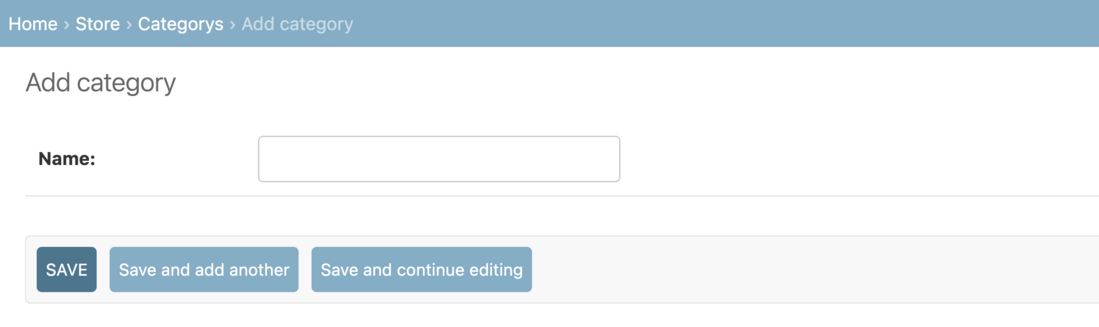
Snapshot of Django-Admin Add category
**customer.py: model for a "Customer" with fields for name, phone, email and password. It includes methods to register, retrieve customers by email and check if a customer exists.
Python `
from django.db import models from django.contrib.auth.hashers import make_password
class Customer(models.Model): first_name = models.CharField(max_length=50) last_name = models.CharField(max_length=50) phone = models.CharField(max_length=10) email = models.EmailField(unique=True) password = models.CharField(max_length=100)
# Save customer
def register(self):
    # If you want hashed password:
    # self.password = make_password(self.password)
    self.save()

@staticmethod
def get_customer_by_email(email):
    try:
        return Customer.objects.get(email=email)
    except Customer.DoesNotExist:
        return False

def isExists(self):
    return Customer.objects.filter(email=self.email).exists()

class Meta:
    verbose_name_plural = "Customers"
`
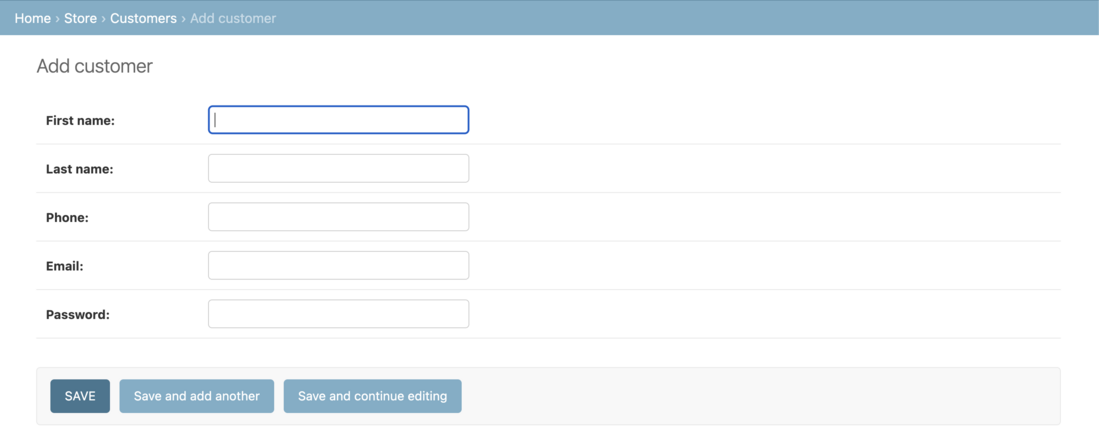
Snapshot of Django-Admin Add customers
**products.py: model for "Products" with fields for name, price, category, description and image. It also includes static methods to retrieve products by ID, retrieve all products and retrieve products by category ID.
Python `
from django.db import models from .category import Category
class Products(models.Model): name = models.CharField(max_length=60) price = models.IntegerField(default=0) category = models.ForeignKey(Category, on_delete=models.CASCADE, default=1) description = models.CharField( max_length=250, default='', blank=True, null=True) image = models.ImageField(upload_to='uploads/products/')
@staticmethod
def get_products_by_id(ids):
    return Products.objects.filter(id__in=ids)

@staticmethod
def get_all_products():
    return Products.objects.all()

@staticmethod
def get_all_products_by_categoryid(category_id):
    if category_id:
        return Products.objects.filter(category=category_id)
    else:
        return Products.get_all_products()
`
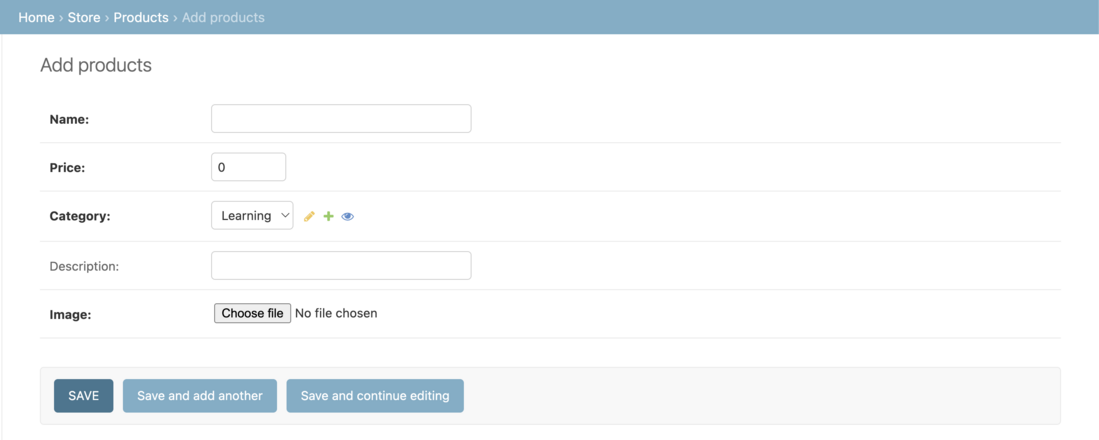
Snapshot of Django-Admin Add products
**orders.py: model for "Order" with fields for product, customer, quantity, price, address, phone, date and status. It also includes methods to place an order and get orders by customer ID.
Python `
from django.db import models from .products import Products from .customer import Customer import datetime
class Order(models.Model): product = models.ForeignKey(Products, on_delete=models.CASCADE) customer = models.ForeignKey(Customer, on_delete=models.CASCADE) quantity = models.IntegerField(default=1) price = models.IntegerField() address = models.CharField(max_length=50, default='', blank=True) phone = models.CharField(max_length=50, default='', blank=True) date = models.DateField(default=datetime.date.today) status = models.BooleanField(default=False)
def placeOrder(self):
    self.save()

@staticmethod
def get_orders_by_customer(customer_id):
    return Order.objects.filter(customer=customer_id).order_by('-date')

class Meta:
    verbose_name_plural = "Orders"
`
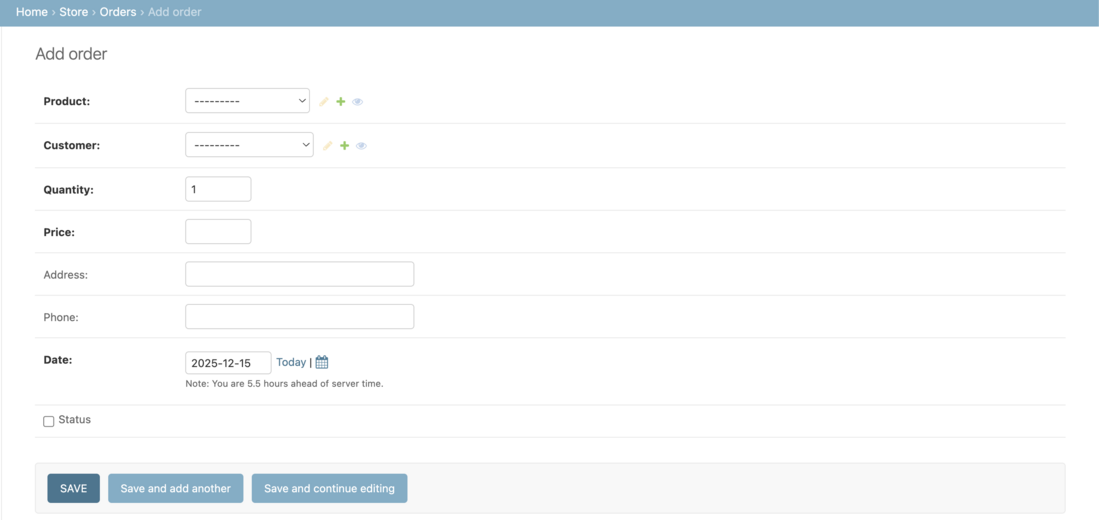
Snapshot of Django-Admin Add orders
Views
**views.py: In views, we create a view named home.py, login.py, signup.py, cart.py, checkout.py, orders.py which takes a request and renders an HTML as a response.
In store/views/home.py:
Python `
from django.shortcuts import render, redirect, HttpResponseRedirect from store.models.products import Products from store.models.category import Category from django.views import View
class Index(View): def post(self, request): product = request.POST.get('product') remove = request.POST.get('remove')
    # ensure cart exists and keys are normalized to strings
    cart = request.session.get('cart', {})

    if product:
        pid = str(product)
        quantity = cart.get(pid, 0)

        if remove:
            # remove one or delete
            if quantity <= 1:
                cart.pop(pid, None)
            else:
                cart[pid] = quantity - 1
        else:
            # add/increment
            cart[pid] = quantity + 1

        # save back to session
        request.session['cart'] = cart

    # always redirect after POST (PRG pattern)
    return redirect('homepage')

def get(self, request):
    # list products and categories (same as before)
    products = None
    categories = Category.get_all_categories()
    categoryID = request.GET.get('category')

    if categoryID:
        products = Products.get_all_products_by_categoryid(categoryID)
    else:
        products = Products.get_all_products()

    data = {
        'products': products,
        'categories': categories
    }
    return render(request, 'index.html', data)
def store(request): return render(request, 'store.html')
`
In store/views/login.py:
Python `
from django.shortcuts import render, redirect, HttpResponseRedirect from django.views import View from store.models.customer import Customer from django.contrib.auth.hashers import check_password
class Login(View): return_url = None
def get(self, request):
    Login.return_url = request.GET.get('return_url')
    return render(request, 'login.html')

def post(self, request):
    email = request.POST.get('email')
    password = request.POST.get('password')
    customer = Customer.get_customer_by_email(email)
    error_message = None
    if customer:
        flag = check_password(password, customer.password)
        if flag:
            request.session['customer'] = customer.id
            if Login.return_url:
                return HttpResponseRedirect(Login.return_url)
            else:
                Login.return_url = None
                return redirect('homepage')
        else:
            error_message = 'Email or Password invalid !!'
    else:
        error_message = 'Email or Password invalid !!'
    return render(request, 'login.html', {'error': error_message})
def logout(request): request.session.clear() return redirect('login')
`
HTML Templates
Create an home.html, login.html, signup.html, cart.html, checkout.html, orders.html in the templates. And map the views to store/urls.py:
Python `
from django.urls import path from .views.home import Index, store from .views.signup import Signup from .views.login import Login, logout from .views.cart import Cart from .views.checkout import CheckOut from .views.orders import OrderView from .middlewares.auth import auth_middleware
urlpatterns = [ path('', Index.as_view(), name='homepage'), path('store/', store, name='store'), path('signup/', Signup.as_view(), name='signup'), path('login/', Login.as_view(), name='login'), path('logout/', logout, name='logout'), path('cart/', auth_middleware(Cart.as_view()), name='cart'), path('check-out/', CheckOut.as_view(), name='checkout'), path('orders/', auth_middleware(OrderView.as_view()), name='orders'), ]
`
The below files show the views for each functionality of the site.
**home.py: view for handling an online store. It includes methods for displaying the store's index, adding or removing items from the cart and rendering the store's product listings. The view also uses Django sessions to manage the user's shopping cart.
Python `
from django.shortcuts import render, redirect, HttpResponseRedirect from store.models.products import Products from store.models.category import Category from django.views import View
Create your views here.
class Index(View):
def post(self, request):
    product = request.POST.get('product')
    remove = request.POST.get('remove')
    cart = request.session.get('cart')
    if cart:
        quantity = cart.get(product)
        if quantity:
            if remove:
                if quantity <= 1:
                    cart.pop(product)
                else:
                    cart[product] = quantity-1
            else:
                cart[product] = quantity+1

        else:
            cart[product] = 1
    else:
        cart = {}
        cart[product] = 1

    request.session['cart'] = cart
    print('cart', request.session['cart'])
    return redirect('homepage')

def get(self, request):
    # print()
    return HttpResponseRedirect(f'/store{request.get_full_path()[1:]}')
def store(request): cart = request.session.get('cart') if not cart: request.session['cart'] = {} products = None categories = Category.get_all_categories() categoryID = request.GET.get('category') if categoryID: products = Products.get_all_products_by_categoryid(categoryID) else: products = Products.get_all_products()
data = {}
data['products'] = products
data['categories'] = categories

print('you are : ', request.session.get('email'))
return render(request, 'index.html', data)
`
**login.py: This view handles user authentication, including login and logout. It verifies user credentials, stores the customer ID in the session upon successful login, supports redirection using a return URL and provides a logout function that clears the session and redirects the user to the login page.
Python `
from django.shortcuts import render, redirect, HttpResponseRedirect from django.contrib.auth.hashers import check_password from store.models.customer import Customer from django.views import View
class Login(View): return_url = None
def get(self, request):
    Login.return_url = request.GET.get('return_url')
    return render(request, 'login.html')

def post(self, request):
    email = request.POST.get('email')
    password = request.POST.get('password')
    customer = Customer.get_customer_by_email(email)
    error_message = None
    if customer:
        flag = check_password(password, customer.password)
        if flag:
            request.session['customer'] = customer.id

            if Login.return_url:
                return HttpResponseRedirect(Login.return_url)
            else:
                Login.return_url = None
                return redirect('homepage')
        else:
            error_message = 'Invalid !!'
    else:
        error_message = 'Invalid !!'

    print(email, password)
    return render(request, 'login.html', {'error': error_message})
def logout(request): request.session.clear() return redirect('login')
`
**signup.py: This view handles user registration by collecting user details, validating input data, hashing the password for security and saving the user to the database. If validation fails, appropriate error messages are displayed on the sign-up page.
Python `
from django.shortcuts import render, redirect from django.contrib.auth.hashers import make_password from store.models.customer import Customer from django.views import View
class Signup (View): def get(self, request): return render(request, 'signup.html')
def post(self, request):
    postData = request.POST
    first_name = postData.get('firstname')
    last_name = postData.get('lastname')
    phone = postData.get('phone')
    email = postData.get('email')
    password = postData.get('password')
    # validation
    value = {
        'first_name': first_name,
        'last_name': last_name,
        'phone': phone,
        'email': email
    }
    error_message = None

    customer = Customer(first_name=first_name,
                        last_name=last_name,
                        phone=phone,
                        email=email,
                        password=password)
    error_message = self.validateCustomer(customer)

    if not error_message:
        print(first_name, last_name, phone, email, password)
        customer.password = make_password(customer.password)
        customer.register()
        return redirect('homepage')
    else:
        data = {
            'error': error_message,
            'values': value
        }
        return render(request, 'signup.html', data)

def validateCustomer(self, customer):
    error_message = None
    if (not customer.first_name):
        error_message = "Please Enter your First Name !!"
    elif len(customer.first_name) < 3:
        error_message = 'First Name must be 3 char long or more'
    elif not customer.last_name:
        error_message = 'Please Enter your Last Name'
    elif len(customer.last_name) < 3:
        error_message = 'Last Name must be 3 char long or more'
    elif not customer.phone:
        error_message = 'Enter your Phone Number'
    elif len(customer.phone) < 10:
        error_message = 'Phone Number must be 10 char Long'
    elif len(customer.password) < 5:
        error_message = 'Password must be 5 char long'
    elif len(customer.email) < 5:
        error_message = 'Email must be 5 char long'
    elif customer.isExists():
        error_message = 'Email Address Already Registered..'
    # saving

    return error_message
`
**cart.py: This model represents an order in the e-commerce system. It stores product and customer references along with quantity, price, delivery details, date and status. It also provides methods to place an order and retrieve customer-specific orders sorted by date.
Python `
from django.db import models from .product import Products from .customer import Customer import datetime
class Order(models.Model): product = models.ForeignKey(Products, on_delete=models.CASCADE) customer = models.ForeignKey(Customer, on_delete=models.CASCADE) quantity = models.IntegerField(default=1) price = models.IntegerField() address = models.CharField(max_length=50, default='', blank=True) phone = models.CharField(max_length=50, default='', blank=True) date = models.DateField(default=datetime.datetime.today) status = models.BooleanField(default=False)
def placeOrder(self):
    self.save()

@staticmethod
def get_orders_by_customer(customer_id):
    return Order.objects.filter(customer=customer_id).order_by('-date')
`
**checkout.py: This view handles the checkout process by collecting the customer’s address and phone number via a POST request, retrieving cart and user details from the session, creating order records for selected products, clearing the cart, and redirecting the user to the cart page.
Python `
from django.shortcuts import render, redirect from django.contrib.auth.hashers import check_password from store.models.customer import Customer from django.views import View from store.models.products import Products from store.models.orders import Order
class CheckOut(View): def post(self, request): address = request.POST.get('address') phone = request.POST.get('phone') customer = request.session.get('customer') cart = request.session.get('cart') products = Products.get_products_by_id(list(cart.keys())) print(address, phone, customer, cart, products)
    for product in products:
        print(cart.get(str(product.id)))
        order = Order(customer=Customer(id=customer),
                      product=product,
                      price=product.price,
                      address=address,
                      phone=phone,
                      quantity=cart.get(str(product.id)))
        order.save()
    request.session['cart'] = {}

    return redirect('cart')
`
**orders.py: This view displays order history for authenticated users. It retrieves the customer ID from the session, fetches their orders from the database and renders them in the orders.html template. Access is restricted using auth_middleware.
Python `
from django.shortcuts import render, redirect from django.contrib.auth.hashers import check_password from store.models.customer import Customer from django.views import View from store.models.products import Products from store.models.orders import Order from store.middlewares.auth import auth_middleware
class OrderView(View):
def get(self, request):
    customer = request.session.get('customer')
    orders = Order.get_orders_by_customer(customer)
    print(orders)
    return render(request, 'orders.html', {'orders': orders})
`