Last Minute Notes (LMNs) Python Programming (original) (raw)
Python is a widely-used programming language, celebrated for its simplicity, comprehensive features, and extensive library support. This "Last Minute Notes" article aims to offer a quick, concise overview of essential Python topics, including data types, operators, control flow statements, functions, and Python collections.
Table of Content
- Introduction to Python
- Variables
- Data Types
- Input and Output
- Operators
- Control Statements
- Functions
- Recursion
- String Manipulation
- Object-Oriented Programming
- Modules and Packages
**Introduction to Python
**First Python Program
Below is a simple Python Program to print "Hello World!":
Python `
print("Hello World!")
`
**Indentation
In Python, **indentationdefines code blocks. It groups statements with the same indentation level using spaces or tabs, to indicate they belong together.
Python `
if 10 > 5: print("This is true!") print("I am tab indentation")
print("I have no indentation")
`
Output
This is true! I am tab indentation I have no indentation
The first two print statements are indented by 4 spaces, indicating they are part of the if block.
**Keywords in Python
| **True | **False | **None | **and |
|---|---|---|---|
| **or | **not | **is | **if |
| **else | **elif | **for | **while |
| **break | **continue | **pass | **try |
| **except | **finally | **raise | **assert |
| **def | **return | **lambda | **yield |
| **class | **import | **from | **in |
| **as | **del | **global | **with |
| **nonlocal | async | await |
**Comments
Comments in Python are ignored by the interpreter and improve code readability. For **single line comments, ****'#'** is used and for **multi-line comments, **triple quotes(''') are used.
Python `
Add two numbers
print(1 + 2)
''' Find the sum of two numbers ''' print(2 + 3)
`
**Variables
Variables store data, acting as placeholders for values in a program.
Python variable names can include **letters, **digits, and **underscores, but **cannot start with a **digit. They are case-sensitive and should not be **Python keywords (e.g., if, else, for).
In Python, we can assign values to variables using the = operator. We can also assign values dynamically and perform multiple assignments in one line.
Python `
Basic assignment
x = 5 y = 3.14 z = "Hi"
Dynamic typing (same variable holding different types)
x = 10 x = "Now a string"
Multiple assignments (same value to multiple variables)
a = b = c = 100 print(a, b, c) # Output: 100 100 100
Assigning different values to multiple variables
x, y, z = 1, 2.5, "Python" print(x, y, z) # Output: 1 2.5 Python
`
Output
100 100 100 1 2.5 Python
Global and Local Variables
- **Global Variables: These are variables defined outside any function and can be accessed by any function in the program. They are global to the entire script.
- **Local Variables: These are variables defined inside a function and can only be accessed within that function. They have a local scope. Python `
Global variable
x = 10
def my_function(): # Local variable y = 5 print("Local variable y:", y) # Accessible within the function print("Global variable x:", x) # Accessible inside function
my_function()
Uncommenting below line will raise an error as y is local to my_function
print("Trying to access y outside function:", y) # Error: y is not defined
`
Output
Local variable y: 5 Global variable x: 10
xis a **global variable because it is defined outside any function and can be accessed globally.yis a **local variable because it is defined insidemy_function()and can only be accessed within that function.
Data Types
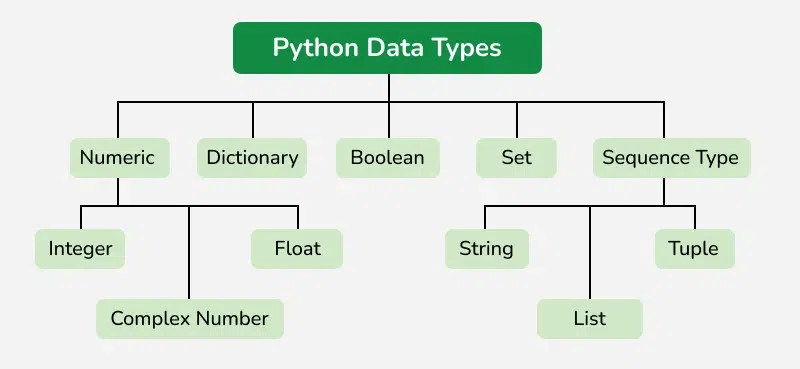
Python has various built-in data types that allow us to store different kinds of values. Here’s a brief overview of the main data types:
- **int (Integer): Represents whole numbers, both positive and negative, without any decimal points. Example:
x = 5,y = -42 - **float (Floating Point Number): Represents real numbers (numbers with a decimal point). Example:
x = 3.14,y = -0.001 - **str (String): Represents a sequence of characters enclosed in single, double, or triple quotes. Example:
name = "Alice",greeting = 'Hello World' - **bool (Boolean): Represents one of two values:
TrueorFalse. Often used in conditional statements. Example:is_active = True,is_valid = False - **list: A collection of ordered, mutable items (can store different data types). Lists are defined using square brackets
[]. Example:fruits = ["apple", "banana", "cherry"] - **tuple: A collection of ordered, immutable items (cannot be changed after creation). Tuples are defined using parentheses
(). Example:coordinates = (10, 20),colors = ("red", "green", "blue") - **set: A collection of unordered, unique items. Sets are mutable and defined using curly braces
{}. Example:unique_numbers = {1, 2, 3, 4},letters = {'a', 'b', 'c'} - **dict (Dictionary): A collection of key-value pairs, where each key is unique. Dictionaries are mutable and defined using curly braces
{}with keys and values separated by a colon(:). Example:student = {"name": "John", "age": 21} - **None: Represents the absence of a value or a null value. It is often used to indicate no value or a missing value. Example:
result = None
**Type Casting
Casting in Python converts one data type to another using built-in functions:
- **int() – Converts values to an integer.
- **float() – Converts values to a floating-point number.
- **str() – Converts values to a string. Python `
Casting variables
s = "10" # Initially a string n = int(s) # Cast string to integer cnt = 5 f = float(cnt) # Cast integer to float age = 25 s2 = str(age) # Cast integer to string
Display results
print(n)
print(cnt)
print(s2)
`
Input and Output
In Python, the print() function is used to display output, while the input() function collects user input.
**Printing Output
Use print() to display text, variables, or expressions.
Python `
print("Hello World")
`
**Taking Input
Use input() to collect user input. By default, input is returned as a string. You can typecast it to other data types.
Python `
name = input("Enter your name: ") print("Hello", name)
`
**Multiple Inputs
Use split() to take multiple inputs in a single line.
Python `
x, y = input("Enter two values: ").split() print(x, y) # Output: 5 10
`
Operators
In Python, operators are special symbols used to perform operations on variables and values. Python provides a variety of operators, categorized into the following types:
**1. Arithmetic Operators
These operators are used to perform basic mathematical operations.
- **Addition(+): Adds two operands.
- **Subtraction(-): Subtracts the second operand from the first.
- **Multiplication(*): Multiplies two operands.
- **Division(/): Divides the first operand by the second (always returns a float).
- **Floor Division(//): Divides and returns the largest integer less than or equal to the result.
- **Modulus(%): Returns the remainder of the division.
- **Exponentiation(**): Raises the first operand to the power of the second operand. Python `
Variables
a = 15 b = 4
Addition
print("Addition:", a + b)
Subtraction
print("Subtraction:", a - b)
Multiplication
print("Multiplication:", a * b)
Division
print("Division:", a / b)
Floor Division
print("Floor Division:", a // b)
Modulus
print("Modulus:", a % b)
Exponentiation
print("Exponentiation:", a ** b)
`
Output
Addition: 19 Subtraction: 11 Multiplication: 60 Division: 3.75 Floor Division: 3 Modulus: 3 Exponentiation: 50625
**2. Comparison Operators
These operators compare two values and return a boolean result.
- **Equal to(
==): ReturnsTrueif both operands are equal. - **Not equal to(
!=): ReturnsTrueif operands are not equal. - **Greater than(
>): ReturnsTrueif the left operand is greater than the right. - **Less than(
<): ReturnsTrueif the left operand is less than the right. - **Greater than or equal to(>=): Returns
Trueif the left operand is greater than or equal to the right. - **Less than or equal to(<=): Returns True if the left operand is less than or equal to the right. Python `
a = 13 b = 33
print(a > b) print(a < b) print(a == b) print(a != b) print(a >= b) print(a <= b)
`
Output
False True False True False True
**3. Logical Operators
These operators are used to perform logical operations, often in conditions.
- **Logical AND (and): Returns
Trueif both conditions areTrue. - **Logical OR (or): Returns True if at least one condition is True.
- **Logical NOT (not): Reverses the boolean value. Python `
a = True b = False print(a and b) print(a or b) print(not a)
`
**4. Assignment Operators
These operators assign values to variables.
- **= : Assigns a value to a variable.
- ****+=** : Adds the right operand to the left operand and assigns the result to the left operand.
- **-= : Subtracts the right operand from the left operand and assigns the result to the left operand.
- ***= : Multiplies the left operand by the right operand and assigns the result.
- ****/=** : Divides the left operand by the right operand and assigns the result.
- ****%=** : Takes the modulus and assigns the result.
- ****//=** : Floor divides and assigns the result.
- ****= : Exponentiates and assigns the result. Python `
a = 10 b = a print(b) b += a print(b) b -= a print(b) b *= a print(b) b <<= a print(b)
`
Output
10 20 10 100 102400
**5. Bitwise Operators
Bitwise operators are used to perform operations on binary representations of numbers. These operators work on bits (0s and 1s) and perform bit-level operations.
- Bitwise AND (&): Compares corresponding bits and returns
1if both bits are1, otherwise0. - Bitwise OR (|): Compares corresponding bits and returns 1 if at least one of the bits is 1.
- Bitwise XOR (Exclusive OR) (^): Compares corresponding bits and returns 1 if the bits are different, otherwise 0.
- Bitwise Left Shift (<<): Shifts the bits of the number to the left by the specified number of positions, adding 0s at the right.
- Bitwise Right Shift (>>): Shifts the bits of the number to the right by the specified number of positions, discarding the rightmost bits. Python `
a = 10 b = 4
print(a & b) # 1010 & 0100 = 0000 = 0 print(a | b) # 1010 | 0100 = 1110 = 14 print(~a) # ~1010 = -11 print(a ^ b) # 1010 ^ 0100 = 1110 = 14 print(a >> 2) # 1010 >> 2 = 0010 = 2 print(a << 2) # 1010 << 2 = 101000 = 40
`
**6. Membership Operators
These operators test whether a value is a member of a sequence (list, tuple, string, etc.).
- **in : Returns True if a value is found in the sequence.
- **not in: Returns
Trueif a value is not found in the sequence. Python `
x = 24 y = 20 a = [10, 20, 30, 40, 50]
if (x not in a): print("x is NOT present in given list") else: print("x is present in given list")
if (y in a): print("y is present in given list") else: print("y is NOT present in given list")
`
Output
x is NOT present in given list y is present in given list
**7. Identity Operators
These operators compare the memory locations of two objects.
- **is : Returns True if two variables point to the same object.
- **is not : Returns True if two variables do not point to the same object. Python `
a = 10 b = 20 c = a
print(a is not b) print(a is c)
`
Control Statements
Control statements in Python are used to control the flow of execution in a program. They allow you to make decisions, repeat tasks, and handle conditions in your code. The main types of control statements are:
**1. Conditional Statements
Conditional statements in Python control the flow of a program by executing code based on specific conditions.
- **If Statement: The if statement executes a block of code if the condition is true.
- **If-Else Statement: The else block executes if the if condition is false.
- **Elif Statement: The elif statement checks multiple conditions and executes the corresponding block for the first true condition. Python `
x = 15
if statement
if x > 10: print("x is greater than 10")
elif statement
elif x == 10: print("x is equal to 10")
else statement
else: print("x is less than 10")
`
Output
x is greater than 10
_Quiz on Conditional Statements
**2. Loops
Loops in Python allow us to execute a block of code multiple times. Python provides two types of loops: for and while.
**for loop
The for loop is used to iterate over a sequence (like a list, tuple, or string) or a range of numbers. It is ideal for iterating over a known collection or when you need to repeat something a fixed number of times.
Syntax:
for item in sequence:
# Execute block of code
Python `
for i in range(5): print(i)
`
**while loop
The while loop is used to execute a block of code as long as the given condition is true. It is ideal when you do not know how many times the loop will run, and the loop continues until a condition is met.
Syntax:
while condition:
# Execute block of code
Python `
x = 0 while x < 5: print(x) x += 1
`
**3. Loop Control Statements
Python provides three loop control statements to manage the flow of loops:
break: Exits the loop entirely when a certain condition is met.continue: Skips the current iteration and moves to the next iteration of the loop.pass: A placeholder that does nothing. It is used when a statement is syntactically required but no action is needed. Python `
for i in range(10):
# Using pass
if i == 1:
    pass

# Using continue
if i == 2:
    continue

# Using break
if i == 5:
    break

print("i =", i)
`
Output
i = 0 i = 1 i = 3 i = 4
Functions
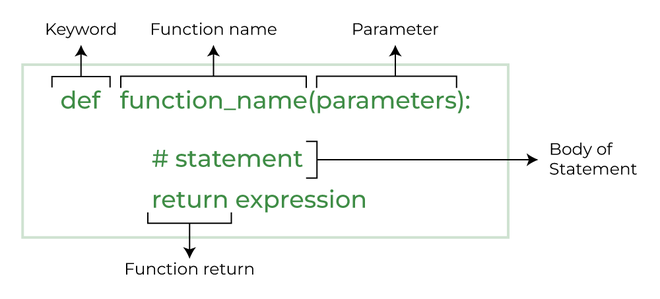
In Python, a function is a block of reusable code that performs a specific task. It is defined using the **def keyword, followed by the function name and parameters (optional). **def keyword is the most used keyword in Python. Functions allow you to organize code, improve readability, and avoid repetition.
**Syntax:
**Return Statement
The return statement ends a function's execution and returns a value to the caller. If no expression follows return, None is returned.
Python `
function with no parameters and no return statement
def fun(): print("fun() called!")
function with parameters but no return statement
def printSum(a, b): print("sum = ", a + b)
function with no parameters with return statement
def greet(): return "Hello!"
function with parameters and return statement
def getSum(a, b): return a + b
fun() printSum(3, 5) print(greet()) print(getSum(3, 5))
`
Output
fun() called! sum = 8 Hello! 8
**Function Arguments
Arguments are the values or data passed to a function when it is called, enabling the function to perform operations using those inputs. Python functions can accept different types of arguments:
**1. Default Arguments
These are values assigned to parameters in case no argument is passed during the function call.
Python `
def greet(name="Guest"): print("Hello", name) greet() greet("Alice")
`
Output
Hello Guest Hello Alice
**2. Keyword Arguments
These allow you to pass arguments by explicitly naming the parameter.
Python `
def person_info(name, age): print(f"{name} is {age} years old.") person_info(age=25, name="Alice") # Output: Alice is 25 years old.
`
Output
Alice is 25 years old.
**3. Variable-Length Arguments
These allow you to pass a variable number of arguments to a function. Use *args for non-keyword and **kwargs for keyword arguments. *args allows a function to accept any number of positional arguments as a tuple. **kwargs allows a function to accept any number of keyword arguments as a dictionary.
Python `
def print_names(*names): for name in names: print(name) print_names("Alice", "Bob", "Charlie")
Output: Alice, Bob, Charlie
`
**Lambda Functions
A lambda function in Python is an anonymous function defined with the lambda keyword. Unlike regular functions created with def, lambda functions are often used for short, simple tasks.
**Syntax:
lambda arguments: expression
Key Features of Lambda Functions:
- **Lambda with Condition Checking: Lambda functions can include simple
ifconditions. - **Lambda with List Comprehension: Used to apply transformations to a list in a concise way.
- **Lambda with if-else: Supports conditional logic within the function.
- **Multiple Statements: Lambda functions only support a single expression. However, multiple lambdas can be chained together.
- **Using
lambdawithfilter(): Filters elements from a sequence based on a condition. - **Using
lambdawithmap(): Applies a function to each element in a list, returning a new list. - **Using
lambdawithreduce(): Applies a function cumulatively to pairs of elements in an iterable.
Example:
Python `
Lambda function for basic operation (square of a number)
square = lambda x: x ** 2 print(square(5))
Lambda with Condition (check if number is even or odd)
even_odd = lambda x: "Even" if x % 2 == 0 else "Odd" print(even_odd(4))
Lambda with List Comprehension (transform a list to its squares)
numbers = [1, 2, 3, 4] squared_numbers = [lambda x: x ** 2 for x in numbers] # List of lambda functions squared_list = [func(num) for func, num in zip(squared_numbers, numbers)] print(squared_list)
Lambda with filter() (filter numbers greater than 2)
filtered = filter(lambda x: x > 2, numbers) print(list(filtered))
Lambda with map() (double each number in the list)
doubled = map(lambda x: x * 2, numbers) print(list(doubled))
Lambda with reduce() (find the product of a list of numbers)
from functools import reduce product = reduce(lambda x, y: x * y, numbers) print(product)
`
Output
25 Even [1, 4, 9, 16] [3, 4] [2, 4, 6, 8] 24
Recursion
Recursion is a process where a function calls itself to solve a problem by breaking it into simpler subproblems. In Python, a recursive function is defined like any other function but includes a call to itself, with conditions that guide the recursion process.
**Basic Structure of Recursive Function
def recursive_function(parameters):
if base_case_condition:
return base_result
else:
return recursive_function(modified_parameters)
**Base Case: The condition that stops the recursion, preventing infinite loops and ensuring progress toward the solution (e.g., n == 1 in factorial).
**Recursive Case: The part of the function that calls itself, reducing the problem size (e.g., return n * factorial(n-1)).
**Recursion vs Iteration
- **Recursion: More intuitive for naturally recursive problems but uses more memory.
- **Iteration: More memory-efficient, typically used for repetitive tasks using loops. Python `
Factorial function using recursion
Base case: when n == 1, stop recursion
def factorial_rec(n): if n == 1: return 1 # Base case else: return n * factorial_rec(n - 1) # Recursive case
Example of recursion vs iteration
Using recursion to find factorial
print(f"Factorial using recursion: {factorial_rec(5)}")
Using iteration to find factorial
def factorial_iter(n): result = 1 for i in range(1, n + 1): result *= i return result
print(f"Factorial using iteration: {factorial_iter(5)}")
`
Output
Factorial using recursion: 120 Factorial using iteration: 120
String Manipulation
A **string in Python is a sequence of characters enclosed in quotes. It can contain letters, numbers, and symbols. Python doesn't have a separate character data type, so a single character is treated as a string of length 1.
**1. Creating a String
Strings can be created using single (') or double (") quotes. We can access individual characters using indexing (starting from 0). Python also supports negative indexing for accessing characters from the end.
Python `
String using single quotes
s1 = 'GeeksforGeeks'
String using double quotes
s2 = "GeeksforGeeks"
print(s1) print(s2)
Accessing a character
print(s1[0]) print(s1[-1])
`
Output
GeeksforGeeks GeeksforGeeks G s
**2. String Slicing
Extracting a portion of the string using slicing.
**Syntax:string[start:end]
Python `
print(s[1:4]) print(s[::-1])
`
**String Immutability
Strings are immutable, so to modify them, you need to create a new string.
Python `
s = "geeksforGeeks" s = "G" + s[1:] print(s)
`
**Common String Methods
len(): Returns the length of the string.upper(): Converts to uppercase.lower(): Converts to lowercase.strip(): Removes leading and trailing spaces.replace(old, new): Replaces substringoldwithnew. Python `
s1 = "GeeksforGeeks" s2 = " Hi Geek! " print(len(s1)) print(s1.upper()) print(s2.lower()) print(s2.strip()) s2 = s2.replace("Geek", "GfG") print(s2)
`
Output
13 GEEKSFORGEEKS hi geek! Hi Geek! Hi GfG!
**Formatting Strings
You can format strings using f-strings or format() method.
Python `
name = "Alice" age = 22 print(f"Name: {name}, Age: {age}")
`
Output
Name: Alice, Age: 22
Object-Oriented Programming
Python **Object-Oriented Programming (OOP) helps organize code in terms of objects and classes, improving readability, reusability, and scalability. Key concepts in Python OOPs include:
- **Class: Blueprint for creating objects, defining attributes and behaviors.
- **Object: Instance of a class containing specific data and methods.
- **Inheritance: Mechanism where one class inherits attributes and methods from another.
- **Encapsulation: Hiding internal state and requiring all interaction through methods.
- **Polymorphism: Ability to use methods in different ways (method overloading or overriding).
- **Abstraction: Hiding complex implementation details and showing only essential features.
Python code example that demonstrates all the key concepts of Object-Oriented Programming (OOPs):
Python `
Class definition: Blueprint for creating objects
class Animal: # Constructor (init): Initializes the object with attributes def init(self, name, species): self.name = name self.species = species
# Method: Function inside a class
def speak(self):
    print(f"{self.name} makes a sound!")
Inheritance: Dog class inherits from Animal class
class Dog(Animal): def init(self, name, breed): super().init(name, "Dog") # Calls the constructor of Animal class self.breed = breed
# Method Overriding: Overriding speak method of the Animal class
def speak(self):
    print(f"{self.name}, a {self.breed}, barks!")
Encapsulation: Hiding the internal state (age) of the class
class Person: def init(self, name, age): self.name = name self.__age = age # Private variable, cannot be accessed directly
# Getter method to access private attribute __age
def get_age(self):
    return self.__age

# Setter method to modify private attribute __age
def set_age(self, age):
    if age > 0:
        self.__age = age
    else:
        print("Invalid age!")
Polymorphism: Using the same method name for different behavior
class Cat(Animal): def init(self, name): super().init(name, "Cat") # Calls the constructor of Animal class with 'Cat' as species
def speak(self):
    print(f"{self.name} meows!")
Abstraction: Hiding complex details in a method
class Car: def init(self, make, model): self.make = make self.model = model
def start_engine(self):
    # In a real-world scenario, this method could be more complex
    print("Engine started... Vroom!")
Creating objects
dog = Dog("Buddy", "Golden Retriever") cat = Cat("Whiskers") # This will now work without error person = Person("Alice", 30) car = Car("Tesla", "Model S")
Using objects and demonstrating OOPs concepts
print(f"{dog.name} is a {dog.species}") dog.speak() # Method Overriding (Polymorphism)
cat.speak() # Polymorphism: Different behavior, same method name
print(f"{person.name} is {person.get_age()} years old.") person.set_age(35) print(f"New age of {person.name}: {person.get_age()}")
car.start_engine() # Abstraction: Details hidden in the method
`
Output
Buddy is a Dog Buddy, a Golden Retriever, barks! Whiskers meows! Alice is 30 years old. New age of Alice: 35 Engine started... Vroom!
- **Class:
AnimalandDogare classes.Doginherits fromAnimal, demonstrating **Inheritance. - **Object:
dog,cat,person, andcarare objects (instances) of the classes. - **Inheritance: The
Dogclass inherits fromAnimal, and thesuper()function is used to call the parent class's constructor. - **Encapsulation: The
Personclass hides theageattribute using__age, which is accessed and modified through getter and setter methods. - **Polymorphism: The
speakmethod is defined in bothDogandCatclasses, demonstrating method overriding, where different classes can implement the same method differently. - **Abstraction: The
Carclass has astart_enginemethod that hides the complex internal details.
Modules and Packages
In Python, modules and packages allow you to organize and reuse code across different programs. A module is a single file that contains functions, classes, and variables, while a package is a collection of related modules.
**1. Importing Modules
To use the functions and classes defined in a module, you need to **import it. Python provides the import statement to include modules in your script.
Syntax:
import module_name
We can also import specific functions or variables from a module using from.
from module_name import function_name
Example:
import math
print(math.sqrt(16)) # Output: 4.0
from math import pi
print(pi) # Output: 3.141592653589793
**2. Standard Library Overview
Python’s **Standard Library is a collection of modules that come pre-installed with Python. It provides various functions for handling file operations, data manipulation, regular expressions, networking, and more. Some popular standard modules include math, datetime, os, sys, and random.
Example:
import random
print(random.randint(1, 10))
**3. Writing and Using Custom Modules
You can create your own modules by writing Python code in a separate .py file. After creating the file, you can import and use the functions or classes from that file in other scripts.
Step 1: Create a module: Save a Python file (mymodule.py).
mymodule.py
def greet(name):
return f"Hello, {name}!"
Step 2: Import and use the custom module:
import mymodule
print(mymodule.greet("Alice")) # Output: Hello, Alice!