Using JWT for user authentication in Flask (original) (raw)
JWT (JSON Web Token) is a compact, secure, and self-contained token used for securely transmitting information between parties. It is often used for authentication and authorization in web applications.
A JWT consists of three parts:
- **Header - Contains metadata (e.g., algorithm used for signing).
- **Payload - Stores user information (claims like user ID, roles).
- **Signature - Ensures token integrity using a secret key.
In Flask, JWT is commonly used to authenticate users by issuing tokens upon login and verifying them for protected routes. Let's see how to create a basic flask app that uses JWT tokens for authentication.
Installation and Setting Up Flask
Create a project folder and then inside that folder create and activate a **virtual environment to install **flask and other necessary **modules in it. Use these commands to create and activate a new virtual environment-
python -m venv venv
.venv\Scripts\activate
And after that install flask and other relevant libraries using this command-
pip install Flask Flask-SQLAlchemy Werkzeug PyJWT
Create a "**templates" folder, it will contain all the html files for the app.
To know more about creating flask apps, refer to- Creating Flask Applicaions
File Structure
After completing the project and running the app for atleast once so that the databse is created, our file system should look similar to this-
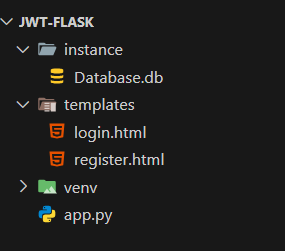
Files Structure
Creating app.py
Let's build our app step by step to implement authentication using JWT tokens. We'll also create an unprotected route to show that without a valid JWT, access is not restricted.
App Configuration
Before we start implementing authentication, let's set up our Flask application and configure necessary settings.
Python `
from flask import Flask, render_template, request, redirect, url_for, jsonify, make_response from flask_sqlalchemy import SQLAlchemy from werkzeug.security import generate_password_hash, check_password_hash import jwt import uuid from datetime import datetime, timezone, timedelta from functools import wraps
app = Flask(name)
Configuration
app.config['SECRET_KEY'] = 'your_secret_key' app.config['SQLALCHEMY_DATABASE_URI'] = 'sqlite:///Database.db' app.config['SQLALCHEMY_TRACK_MODIFICATIONS'] = False
Database setup
db = SQLAlchemy(app)
`
**Explanation:
- **Flask initializes the web application.
- **SECRET_KEY is used to sign JWT tokens.
- **SQLALCHEMY_DATABASE_URI specifies the SQLite database.
- **SQLAlchemy is set up for database interactions.
Creating the User Model
We need a database model to store user details. For this app, we are going to use SQLAlchemy for our database. Here's how to create it.
Python `
class User(db.Model): id = db.Column(db.Integer, primary_key=True) public_id = db.Column(db.String(50), unique=True) name = db.Column(db.String(100)) email = db.Column(db.String(70), unique=True) password = db.Column(db.String(80))
`
**Explanation:
- **id is the primary key.
- **public_id stores a unique identifier for each user.
- **name, **email, and **password store user details.
Implementing Authentication (Login and Registration)
This section covers user authentication, including login and signup features.
Python `
@app.route('/signup', methods=['GET', 'POST']) def register(): if request.method == 'POST': name = request.form['name'] email = request.form['email'] password = request.form['password']
    existing_user = User.query.filter_by(email=email).first()
    if existing_user:
        return jsonify({'message': 'User already exists. Please login.'}), 400

    hashed_password = generate_password_hash(password)
    new_user = User(public_id=str(uuid.uuid4()), name=name, email=email, password=hashed_password)

    db.session.add(new_user)
    db.session.commit()

    return redirect(url_for('login'))

return render_template('register.html')
@app.route('/login', methods=['GET', 'POST']) def login(): if request.method == 'POST': email = request.form['email'] password = request.form['password'] user = User.query.filter_by(email=email).first()
    if not user or not check_password_hash(user.password, password):
        return jsonify({'message': 'Invalid email or password'}), 401

    token = jwt.encode({'public_id': user.public_id, 'exp': datetime.now(timezone.utc) + timedelta(hours=1)},
                       app.config['SECRET_KEY'], algorithm="HS256")

    response = make_response(redirect(url_for('dashboard')))
    response.set_cookie('jwt_token', token)

    return response

return render_template('login.html')
`
**Explanation:
- ****'/register'** route stores user details securely with hashed passwords.
- ****'/login'** route checks credentials and generates a **JWT token.
- The token is stored in cookies and used for authentication.
Implementing JWT Token Verification
To secure routes, we create a decorator that checks for a valid JWT token.
Python `
def token_required(f): @wraps(f) def decorated(*args, **kwargs): token = request.cookies.get('jwt_token')
    if not token:
        return jsonify({'message': 'Token is missing!'}), 401

    try:
        data = jwt.decode(token, app.config['SECRET_KEY'], algorithms=["HS256"])
        current_user = User.query.filter_by(public_id=data['public_id']).first()
    except:
        return jsonify({'message': 'Token is invalid!'}), 401

    return f(current_user, *args, **kwargs)

return decorated
`
**Explanation:
- Retrieves the token from cookies.
- Decodes and verifies the token.
- Fetches the corresponding user from the database.
- Returns an error message if the token is missing or invalid.
Creating Routes for Home and Dashboar
These routes handle rendering pages and displaying user information after login.
Python `
@app.route('/') def home(): return render_template('login.html')
@app.route('/dashboard') @token_required def dashboard(current_user): return f"Welcome {current_user.name}! You are logged in."
`
**Explanation:
- The home route renders the login page.
- The dashboard route is protected with JWT and displays the logged-in user's name.
Running the Application
Finally, we initialize the database and start the Flask server.
Python `
if name == 'main': with app.app_context(): db.create_all() app.run(debug=True)
`
**Explanation:
- **db.create_all() - ensures the database is created before running the server.
- **app.run(debug=True) - runs the Flask application in debug mode.
Complete app.py code
Python `
from flask import Flask, render_template, request, redirect, url_for, jsonify, make_response from flask_sqlalchemy import SQLAlchemy from werkzeug.security import generate_password_hash, check_password_hash import jwt import uuid from datetime import datetime, timezone, timedelta from functools import wraps
app = Flask(name)
Configuration
app.config['SECRET_KEY'] = 'your_secret_key' app.config['SQLALCHEMY_DATABASE_URI'] = 'sqlite:///Database.db' app.config['SQLALCHEMY_TRACK_MODIFICATIONS'] = False
Database setup
db = SQLAlchemy(app)
class User(db.Model): id = db.Column(db.Integer, primary_key=True) public_id = db.Column(db.String(50), unique=True) name = db.Column(db.String(100)) email = db.Column(db.String(70), unique=True) password = db.Column(db.String(80))
Token required decorator
def token_required(f): @wraps(f) def decorated(*args, **kwargs): token = request.cookies.get('jwt_token')
    if not token:
        return jsonify({'message': 'Token is missing!'}), 401

    try:
        data = jwt.decode(token, app.config['SECRET_KEY'], algorithms=["HS256"])
        current_user = User.query.filter_by(public_id=data['public_id']).first()
    except:
        return jsonify({'message': 'Token is invalid!'}), 401

    return f(current_user, *args, **kwargs)

return decorated
@app.route('/') def home(): return render_template('login.html')
@app.route('/login', methods=['GET', 'POST']) def login(): if request.method == 'POST': email = request.form['email'] password = request.form['password'] user = User.query.filter_by(email=email).first()
    if not user or not check_password_hash(user.password, password):
        return jsonify({'message': 'Invalid email or password'}), 401

    token = jwt.encode({'public_id': user.public_id, 'exp': datetime.now(timezone.utc) + timedelta(hours=1)},
                       app.config['SECRET_KEY'], algorithm="HS256")

    response = make_response(redirect(url_for('dashboard')))
    response.set_cookie('jwt_token', token)

    return response

return render_template('login.html')
@app.route('/signup', methods=['GET', 'POST']) def register(): if request.method == 'POST': name = request.form['name'] email = request.form['email'] password = request.form['password']
    existing_user = User.query.filter_by(email=email).first()
    if existing_user:
        return jsonify({'message': 'User already exists. Please login.'}), 400

    hashed_password = generate_password_hash(password)
    new_user = User(public_id=str(uuid.uuid4()), name=name, email=email, password=hashed_password)

    db.session.add(new_user)
    db.session.commit()

    return redirect(url_for('login'))

return render_template('register.html')
@app.route('/dashboard') @token_required def dashboard(current_user): return f"Welcome {current_user.name}! You are logged in."
if name == 'main': with app.app_context(): db.create_all() app.run(debug=True)
`
Creating Templates
Inside the templates folder create two files **login.html file and **register.html, these files will serve the page for registration and login, below is the code for these file-
login.html
HTML `
LoginLogin
Email:Password:
Login
Don't have an account? Register here
`
register.html
HTML `
RegisterSignup
Name:Email:
Password:
Signup
Already have an account? Login here
`
Running and Testing Application
After setting up everything, let's test the JWT authentication using Postman. Make sure that Postman is installed on your system, download and install it from here if it isn't.
To test the application follow these steps-
**1. Start the Flask app using the following command in terminal
python app.py
**2. Register a new user
- Open Postman and send a **POST request to **http://127.0.0.1:5000/signup.
- Provide name, email, and password in the body (**x-www-form-urlencoded).
- If successful, it redirects to the login page.
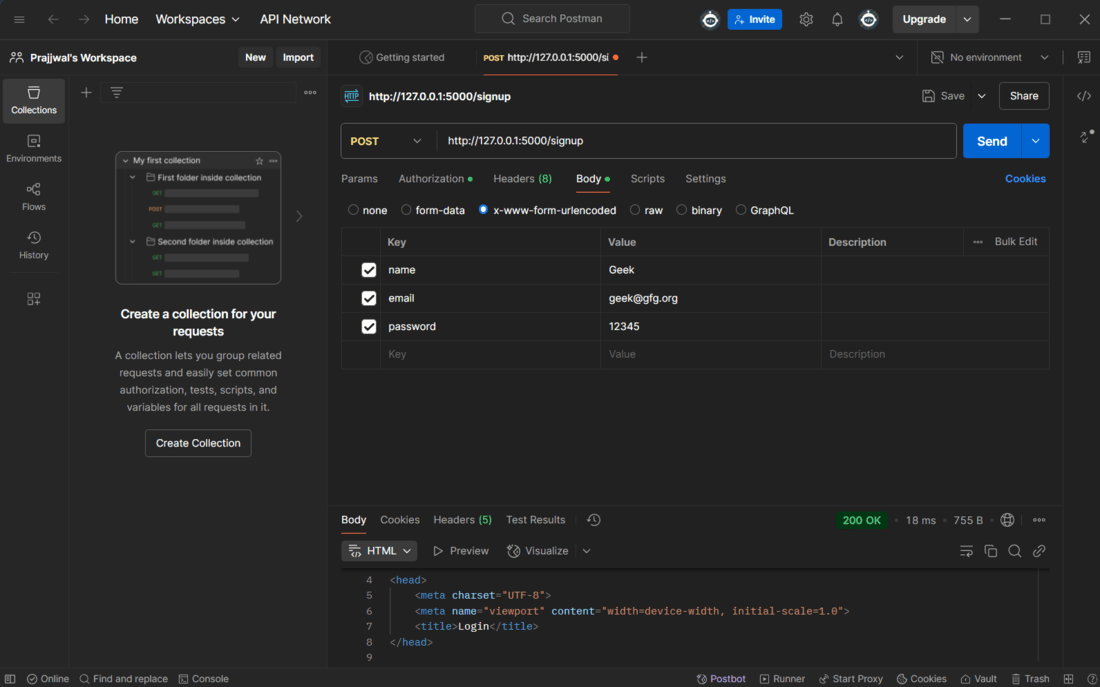
Registeration
**3. Login to get JWT Token
- Send a **POST request to **http://127.0.0.1:5000/login.
- Provide the registered email and password.
- If successful, a **JWT token is set in cookies.

Login
**4. Test Unauthorized Access
- Open Postman and send a **GET request to **http://127.0.0.1:5000/dashboard without a token.
- You should receive a **401 Unauthorized error.
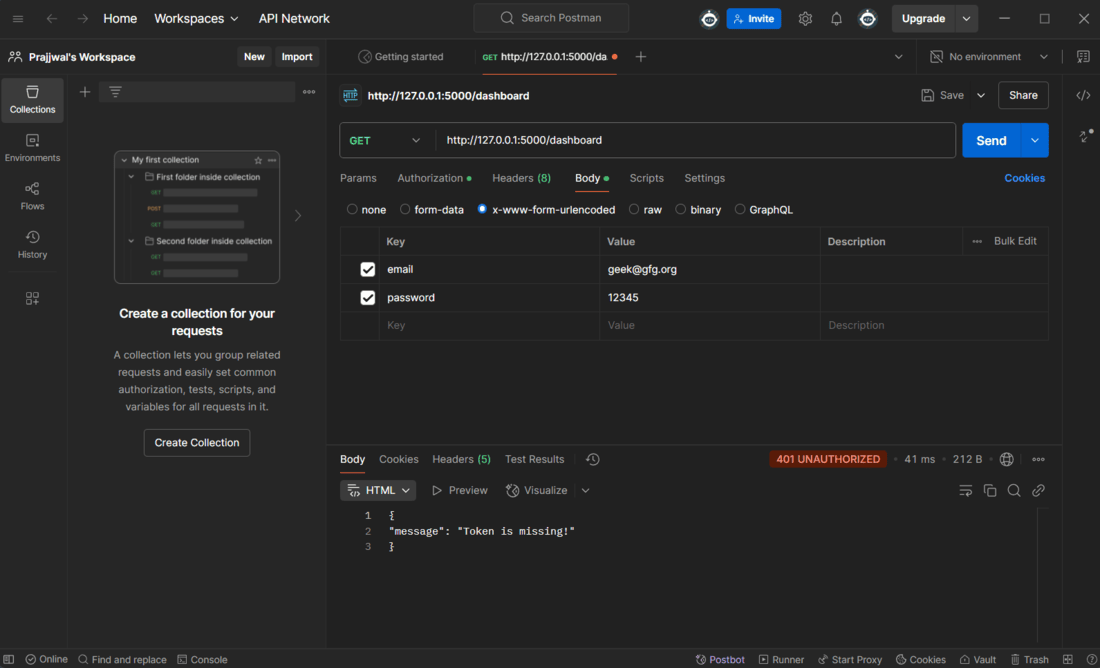
Unauthorized access