Performance Testing Software Testing (original) (raw)
Last Updated : 5 Jun, 2026
Performance Testing is a type of software testing that evaluates how well an application performs under expected and peak workloads. It ensures that the system remains responsive, stable and scalable when multiple users access it simultaneously, helping identify performance issues before release.
- Measures system speed, responsiveness and stability
- Identifies performance bottlenecks under different load conditions
- Ensures the application can handle expected user traffic efficiently
Types of Performance Testing
The types of performance testing are as follows:
- **Load testing: Load testing simulates expected real-world user load on a system to evaluate its performance. It helps identify performance bottlenecks and verifies whether the application can handle anticipated users or transactions. The objective is to ensure smooth performance before releasing the product.
- **Stress testing: Stress testing evaluates the system’s behavior beyond normal operating limits. It helps identify the breaking point of the application and observes how the system recovers after failure under extreme load conditions.
- **Spike testing: Spike testing checks how the system responds to sudden and sharp increases in user traffic. It helps identify performance issues caused by unexpected spikes in load.
- **Soak testing: Soak testing evaluates system performance under a continuous load for an extended period. It helps detect issues such as memory leaks, resource exhaustion or performance degradation over time.
- **Endurance testing: Endurance testing focuses on the system’s long-term stability under a steady load. It ensures the application can handle expected workloads for long durations without failure.
- **Volume testing: Volume testing examines system performance by processing large volumes of data in the database. The objective is to verify system behavior as data size increases.
- **Scalability testing: Scalability testing determines the system’s ability to scale up or down with increasing user load. It helps in capacity planning and ensures consistent performance as demand grows.
Performance Testing Architecture
Performance Testing Architecture refers to the overall setup used to measure a software system’s speed, scalability, stability, and reliability under varying workloads.
It helps identify:
- Response time issues
- Throughput limitations
- Resource utilization problems
- System bottlenecks under load
Performance testing is a non-functional testing technique generally performed after functional testing and increasingly integrated into Agile and CI/CD workflows.
**Components of Performance Testing Architecture
- **Load Generator: Simulates multiple virtual users interacting with the application simultaneously.
- **Test Scripts: Mimic real-world user actions and application workflows during testing.
- **Controller: Manages and controls the execution of performance tests.
- **Monitoring Tools: Track CPU usage, memory consumption, server health, and database performance.
- **Result Analyzer: Collects, analyzes, and generates performance test reports and metrics.
- **Test Environment: Provides a dedicated setup that closely resembles the production environment.
Performance Testing Process
Performance testing follows a structured process to ensure that applications perform efficiently under expected and peak workloads.
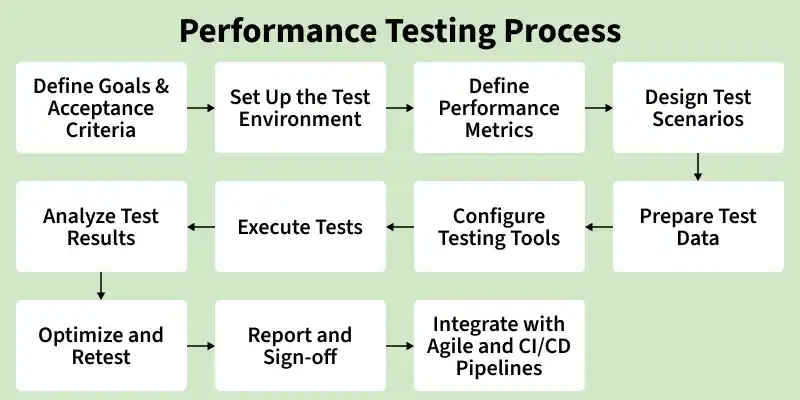
Performance Testing Process
1. Define Goals and Acceptance Criteria
Define clear performance testing objectives and pass/fail criteria based on business requirements, SLAs, acceptable thresholds for throughput and resource usage, testing scope, and team responsibilities across development, QA, and operations.
2. Set Up the Test Environment
Prepare a testing environment that closely matches the production setup by configuring servers, databases, hardware, software, and network settings for realistic performance testing. Ensure the environment is isolated from unrelated traffic and validated for stability before test execution begins.
3. Define Performance Metrics
Identify key performance metrics such as response time, throughput, CPU usage, memory usage, error rate, and network utilization to evaluate system behavior. Set benchmark values for these metrics based on the goals and SLAs defined in step 1.
4. Design Test Scenarios
Design realistic test scenarios based on user behavior patterns, expected workload, transaction frequency, and data volume to determine virtual users, test duration, and ramp-up strategy. Establish a baseline test run under normal load conditions to measure future performance improvements and regressions objectively.
5. Prepare Test Data
Prepare realistic, production-like test data by masking sensitive information, ensuring sufficient data volume to simulate real user behavior, and validating data integrity before test execution.
6. Configure Testing Tools
Configure performance testing and monitoring tools. Set up dashboards and monitoring systems such as Grafana, Dynatrace, or New Relic to capture detailed performance data during test execution. See the Tools section for a full list of available options.
7. Execute Performance Tests
Run the prepared test scripts under different workload conditions. Capture logs, reports, response times, and monitoring data throughout execution to evaluate system behavior and identify performance issues. Common performance tests include Load Test, Stress Test, Soak / Endurance Test, Volume Test, and Scalability Test.
8. Analyze Test Results
Analyze test data to identify performance bottlenecks, slow response times, resource utilization issues, and system failures, then compare the results against predefined benchmarks and SLAs for pass/fail evaluation.
In Agile environments, teams also correlate performance results with functional test outcomes, code changes, builds, and release versions to trace regressions accurately and identify which change introduced the performance issue.
9. Optimize and Retest
Optimize application code, database queries, server configurations, and infrastructure resources to resolve identified performance issues. Retest after each optimization cycle and compare results with the baseline to validate performance improvements.
10. Report and Sign-Off
Prepare a formal performance test report summarizing executed tests, results against acceptance criteria, identified bottlenecks, optimizations applied, and release recommendations. Obtain stakeholder approval and sign-off before moving to production deployment.
11. Integrate with Agile and CI/CD Pipelines
Modern software teams integrate performance testing directly into CI/CD pipelines to ensure performance is continuously monitored throughout the development lifecycle rather than treated as a one-time pre-release activity.
- **Automate Performance Test Execution: Run JMeter or Gatling tests automatically in CI/CD pipelines during builds and deployments, and execute quick performance smoke tests on commits and full load tests before releases.
- **Define Formal Performance Gates: Set automated thresholds for response time, throughput, and error rates to fail unstable builds, and apply different performance gate criteria for development, staging, and production environments.
- **Integrate with Test Management Frameworks: Connect performance results with tools like Jira, TestRail, or Xray to centralize reporting, and maintain a unified dashboard for both functional and performance testing outcomes.
- **Track Stability Trends Over Time: Use monitoring tools like Grafana, Datadog, or New Relic to monitor long-term trends, and track metrics such as p95 response time, throughput, and error rates across releases.
- **Feed Results into Team Visibility: Share automated performance reports through platforms like Slack or Microsoft Teams, and provide visibility into application performance health for developers, testers, and release managers.
Importance of Performance Testing
- Identifies performance bottlenecks and system congestion
- Evaluates application speed, stability, and scalability
- Ensures the system can handle expected users and transactions
- Improves reliability and prevents failures in production
- Helps optimize the application before market release
Advantages of Performance Testing
- Identifies performance bottlenecks such as slow database queries, memory leaks, and network issues
- Improves scalability by determining how the system performs as user load increases
- Enhances reliability and stability under normal and peak workloads
- Reduces production risks by detecting performance issues early
- Cost-effective compared to fixing performance problems after deployment
- Improves user experience by ensuring fast and responsive application behavior
- Supports future growth by preparing the system for traffic spikes
- Helps meet industry and compliance standards
- Provides deeper system insight by revealing behavior under different load conditions
Cloud-based Performance Testing
Cloud-based Performance Testing uses cloud infrastructure to simulate real-world user traffic and evaluate application performance at scale.
- Uses cloud platforms to generate large-scale user loads
- Simulates users from multiple geographic locations
- Enables on-demand scalability and flexible test execution
- Reduces infrastructure and maintenance costs
- Provides real-time performance monitoring and analytics
- Supports continuous testing and faster feedback cycles
- Helps identify performance bottlenecks early
- Improves application reliability and scalability
- Ideal for modern web and cloud-native applications
- Apache JMeter: An open-source tool used for load and performance testing by simulating multiple users and measuring system performance under different load conditions.
- **OpenSTA (Open System Testing Architecture): An open-source tool for testing the load and stress of web applications by simulating concurrent user activity.
- **LoadRunner: A commercial performance testing tool that simulates virtual users to identify performance bottlenecks and measure response times under varying loads.
- **WebLOAD: A performance testing tool used to evaluate the scalability and reliability of web applications by generating user requests to the server.
- **Gatling: An open-source load testing tool designed for high-performance web applications, simulating large user traffic to detect performance issues.
- **BlazeMeter: A cloud-based performance testing platform that enables large-scale load testing and continuous performance monitoring.
Performance Testing Attributes
- Speed: It determines whether the software product responds rapidly.
- Scalability: It determines the amount of load the software product can handle at a time.
- Stability: It determines whether the software product is stable in case of varying workloads.
- Reliability: It determines whether the software product performs consistently without failures over time.