SQL UPDATE VIEW (original) (raw)
Last Updated : 12 Feb, 2026
The SQL UPDATE VIEW statement is used to change the definition of an existing view without recreating it. It helps modify how data is displayed while keeping the original tables unchanged. There are two main ways to update a view in SQL:
- **Using the UPDATE statement: This method updates view data without changing its structure and only works for simple single-table views.
- **Using the CREATE OR REPLACE VIEW statement: It updates a view by creating it if missing or replacing it if it already exists.
**Syntax:
UPDATE view_name
SET column1 = value1, column2 = value2, ...
WHERE condition;
To modify the structure of a view:
CREATE OR REPLACE VIEW view_name AS
SELECT column1, column2, ...
FROM table_name
WHERE condition;
Examples of Updating a View
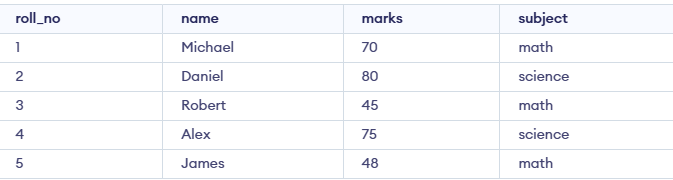
To understand How to Create and Update Views we need to create a table on which we will perform various operations and queries.
1. Updating View Using IN Operator
This method allows updating the values in the view using the UPDATE keyword. We will set specific conditions to update data in the view. The query for updating the view is as below.
**Query:
UPDATE view1
SET Marks=50
where Roll_no in (3,5);
**Output:

This query updates the view1 where the Marks will be set to 50 for the students with Roll_No 3 and 5.
2. Updating View Using Arithmetic Operation
We can update the view using arithmetic operations also. Arithmetic operations are used to change the values of attributes present in the view. Here we are updating the view. Marks will be updated using the Marks*0.95 formula. So query for the given condition will be as below.
**Query:
UPDATE view1 SET Marks = Marks*0.95;
**Output:

In this query, the Marks for all students in view1 will be updated to 95% of their current values, effectively applying a scaling factor.
3. Updating View Using Aggregate Function
We can also update the view using the aggregate function. As we are using the aggregate function, we need to change the schema/ structure of the view. So we will CREATE OR REPLACE VIEW to update the view. The query for updating the view using the aggregate function is as below.
**Query:
CREATE OR REPLACE VIEW view1 AS
SELECT Subject, SUM(Marks) AS TotalMarks
FROM Student
GROUP BY Subject;
**Output:

- This query creates or replaces view1 with a new definition that calculates the total marks (
SUM(Marks)) for each subject. - The view will now display total marks grouped by subject.
4. Updating View Using Subqueries
The view can be updated using nestes or subqueries. When there is a need for more than a query for updating the view, we can update the view. Here we are using the CREATE OR REPLACE keyword as we need to change the structure of view. The query for updating the view which is using subqueries is as below.
**Query:
CREATE OR REPLACE VIEW view1 AS
SELECT Name,
(SELECT SUM(Marks) FROM Student s WHERE s.Subject = Student.Subject) AS TotalMarks
FROM Student;
**Output:
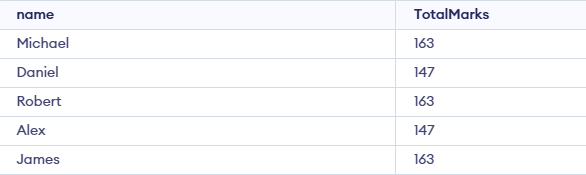
- Creates or replaces a view named view1.
- Displays each student's Name.
- Uses a subquery to calculate the total marks for all students who have the same Subject.
- TotalMarks shows the sum of marks subject-wise, not student-wise.
- The subquery matches the subject of the current row with other rows.
- Each student gets their name and the total marks of their subject group.