CI/CD Pipeline System Design (original) (raw)
Last Updated : 14 Apr, 2026
CI/CD stands for Continuous Integration and Continuous Delivery/Deployment. It automates building, testing, and deploying code, making software delivery faster, more reliable, and less error-prone.
- **Continuous Integration: Developers regularly merge code changes, and automated tests run to detect issues early.
- **Continuous Delivery: Code changes are automatically prepared for release after successful testing but require manual approval for deployment.
- **Continuous Deployment: Code changes are automatically deployed to production without manual approval
**Example: In a web application, when a developer pushes code to a repository, it is automatically built and tested. If everything passes, the application is deployed to production without manual effort.
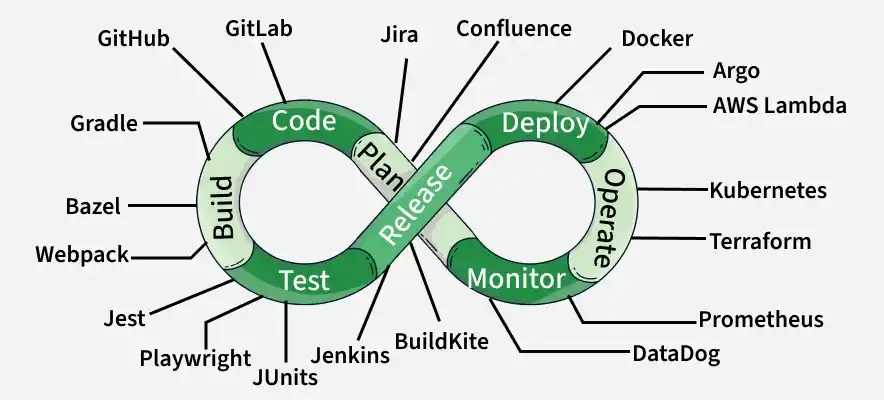
Continuous Integration (CI)
Continuous Integration (CI) is the core practice of the CI/CD pipeline. It means developers frequently merge small code changes into a shared repository to detect issues early. It focuses on automating builds and tests to maintain code quality and avoid large, complex integrations later.
**Example: In a project, whenever a developer commits code to GitHub, a CI tool like Jenkins or GitHub Actions automatically builds the application and runs tests. If any test fails, the developer is notified immediately and can fix the issue quickly.
Working
This explains how the Continuous Integration process runs automatically after code changes.
- Developers regularly push small code changes to a shared repository (multiple times a day instead of large infrequent updates). This keeps the codebase updated and reduces integration issues.
- Each code push automatically triggers the CI pipeline, which starts with building the application. This step compiles the code and prepares it for testing to ensure there are no build errors.
- After a successful build, automated tests are executed. These include unit tests to verify individual components and integration tests to ensure different parts of the system work together correctly.
- If any step fails (build or tests), the pipeline stops and notifies developers immediately, allowing quick fixes. If everything passes, the code is considered stable and ready for the next stage.
Types of CI Tests
There are two types of CI Tests.
- **Unit Tests: Verify small, individual components.
- **Integration Tests: Ensure different parts of the application work correctly together.
Goal
Detect integration issues early, when they are easiest and cheapest to fix. Avoid “integration hell”, which happens when large code changes are merged late and cause:
- Massive conflicts.
- Hidden bugs.
- Long debugging cycle.
Continuous Delivery (CD)
Continuous Delivery (CD) extends Continuous Integration by automating everything needed to prepare code for production release. Where CI stops after building and testing, CD starts and moves the validated artifact through pre-production environments.
**Example: After a developer pushes a new feature, the code passes CI tests and is automatically deployed to a staging environment that mirrors production. Here, end-to-end, performance, and security tests are run before the feature is released to users.
Working
This explains what happens after the code successfully passes the CI stage.
- Once the code passes all builds and tests in CI, the CD pipeline takes over and automatically moves the application to the next stages. The first step is deploying the build to a testing environment, where additional tests like end-to-end and integration tests are performed to check the full system behavior.
- After passing testing, the application is deployed to a staging environment. This environment is almost the same as production (same setup, configurations, and data patterns), so it helps teams verify that the application will work correctly in real-world conditions.
- These environments act as checkpoints to catch any remaining issues before production. By the time the code reaches the end of CD, it is fully tested, stable, and ready to be released with confidence.
Types of Tests in CD Pipeline
CD runs deeper and longer tests, such as:
- End-to-end (E2E) tests
- Performance tests
- Security scans
- User Acceptance Tests (UAT)
Goal
The goal is to keep the application always ready for release with high confidence.
- Ensure there is always a production-ready build that has passed all automated checks
- Enable releases at any time with confidence and stability
Continuous Deployment (CD)
Continuous Deployment (CD) is the highest level of automation in the CI/CD pipeline. It automatically releases code changes to production without any manual approval. Once the code passes all tests, it goes live directly. This helps deliver updates faster and ensures users always get the latest version.
**Example: If a developer fixes a bug in the login feature, the change is automatically tested through the pipeline. Once it passes all checks, it is deployed to the live application immediately, so users experience the fix without waiting for the next release cycle.
Working
This explains how code automatically moves to production after all checks.
- A developer pushes code, which first goes through CI where the application is built and tested using unit and integration tests. If everything passes, it moves to the CD stage where more advanced tests like end-to-end, performance, and security tests are executed.
- If the code successfully passes all these checks, it is automatically deployed to production without any manual approval. This ensures fast, reliable releases and keeps the application always up to date.
Traditional Approach Vs CI/CD Approach
Let us compare traditional approach vs CI/CD approach step-by-step.
1. Code Integration
This is about how and when developers merge their code into the main project.
**Traditional Approach (Waterfall style)
- Developers work separately for weeks/months. Merge all code at the end of the project.
- Result: Huge “merge conflicts,” broken features, lots of debugging.
**CI/CD Approach
- Developers integrate small code changes daily or even hourly.
- Automated build + test runs immediately.
- Result: Conflicts caught early, easier fixes.
2. Testing
This covers how code is tested during development.
**Traditional Approach
- Testing happens after the full system is built. Manual QA takes days/weeks.
- Bugs found late = more costly to fix.
**CI/CD Approach
- Automated tests run for every single code push (unit tests, integration tests, UI tests).
- Bugs found within minutes of writing the code.
3. Deployment
This refers to releasing the application to production.
**Traditional Approach
- Releases happen every few months.
- Requires “big bang” deployment night-long downtime, rollbacks if something breaks.
- Example: Midnight deployment, 5-hour downtime, angry customers.
**CI/CD Approach
- Small, frequent deployments (multiple times a day if needed).
- Example: Deploy wishlist feature at 3 PM, monitor, roll back instantly if needed.
A CI/CD pipeline consists of multiple stages that automate the process of building, testing, and deploying code efficiently and reliably.
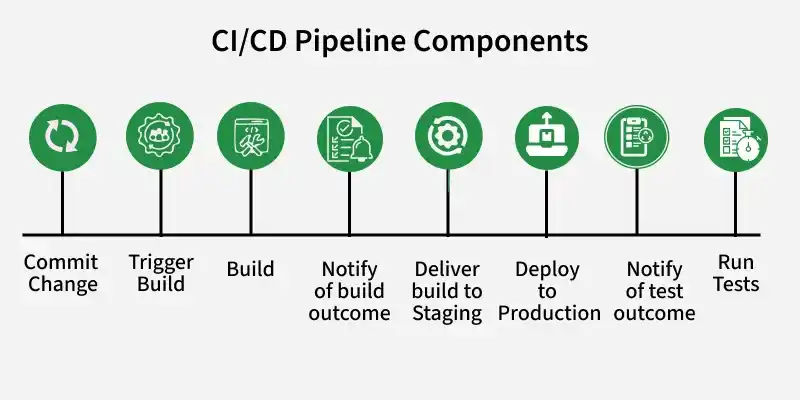
Component
Stage 1: Source
The Source stage is the entry point and trigger for the entire CI/CD pipeline. It is intrinsically linked to the version control system, which acts as the single source of truth for the codebase.
- **Trigger: The pipeline run is initiated by an event in the VCS. The most common trigger is a git push to a specific branch (like main or develop), but it can also be the creation or update of a pull request, the creation of a Git tag, or even a scheduled event.
- **Pre-flight Checks: Before committing to resource-intensive build and test processes, the pipeline performs a series of rapid, automated checks directly on the source code. This embodies the "fail fast" principle: find simple issues immediately to save time and computational resources. These checks often include:
- **Static Code Analysis: Tools like SonarQube scan the source code without executing it to identify potential bugs, logical errors, code smells, and overly complex constructs that might lead to future problems.
- **Linting: Linters enforce a consistent coding style and formatting across the codebase. This improves readability and maintainability, which is crucial for collaborative projects.
- **Security Scanning (SAST): Static Application Security Testing (SAST) tools analyze the source code for known security vulnerabilities, such as SQL injection or cross-site scripting flaws, before the code is even compiled.
Stage 2: Build
Once the source code passes the initial checks, the Build stage transforms it from human-readable code into a runnable, packaged application.
- **Compilation: Source code is compiled or transpiled into an executable format (e.g., Java bytecode, .NET assemblies, or bundled JavaScript for browsers).
- **Dependency Management: All required libraries and frameworks are automatically fetched and included during the build process.
- **Artifact Creation: The application is packaged with its code, dependencies, and configuration into a deployable unit such as a Docker image, JAR/WAR file, NuGet package, or ZIP file.
- **Immutability: The created artifact is versioned and never changed. The same artifact is used across all environments to ensure consistency and avoid “works on my machine” issues.
Stage 3: Test
The Test stage is where the build artifact is subjected to a rigorous and multi-layered validation process to ensure its quality, correctness, and stability. This stage is often the most time-consuming part of the pipeline and is composed of several sub-stages of automated testing.
- **Unit Tests: Test the smallest parts of code (functions/classes) in isolation. They are fast, developer-written, and help quickly identify specific failures.
- **Integration Tests: Check whether different modules or services work together correctly, such as database interactions or API communication between services.
- **End-to-End (E2E) Tests: Validate the complete application flow from a user’s perspective by simulating real user actions like login, checkout, etc.
- **Compliance & Security Testing: Ensure the system follows required policies and security standards, including runtime vulnerability checks using tools like DAST.
Stage 4: Deploy
After the build artifact has successfully passed all automated tests, the Deploy stage is responsible for releasing it to various environments and, ultimately, to end-users.
- **Environment Promotion: The validated artifact moves through multiple environments—Development, Staging (near-production replica), and UAT—before being released to Production for end users.
- **Deployment Strategies: Production deployment is handled using strategies like Rolling, Blue-Green, or Canary to ensure smooth releases with minimal or zero downtime.
- **Infrastructure as Code (IaC): Modern pipelines also manage infrastructure using code (e.g., Terraform, AWS CloudFormation, Azure ARM), enabling automated provisioning and version-controlled infrastructure along with application deployment.
Pipeline Orchestration
Pipeline orchestration in system design involves managing and automating the various stages of a CI/CD pipeline to ensure smooth and efficient delivery of software. Orchestration ensures that each stage of the pipeline, from code commit to production deployment, is executed in the correct order and according to predefined rules.
Here's an in-depth look at pipeline orchestration in system design:
1. Pipeline Definition
This defines how the CI/CD pipeline is structured and written in code.
- **Declarative Pipelines: Use a domain-specific language (DSL) to define the stages and steps of the pipeline in code. This makes the pipeline easy to version control and modify.
- **Scripted Pipelines: Use general-purpose scripting languages to define complex workflows and custom logic.
2. Stage Management
This controls how different steps in the pipeline are executed.
- **Sequential Stages: Define stages that execute one after another, ensuring a linear flow from development to deployment.
- **Parallel Stages: Execute multiple stages simultaneously to optimize the use of resources and reduce overall pipeline execution time.
3. Conditionals and Branching
This allows flexible execution based on conditions and code branches.
- **Conditional Execution: Execute stages or steps based on specific conditions, such as the branch name, environment variables, or the results of previous steps.
- **Branching: Define different workflows for different branches (e.g., feature branches, main branch) to manage different stages of development and release.
4. Pipeline Triggers
This determines when the pipeline should start.
- **Event-Based Triggers: Start the pipeline based on events such as code commits, pull requests, or manual triggers.
- **Scheduled Triggers: Execute pipelines at scheduled intervals to perform tasks like nightly builds or periodic testing.
5. Artifact Management
This handles the outputs generated during the build process.
- **Build Artifacts: Manage the outputs of the build process (e.g., compiled binaries, Docker images) and ensure they are passed correctly between stages.
- **Artifact Storage: Use artifact repositories (e.g., JFrog Artifactory, Nexus) to store and manage build artifacts.
6. Environment Management
This ensures proper configuration across different stages.
- **Environment Variables: Define and manage environment variables that are required for different stages of the pipeline.
- **Infrastructure as Code (IaC): Use tools like Terraform or Ansible to provision and manage infrastructure as part of the pipeline.
These tools help automate the entire software delivery process, from code integration to deployment, making development faster and more reliable.
- **Jenkins: Open-source automation server; highly extensible with plugins; ideal for complex pipelines.
- **GitLab CI/CD: Built into GitLab; easy setup; supports pipelines as code and Kubernetes integration.
- **CircleCI: Cloud-based; fast builds with parallelism and caching; works well with Docker.
- **Travis CI: Cloud-based; simple setup; popular for open-source projects and multiple languages.
- **GitHub Actions: Integrated into GitHub; event-driven workflows; easy automation using prebuilt actions.
**Tip: Choose a tool based on your project size, version control system, and team familiarity.
Security in CI/CD Pipelines
Ensuring security in CI/CD pipelines is critical to protect the software development lifecycle from vulnerabilities and threats. Implementing security best practices at each stage of the CI/CD pipeline helps safeguard code, build artifacts, and deployment environments.
Here are key considerations and best practices for securing CI/CD pipelines:
1. Code Security
This focuses on securing the code before it enters the pipeline.
- **Code Reviews: Enforce peer reviews for all code changes. Tools like GitHub and GitLab provide features for mandatory code reviews before merging.
- **Static Code Analysis: Use tools like SonarQube, Checkmarx, or Snyk to analyze code for vulnerabilities and coding standards during the build stage.
- **Secrets Management: Store sensitive information such as API keys, passwords, and tokens in secure vaults like HashiCorp Vault, AWS Secrets Manager, or Azure Key Vault. Avoid hardcoding secrets in the codebase.
2. Build Security
This ensures the build process is secure and free from vulnerabilities.
- **Build Isolation: Run builds in isolated environments (e.g., containers or virtual machines) to prevent cross-contamination and unauthorized access.
- **Dependency Management: Use tools like OWASP Dependency-Check, Snyk, or WhiteSource to scan dependencies for known vulnerabilities. Regularly update dependencies to their latest secure versions.
- **Signed Artifacts: Sign build artifacts cryptographically to ensure their integrity and authenticity. Verify signatures before deploying artifacts to production.
3. Environment Security
This focuses on securing different deployment environments.
- **Infrastructure as Code (IaC): Use IaC tools like Terraform, Ansible, or CloudFormation to define and manage infrastructure securely. Store IaC configurations in version-controlled repositories.
- **Environment Segmentation: Isolate environments (development, staging, production) to minimize the risk of unauthorized access and data leakage. Use network segmentation and firewall rules to control access between environments.
- **Access Controls: Implement role-based access control (RBAC) to restrict access to CI/CD tools and environments. Use principles of least privilege to grant minimum necessary permissions to users and service accounts.
4. Pipeline Security
This ensures the CI/CD pipeline itself is protected from threats.
- **Secure CI/CD Tools: Ensure the CI/CD tool (e.g., Jenkins, GitLab CI/CD, CircleCI) is up to date with security patches. Regularly audit configurations and permissions.
- **Pipeline Hardening: Enforce strict access controls on pipeline configurations and scripts. Use encrypted communication channels (e.g., HTTPS, SSH) for data transmission.
- **Third-Party Integrations: Evaluate and limit the use of third-party plugins and integrations. Ensure they come from trusted sources and are regularly updated.
5. Runtime Security
This focuses on monitoring and securing the pipeline during execution.
- **Container Security: Use container security tools like Aqua, Twistlock (Palo Alto Prisma), or Clair to scan container images for vulnerabilities. Follow best practices for container security, such as running containers with non-root users and minimizing the attack surface.
- **Continuous Monitoring: Implement monitoring and logging for CI/CD pipeline activities. Use tools like ELK Stack (Elasticsearch, Logstash, Kibana), Splunk, or Prometheus to monitor pipeline logs and detect anomalies.
- **Incident Response: Develop and maintain an incident response plan for CI/CD pipeline security breaches. Regularly conduct drills and update the plan based on lessons learned.
6. Compliance and Governance
This ensures adherence to security policies and regulations.
- **Policy Enforcement: Use policy-as-code tools like Open Policy Agent (OPA) or Sentinel to enforce security and compliance policies across the CI/CD pipeline.
- **Audit Trails: Maintain detailed audit logs of pipeline activities, including code commits, build processes, and deployment actions. Ensure logs are tamper-evident and stored securely.
- **Compliance Checks: Integrate compliance checks into the CI/CD pipeline to ensure adherence to industry standards and regulations (e.g., GDPR, HIPAA, PCI-DSS).
Scaling CI/CD Pipelines
Scaling CI/CD pipelines is essential for supporting larger teams, handling increased load, and ensuring high availability.
Here are key considerations and best practices for scaling CI/CD pipelines effectively:
1. Infrastructure Scalability
This focuses on expanding resources to handle increased workload efficiently.
- **Horizontal Scaling: Add more CI/CD servers or agents to handle additional load. Tools like Jenkins, GitLab CI, and CircleCI support adding multiple agents to distribute the workload.
- **Containerization: Use containers to run CI/CD jobs in isolated, reproducible environments. Tools like Docker and Kubernetes can help manage and scale containerized workloads.
- **Cloud Services: Leverage cloud-based CI/CD services (e.g., AWS CodePipeline, Azure DevOps, GitHub Actions) to automatically scale infrastructure based on demand.
2. Parallel Execution
This helps reduce pipeline execution time by running tasks simultaneously.
- **Parallel Jobs: Configure pipelines to run multiple jobs in parallel. This can significantly reduce the time required to complete the pipeline, especially for build and test stages.
- **Matrix Builds: Use matrix builds to run the same set of tests or builds across different environments or configurations (e.g., multiple OS versions, different programming language versions).
3. Pipeline Optimization
This improves efficiency and reduces unnecessary processing.
- **Caching: Implement caching mechanisms to reuse dependencies and artifacts between builds. This reduces the time spent on downloading and installing dependencies.
- **Incremental Builds: Configure the pipeline to only build and test changed components rather than the entire project. This can be achieved using tools like Bazel or Gradle's incremental build feature.
- **Pipeline as Code: Define CI/CD pipelines as code to version control and easily replicate pipeline configurations across different projects and environments.
4. Load Balancing
This ensures even distribution of workload across resources.
- **Load Balancers: Use load balancers to distribute incoming CI/CD job requests evenly across multiple servers or agents. This ensures no single server is overwhelmed.
- **Distributed Builds: Use distributed build systems that can split large builds into smaller tasks and run them across multiple nodes.
5. Monitoring and Logging
This helps track performance and quickly identify issues.
- **Centralized Logging: Implement centralized logging solutions (e.g., ELK Stack, Splunk) to aggregate logs from all CI/CD components. This helps in monitoring pipeline health and troubleshooting issues.
- **Performance Monitoring: Use monitoring tools (e.g., Prometheus, Grafana) to track the performance of CI/CD pipelines. Monitor metrics like job duration, resource utilization, and failure rates.
6. High Availability and Fault Tolerance
This ensures the pipeline remains operational even during failures.
- **Redundancy: Set up redundant CI/CD servers or agents to ensure high availability. Use techniques like active-active or active-passive configurations.
- **Automated Failover: Implement automated failover mechanisms to switch to backup servers in case of failures. Tools like Kubernetes can help manage failover for containerized workloads.
CI/CD Challenges and their Solutions
Continuous Integration/Continuous Deployment (CI/CD) pipelines are powerful tools for automating software delivery processes, but they come with their own set of challenges. Here are some common challenges with CI/CD pipelines and how to avoid or mitigate them:
1. Complexity of Pipeline Configuration
This occurs when pipelines become difficult to manage due to multiple stages and environments.
**Challenge: CI/CD pipelines can become complex, especially in large projects with multiple stages and environments.
**Solution: Use Infrastructure as Code (IaC) tools like Terraform or CloudFormation to manage pipeline configurations. Break down pipelines into smaller, reusable components. Use version control for pipeline configurations to track changes and facilitate collaboration.
2. Integration Issues
This happens when different tools in the pipeline do not work smoothly together.
**Challenge: Ensuring that various tools and systems integrate seamlessly within the pipeline (e.g., version control, testing frameworks, deployment targets).
**Solution: Regularly update and test integrations between tools. Use standardized APIs and plugins provided by CI/CD platforms. Automate integration testing as part of your pipeline.
3. Slow Build/Test Execution
This arises when builds and tests take too much time, slowing down development.
**Challenge: Long build and test times can delay feedback and deployment.
**Solution: Optimize build processes by parallelizing tasks and leveraging caching mechanisms. Use containerization (e.g., Docker) to create consistent environments for builds and tests. Implement incremental builds to only build/test what has changed.
4. Maintaining Pipeline Reliability
This refers to keeping the pipeline stable and consistently working.
**Challenge: Ensuring that the CI/CD pipeline is reliable and consistent in delivering builds.
**Solution: Monitor pipeline performance and reliability metrics. Implement automated retries and notifications for failed builds. Regularly review and update pipeline configurations and dependencies.
5. Security Concerns
This involves risks related to data, credentials, and system vulnerabilities.
**Challenge: Vulnerabilities in pipeline components or improper handling of credentials can lead to security breaches.
**Solution: Use secrets management tools (e.g., HashiCorp Vault, AWS Secrets Manager) to securely store and access credentials. Implement least privilege access controls for pipeline components. Conduct regular security audits and vulnerability assessments.
6. Scaling Challenges
This happens when pipelines struggle to handle increased workloads or team size.
**Challenge: Scaling CI/CD pipelines to handle increased workload and larger teams.
**Solution: Use scalable CI/CD platforms that support distributed builds and parallel execution. Monitor resource utilization and adjust pipeline configurations accordingly. Implement pipeline as code practices to easily replicate and scale pipelines.
7. Lack of Testing Coverage
This occurs when insufficient testing leads to bugs in production.
**Challenge: Inadequate testing can result in bugs reaching production.
**Solution: Implement a comprehensive testing strategy (unit, integration, regression, performance). Automate testing at every stage of the pipeline. Integrate testing frameworks with CI/CD tools for seamless execution and reporting.