Cold and Warm Cache in System Design (original) (raw)
Last Updated : 4 May, 2026
Caching is a technique that stores frequently accessed data in a temporary layer for faster retrieval and reduced latency. It improves performance by minimizing repeated data fetching and lowering backend load. Understanding cold cache (empty) and warm cache (preloaded) helps optimize response time.
- Stores frequently accessed data closer to users or applications, improving access speed.
- Reduces latency, bandwidth usage, and backend load; cold cache is slower initially, while warm cache speeds up repeated requests.
**Example: When you open a video on YouTube for the first time, it loads slower (cold cache), but reopening it later is faster because the data is already cached (warm cache).
Cold Cache
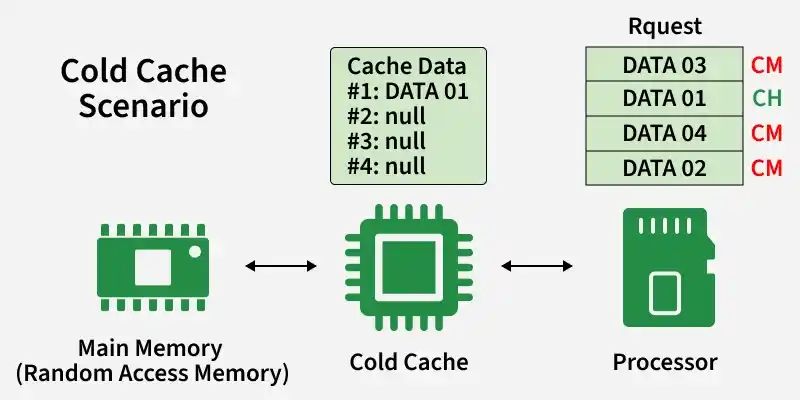
A cold cache is a newly initialized cache with little or no data, so most requests result in misses and require fetching data from the backend, leading to slower performance.
- Most requests cause cache misses. (data not found in cache)
- Data is fetched from backend (database/primary storage), which is slower.
- Results in higher latency and increased load on backend systems due to repeated fetching.
Challenges
Cold cache leads to performance issues initially due to lack of cached data.
- **High Latency: Increased response times due to frequent cache misses.
- **Increased Load: Higher load on primary storage systems as they handle more requests.
- **User Experience: Potential degradation in user experience due to slower response times.
Use Cases
Cold cache situations typically occur when systems are new or recently restarted.
- **System Start-up: When a system or application is first launched, its cache is typically cold.
- **Disaster Recovery: After a system failure and subsequent recovery, caches are often cold.
- **Deployment of New Systems: Newly deployed systems start with cold caches.
Real world Example
Cold cache scenarios are common when data has not been previously accessed.
- **First-time website visits: When a user visits a website for the first time, their browser cache is essentially cold. It doesn't contain any previously accessed data from that website, so each resource (images, scripts, stylesheets) needs to be fetched from the server, resulting in longer loading times.
- **Freshly booted application: When a computer application is just launched after a system boot, its cache is cold. It hasn't stored any data from previous sessions, so it needs to fetch data from the disk or network, resulting in slower performance initially.
Warm Cache
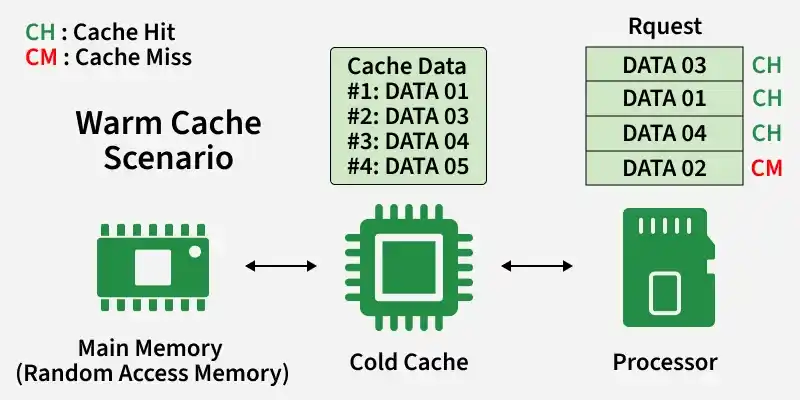
A warm cache contains frequently accessed data, leading to a high cache hit rate and faster responses. It reduces dependency on backend systems and improves overall performance.
- Most requests are served directly from cache, reducing calls to databases or services.
- Lowers backend load and latency, resulting in quicker response times.
Challenges
Warm cache systems face issues related to data accuracy, consistency, and efficient resource usage.
- **Cache Invalidation: Ensuring that outdated or stale data is removed from the cache.
- **Consistency: Maintaining data consistency between the cache and primary storage.
- **Resource Utilization: Managing the memory and storage resources used by the cache.
Use Cases
Warm caches are widely used in systems where fast access to frequently used data is critical.
- **Web Servers: Frequently accessed web pages and resources benefit from warm caches.
- **Database Systems: Query results stored in a warm cache reduce database load and improve response times.
- **Content Delivery Networks (CDNs): CDNs with warm caches deliver content faster to users by storing popular content closer to the users.
Real world Example
Warm cache improves performance in everyday applications by storing frequently accessed data for quick reuse.
- **Frequently visited websites: After a user visits a website several times, their browser cache becomes warm. Commonly accessed resources like logos, CSS files, and JavaScript libraries are already stored locally, leading to quicker load times on subsequent visits.
- **Database query results: In a database system, when a query is executed multiple times with similar parameters, the query result may be cached in memory after the first execution. Subsequent executions of the same query with similar parameters can then benefit from the cached result, resulting in faster response times.
Cold Vs Warm Cache
Cold cache has a low hit rate because it starts empty, leading to slower performance and more backend requests. Warm cache has a high hit rate as it stores frequently accessed data, resulting in faster responses and reduced backend load.
| Cold Cache | Warm Cache |
|---|---|
| Empty cache with no stored data | Cache already contains frequently accessed data |
| First requests result in cache misses | Most requests result in cache hits |
| Slower initial performance | Faster overall performance |
| Higher latency on first access | Lower latency for repeated access |
| Needs time to build cache data | Already optimized for quick responses |
| Less efficient at the beginning | More efficient due to stored data |
| Suitable for testing, benchmarking | Ideal for production environments |
| Increases load on backend initially | Reduces backend load significantly |
Cache Warming
Cache warming is the process of filling a cold cache with frequently or likely-to-be-used data so that the system can quickly move to a warm state and improve performance. It helps reduce initial latency and ensures faster response for early requests.
Techniques
Cache warming should focus on selective prefetching rather than loading all data, as preloading everything can waste memory and processing resources.
- **Selective Prefetching: Loads only high-priority or frequently accessed data based on usage patterns.
- **Metadata Prefetching: Loads commonly required metadata first to reduce lookup time.
- **Targeted Data Loading: Prefetches only high-probability data that is likely to be requested soon.
- **Warm Cache Copying: Copies frequently used data from an already warm cache to a new or cold cache.
Benefits
Cache warming improves system responsiveness and overall performance.
- Faster response time for initial requests.
- Reduced latency and improved system efficiency.
- Better user experience in systems like CDNs.
Challenges
Cache warming must be used carefully to avoid inefficiencies.
- Unnecessary data loading increases overhead.
- Wastes resources if unused data is cached.
- Makes cache management and eviction more complex.
These tools help implement efficient caching in real-world systems.
- **Redis: An in-memory data structure store, commonly used as a database, cache, and message broker.
- **Memcached: A distributed memory caching system designed for speeding up dynamic web applications.
- **Varnish **Cache: A web application accelerator designed for HTTP caching.
- **Apache **Ignite: An in-memory computing platform that provides caching capabilities.
- **Ehcache: A Java-based caching solution widely used in enterprise applications.