Unified Modeling Language (UML) Diagrams (original) (raw)
Last Updated : 16 Apr, 2026
Unified Modeling Language (UML) is a general-purpose modeling language. The main aim of UML is to define a standard way to visualize the way a system has been designed. It is quite similar to blueprints used in other fields of engineering. UML is not a programming language, it is rather a visual language.
- UML is a standardized modeling language (approved by ISO) that provides a common way for teams to visualize and communicate system design.
- We use UML diagrams to show thebehavior and structure of a system.
- UML helps software engineers, businessmen, and system architects with modeling, design, and analysis.
- The International Organization for Standardization (ISO) published UML as an approved standard in 2005. UML has been revised over the years and is reviewed periodically.
**Example: In an e-commerce system, a UML diagram can show components like User, Product, and Order, and how they interact during processes like placing an order.
Need of UML
UML is essential for clearly visualizing and communicating system design among different stakeholders involved in a project.
- Complex applications need collaboration and planning from multiple teams, so a clear and concise way of communication is required.
- Business stakeholders may not understand code, so UML helps explain system requirements, functionalities, and processes in a simple visual way.
- It saves time by allowing teams to visualize workflows, user interactions, and system structure before actual development.
Types of UML Diagrams
UML is linked with object-oriented design and analysis. UML makes use of elements and forms associations between them to form diagrams. Diagrams in UML can be broadly classified as:
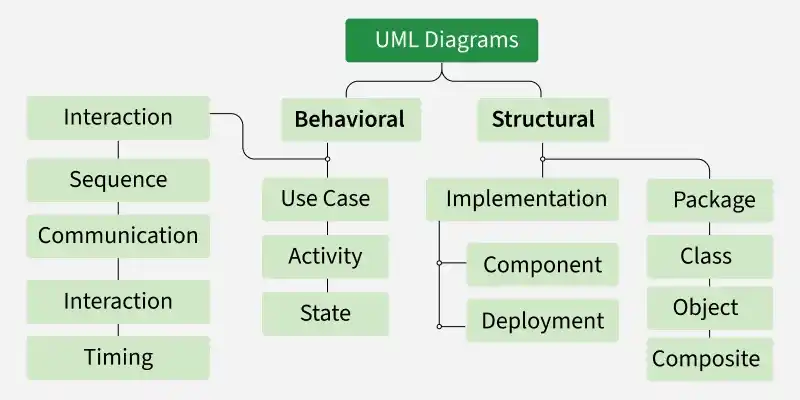
UML Diagram
1. Structural UML Diagrams
Structural UML diagrams are visual representations that depict the static aspects of a system, including its classes, objects, components, and their relationships, providing a clear view of the system's architecture. Structural UML diagrams include the following types:
1. Class Diagram
The most widely used UML diagram is the class diagram. It is the building block of all object oriented software systems. We use class diagrams to depict the static structure of a system by showing system's classes, their methods and attributes. Class diagrams also help us identify relationship between different classes or objects.
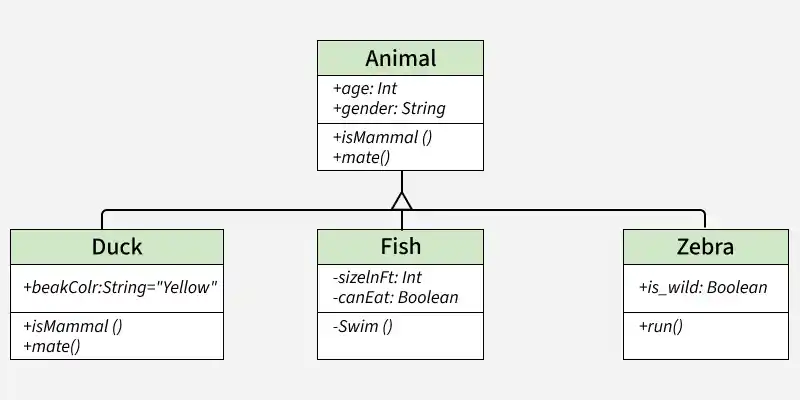
Class Diagram
Composite Structure Diagram
We use composite structure diagrams to represent the internal structure of a class and its interaction points with other parts of the system.
- A composite structure diagram represents relationship between parts and their configuration which determine how the classifier (class, a component, or a deployment node) behaves.
- They represent internal structure of a structured classifier making the use of parts, ports, and connectors.
- They are similar to class diagrams except they represent individual parts in detail as compared to the entire class.
2. Object Diagram
An Object Diagram can be referred to as a screenshot of the instances in a system and the relationship that exists between them. Since object diagrams depict behaviour when objects have been instantiated, we are able to study the behavior of the system at a particular instant.
- An object diagram is similar to a class diagram except it shows the instances of classes in the system.
- We depict actual classifiers and their relationships making the use of class diagrams.
- On the other hand, an Object Diagram represents specific instances of classes and relationships between them at a point of time.
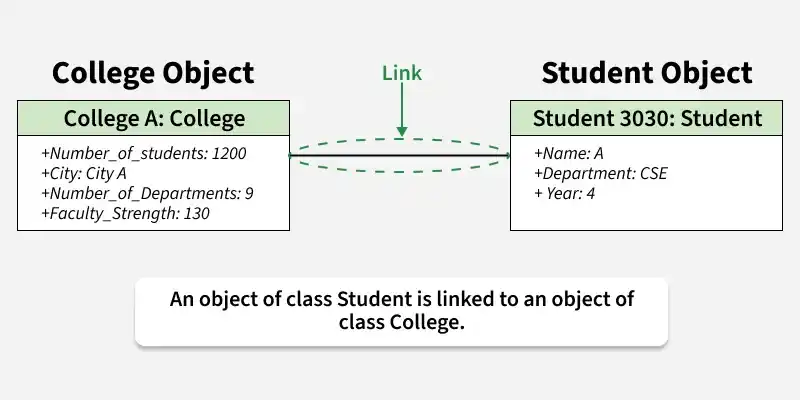
Object Diagram
3. Component Diagram
Component diagrams are used to represent how the physical components in a system have been organized. We use them for modelling implementation details.
- Component Diagrams depict the structural relationship between software system elements and help us in understanding if functional requirements have been covered by planned development.
- Component Diagrams become essential to use when we design and build complex systems.
- Interfaces are used by components of the system to communicate with each other.
- In modern systems, component diagrams are widely used in microservices architecture to represent service boundaries, APIs, and communication between different services.
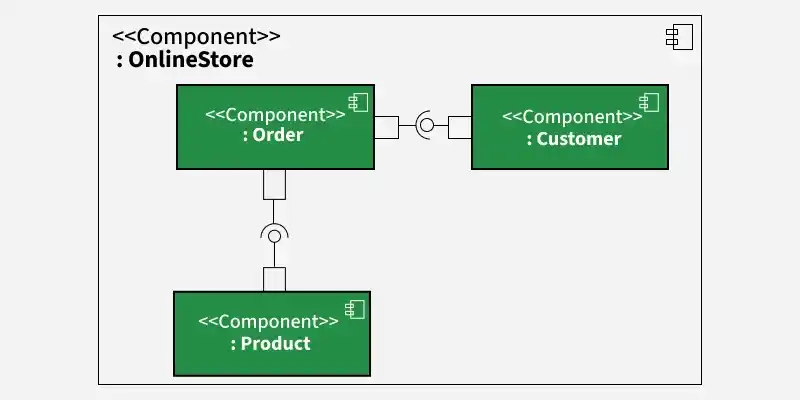
Component Diagram
4. Deployment Diagram
Deployment Diagrams are used to represent system hardware and its software. It tells us what hardware components exist and what software components run on them.
- We illustrate system architecture as distribution of software artifacts over distributed targets.
- An artifact is the information that is generated by system software.
- They are primarily used when a software is being used, distributed or deployed over multiple machines with different configurations.
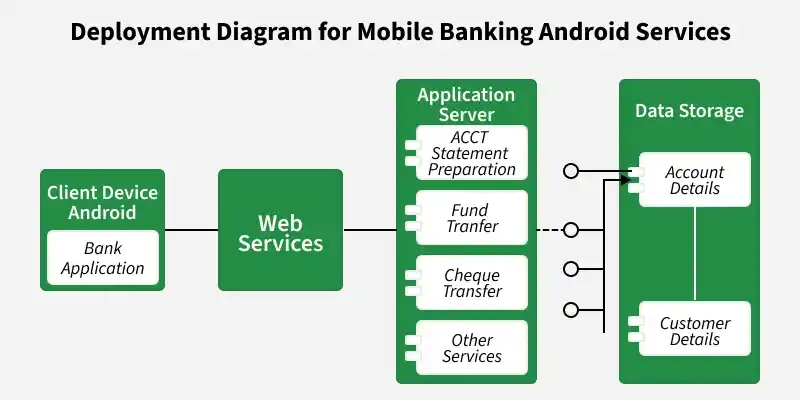
Deployment Diagram
5. Package Diagram
We use Package Diagrams to depict how packages and their elements have been organized. A package diagram simply shows us the dependencies between different packages and internal composition of packages.
- Packages help us to organize UML diagrams into meaningful groups and make the diagram easy to understand.
- They are primarily used to organize class and use case diagrams.
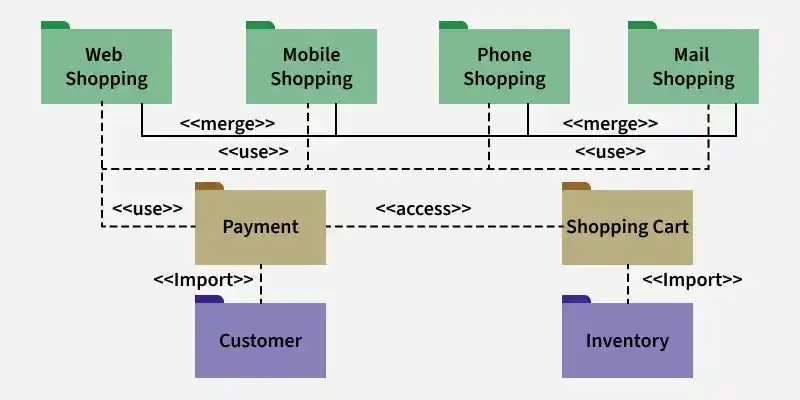
Package Diagram
2. Behavioral UML Diagrams
Behavioral UML diagrams are visual representations that depict the dynamic aspects of a system, illustrating how objects interact and behave over time in response to events.
1. State Machine Diagrams
A state diagram is used to represent the condition of the system or part of the system at finite instances of time. It’s a behavioral diagram and it represents the behavior using finite state transitions.
- State diagrams are also referred to as State machines and State-chart Diagrams
- These terms are often used interchangeably. So simply, a state diagram is used to model the dynamic behavior of a class in response to time and changing external stimuli.
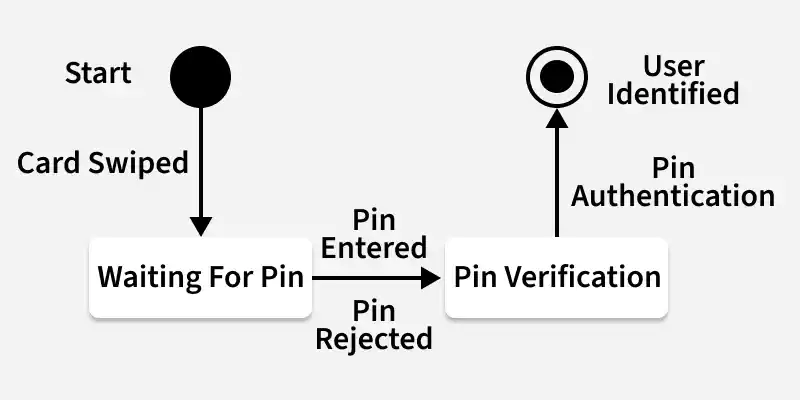
State Machine Diagram
2. Activity Diagrams
We use Activity Diagrams to illustrate the flow of control in a system. We can also use an activity diagram to refer to the steps involved in the execution of a use case.
- We model sequential and concurrent activities using activity diagrams. So, we basically depict workflows visually using an activity diagram.
- An activity diagram focuses on condition of flow and the sequence in which it happens.
- We describe or depict what causes a particular event using an activity diagram.
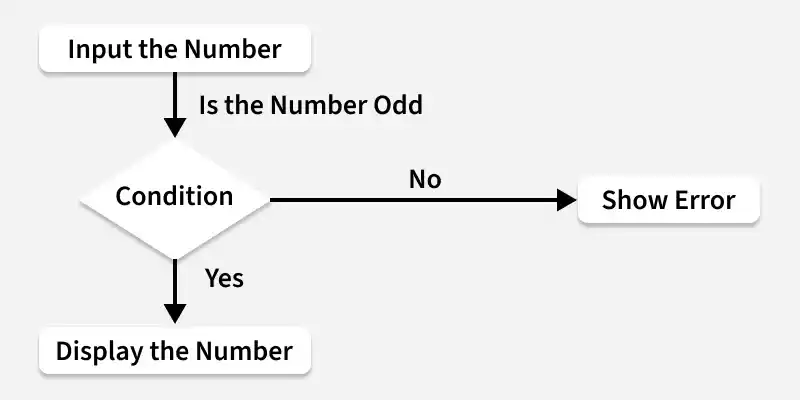
Activity Diagram
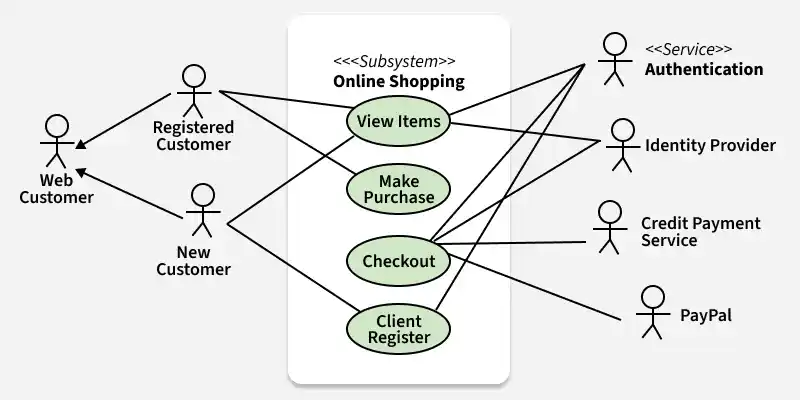
3. Use Case Diagrams
Use Case Diagrams are used to depict the functionality of a system or a part of a system. They are widely used to illustrate the functional requirements of the system and its interaction with external agents(actors).
- A use case is basically a diagram representing different scenarios where the system can be used.
- A use case diagram gives us a high level view of what the system or a part of the system does without going into implementation details.
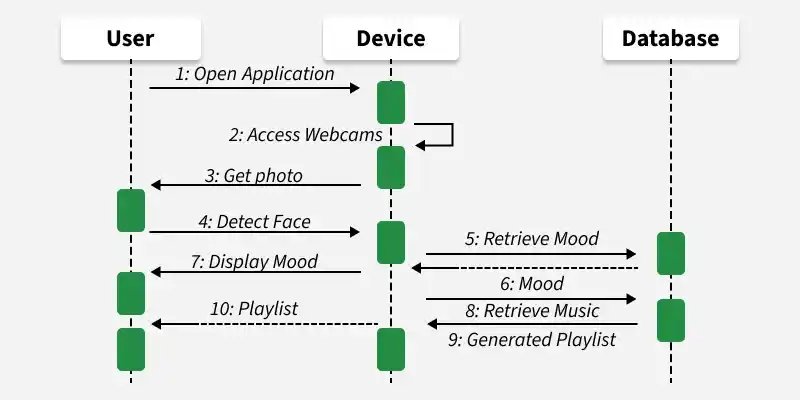
4. Sequence Diagram
A sequence diagram simply depicts interaction between objects in a sequential order i.e. the order in which these interactions take place.
- We can also use the terms event diagrams or event scenarios to refer to a sequence diagram.
- Sequence diagrams describe how and in what order the objects in a system function.
- These diagrams are widely used by businessmen and software developers to document and understand requirements for new and existing systems.
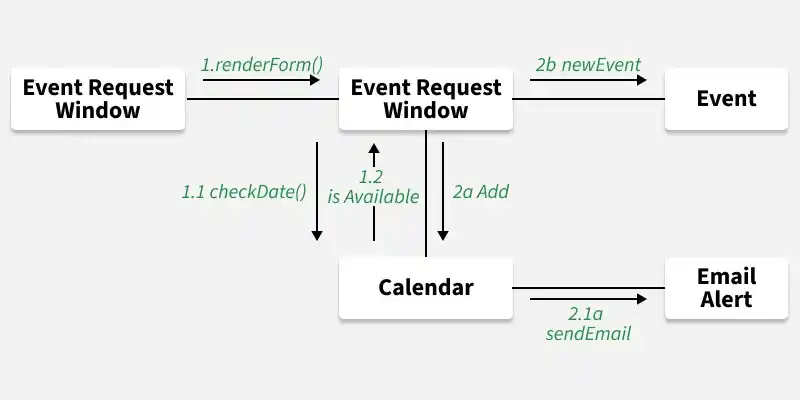
5. Communication Diagram
A Communication Diagram (known as Collaboration Diagram in UML 1.x) is used to show sequenced messages exchanged between objects.
- A communication diagram focuses primarily on objects and their relationships.
- We can represent similar information using Sequence diagrams, however communication diagrams represent objects and links in a free form.
Communication Diagram
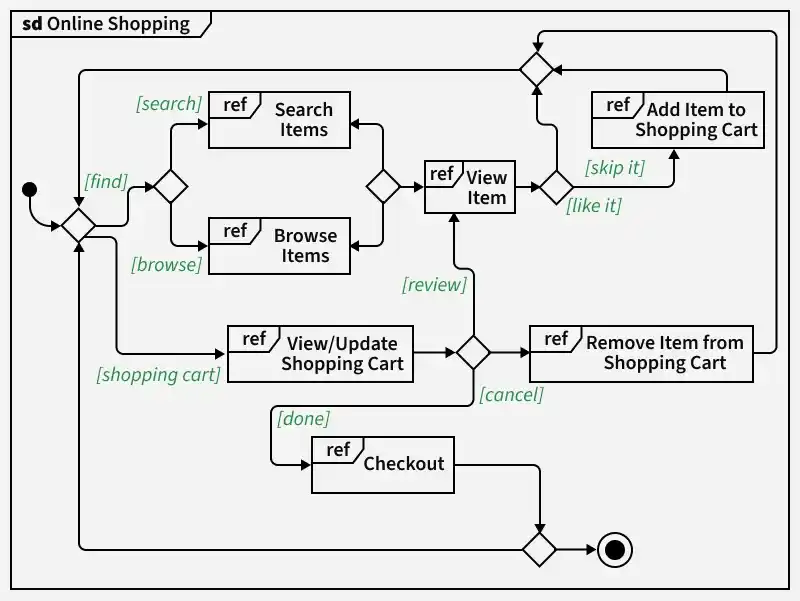
6. Interaction Overview Diagram
An Interaction Overview Diagram (IOD) is a type of UML (Unified Modeling Language) diagram that illustrates the flow of interactions between various elements in a system or process. It provides a high-level overview of how interactions occur, including the sequence of actions, decisions, and interactions between different components or objects.
Interaction Overview Diagram
Additions in UML 2.0
- Software development methodologies like agile have been incorporated and scope of original UML specification has been broadened.
- Originally UML specified 9 diagrams. UML 2.x has increased the number of diagrams from 9 to 13. The four diagrams that were added are : timing diagram, communication diagram, interaction overview diagram and composite structure diagram. UML 2.x renamed statechart diagrams to state machine diagrams.
- UML 2.x added the ability to decompose software system into components and sub-components.
There are several tools available for creating Unified Modeling Language (UML) diagrams, which are commonly used in software development to visually represent system architecture, design, and implementation. Here are some popular UML diagram creating tools:
- **Lucidchart: Lucidchart is a web-based diagramming tool that supports UML diagrams. It's user-friendly and collaborative, allowing multiple users to work on diagrams in real-time.
- **Draw.io: Draw.io is a free, web-based diagramming tool that supports various diagram types, including UML. It integrates with various cloud storage services and can be used offline.
- **Visual Paradigm: Visual Paradigm provides a comprehensive suite of tools for software development, including UML diagramming. It offers both online and desktop versions and supports a wide range of UML diagrams.
- **StarUML: StarUML is an open-source UML modeling tool with a user-friendly interface. It supports the standard UML 2.x diagrams and allows users to customize and extend its functionality through plugins.