LBitmap::Offset (original) (raw)
Summary
Shifts the bitmap pixels horizontally and vertically.
Syntax
#include "ltwrappr.h"
L_INT LBitmap::Offset(nHorizontalShift, nVerticalShift, crBackColor, uFlags)
Parameters
L_INT nHorizontalShift
Horizontal shift of the bitmap, in pixels.
L_INT nVerticalShift
Vertical shift of the bitmap, in pixels.
COLORREF crBackColor
The COLORREF value that specifies the fill color for any exposed areas. You can specify a COLORREF value, such as the return value of the Windows RGB macro, or you can use the PALETTEINDEX macro to specify a palette color. This is only useful when uFlags parameter is set to FILL_CLR.
L_UINT uFlags
Flag that indicates how to handle any exposed areas resulting from the bitmap shift.
Possible values are:
| Value | Meaning |
|---|---|
| FILL_CLR | [0x0000] Fill the exposed areas with crBackColor. |
| FILL_NOCHG | [0x0002] Leave the exposed area as is, without changing it. |
| FILL_RPT | [0x0001] Stretch the image edges to fill the exposed area. |
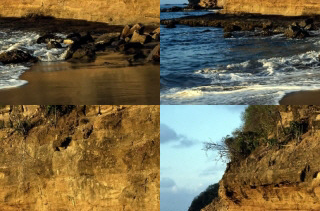
| FILL_WRAP | [0x0003] Fill any exposed areas with the opposite side of the image. |
Returns
| Value | Meaning |
|---|---|
| SUCCESS | The function was successful. |
| < 1 | An error occurred. Refer to Return Codes. |
Comments
This function shifts the bitmap pixels horizontally and vertically.
Use the LBitmapRgn::Offset function to move a bitmap region by the specified number of rows and columns.
This function supports 12- and 16-bit grayscale and 48- and 64-bit color images. Support for 12- and 16-bit grayscale and 48- and 64-bit color images is available only in the Document/Medical toolkits.
To update a status bar or detect a user interrupt during execution of this function, refer to LBase::EnableStatusCallback.
This function does not support signed data images. It returns the error code ERROR_SIGNED_DATA_NOT_SUPPORTED if a signed data image is passed to this function.
This function does not support 32-bit grayscale images. It returns the error code ERROR_GRAY32_UNSUPPORTED if a 32-bit grayscale image is passed to this function.
Offset Function - Before

Offset Function - After
View additional platform support for this Offset function.
Required DLLs and Libraries
- LTIMGEFX
- For a listing of the exact DLLs and Libraries needed, based on the toolkit version, refer to Files To Be Included With Your Application.
Platforms
Win32, x64.
See Also
Functions
- LBitmap::Emboss
- LBitmap::MotionBlur
- LBitmapBase::Underlay
- LBitmap::Bending
- LBitmap::Cylindrical
- LBitmap::FreeHandShear
- LBitmap::FreeHandWave
- LBitmap::Polar
- LBitmap::Punch
- LBitmap::RadialBlur
- LBitmap::RadWave
- LBitmap::Ripple
- LBitmap::Swirl
- LBitmap::Wave
- LBitmap::Wind
- LBitmap::ZoomBlur
- LBitmap::ZoomWave
- LBitmap::BumpMap
- LBitmap::FreePlaneBend
- LBitmap::FreeRadBend
- LBitmap::PlaneBend
- LBitmap::Plane
- LBitmap::Tunnel
- LBitmap::Spherize
- LBitmapRgn::Offset
Topics
- Raster Image Functions: Doing Geometric Transformations
- Raster Image Functions: Artistic Effects
- Applying Artistic Effects
Example
L_INT LBitmap__OffsetExample(LBitmapWindow m_LBitmapWnd)
{
L_INT nRet;
LBitmap LeadBitmap;
nRet =LeadBitmap.Load(MAKE_IMAGE_PATH(TEXT("IMAGE1.CMP")), 0,ORDER_BGR);
if(nRet !=SUCCESS)
return nRet;
nRet =LeadBitmap.Offset(m_LBitmapWnd.GetWidth() / 2, m_LBitmapWnd.GetHeight() / 2, 0, FILL_WRAP);
if(nRet !=SUCCESS)
return nRet;
return SUCCESS;
}
LEADTOOLS Raster Imaging C++ Class Library Help