Security Group and Network ACL in AWS (original) (raw)
Last Updated : 2 Jun, 2026
In AWS, securing your network involves two main layers of protection: Security Groups (SGs) and Network Access Control Lists (NACLs). Both work like firewalls, but they protect different parts of the VPC and behave differently.
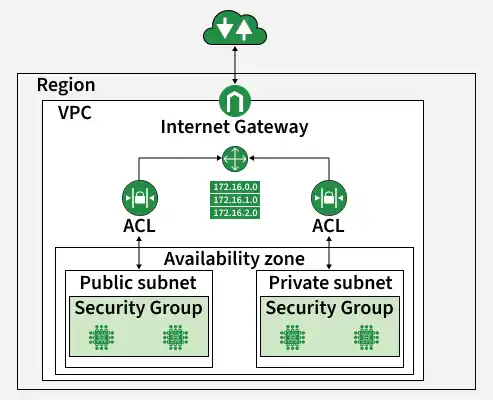
The main difference between them is based on Stateful and Stateless filtering.
1. Security Groups (Stateful)
A Security Group acts as a virtual firewall for your EC2 instances and other AWS resources like RDS, Lambda, and ELB.
**Level: Instance Level
- It is attached directly to a specific resource.
**Behavior: Stateful
- If a request is allowed to go out, the response traffic is automatically allowed back.
- You do not need to create separate inbound or outbound rules for return traffic.
**Rules: Allow Only
- Security Groups support only allow rules.
- Any traffic not explicitly allowed is automatically denied.
**Usage: Primary Defense
- Used to tightly control access to individual instances and services.
**Example: If you allow outbound internet access from an EC2 instance to download updates, the returning traffic is automatically permitted without adding extra inbound rules.
2. Network ACLs (Stateless)
A Network ACL (NACL) acts as a firewall for an entire subnet.
**Level: Subnet Level
- It controls traffic entering and leaving the subnet.
**Behavior: Stateless
- NACLs do not remember connections.
- If inbound traffic is allowed, outbound response traffic must also be explicitly allowed.
**Rules: Allow and Deny
- Unlike Security Groups, NACLs can create both allow and deny rules.
**Usage: Secondary Defense
- Commonly used for broad traffic control, such as blocking suspicious IP addresses or creating secure subnet boundaries.
**Example: If you allow inbound HTTP traffic on port 80, you must also allow outbound response traffic, otherwise, the communication will fail.
Comparison Matrix
| **Feature | **Security Group | **Network ACL (NACL) |
|---|---|---|
| **Scope | Instance Level (EC2, RDS, ENI) | Subnet Level |
| **State | Stateful (Return traffic auto-allowed) | Stateless (Return traffic must be allowed) |
| **Rule Types | Allow rules only | Allow and Deny rules |
| **Default Rule | Deny All (Implicit) | Allow All (Default NACL) / Deny All (Custom NACL) |
| **Order | All rules evaluated before decision | Processed in Number Order (Lowest first) |
| **Blocking | Cannot explicitly block an IP | Can explicitly DENY an IP |
Working of Network ACL ( NACL )
Network ACLs (NACLs) evaluate the traffic entering and leaving the subnet in your VPC (Virtual Private Cloud). They process rules in sequential order, starting from the lowest numbered rule, to determine whether the traffic should be allowed or denied.
If a packet matches an allow rule, it is permitted; if it matches a deny rule, it is blocked. When no rule matches, the default deny action is applied, helping enforce security policies and protect AWS infrastructure from unauthorized access and potential threats.
Managing Subnet Traffic Using Network ACLs in AWS
The following are the steps that guides you in controlling the traffic to subnets using the Network ACLs:
- **Create a Network ACL: Create a Network ACL in your VPC using the AWS Management Console or AWS CLI.
- **Associate the Network ACL with Subnets: Associate the NACL with the subnets where you want to control traffic. One NACL can be linked to multiple subnets, but each subnet can have only one NACL at a time.
- **Define Inbound and Outbound Rules: Configure inbound and outbound rules to allow or deny specific traffic. Rules are evaluated starting from the lowest numbered rule.
- **Prioritize Rules: Arrange rules based on priority, keeping specific rules at the top and general rules at the bottom.
- **Configure Rule Actions: Set each rule action as Allow or Deny according to security requirements, such as allowing HTTP/HTTPS traffic while blocking specific IP addresses.
- **Apply Changes: Save and apply the changes to the Network ACL. The updated rules take effect immediately for the associated subnets.
Network ACL Rules
Network ACL rules control the traffic entering and leaving a subnet in a VPC. Rules are processed from the lowest to highest rule number, and the first matching rule is applied.
- Rules can Allow or Deny traffic
- Based on IP address, protocol, and port number
- Processed in numerical order
- Provide granular control over network traffic
Network ACLs and Other AWS Services
Network ACLs work with other AWS services to improve security and network management by providing an additional layer of protection at the subnet level alongside Security Groups. They also integrate with AWS CloudFormation and AWS CLI, allowing users to automate the deployment and management of network access controls within AWS infrastructure.
Scenario: Web Server in a Public Subnet
Security Group Configuration
- Inbound: Allow TCP Port 80 from
0.0.0.0/0 - Outbound: Allow All (default)
Since Security Groups are stateful, the response traffic is automatically allowed back to the user.
NACL Configuration
- Inbound: Allow TCP Port 80 from
0.0.0.0/0 - Outbound: Allow TCP Ports
1024-65535to0.0.0.0/0
Since NACLs are stateless, outbound ephemeral ports must be explicitly allowed; otherwise, the response traffic will be blocked.
Best Practices
- Use Security Groups as the primary layer of security because they are easier to manage and stateful.
- Use NACLs mainly for blocking specific IP addresses or subnets.
- Follow the principle of least privilege by allowing only the minimum required access.