What is Security Group in AWS and How to Create it? (original) (raw)
Last Updated : 23 Jul, 2025
Cybersecurity has grown to be a crucial component of any business in the modern digital age. Access management is a fundamental element of cybersecurity. Controlling access includes deciding who has access to what resources and for what goals. The management of resource access in the cloud is done using security groups. We shall define security groups in this article and explain how they operate and may be created in Amazon Web Services (AWS). We'll also define a few crucial terms related to security groups, offer pertinent examples, and give step-by-step directions with screenshots.
An example of one of these features is the security group, which functions as a virtual firewall to regulate the inbound and outgoing traffic for Amazon EC2 instances or other AWS resources in a VPC. We shall go over a security group's definition and formation in this article.
- **Security Group: It performs the function of a virtual firewall, managing the inbound and outbound traffic for one or more Amazon EC2 instances or other AWS services within a VPC.
- **Inbound Rules: These outline the types of traffic that are permitted to use the resources. It serves as a virtual firewall, controlling the traffic going in and coming out of a VPC for one or more Amazon EC2 instances or other AWS services.
- **Outbound Rules: These regulate the traffic that is permitted to depart from the resources. The destination for incoming traffic is dealt with by outbound rules. They may be forwarded to an alternative Security Group, a CIDR block, a single IPv4 or IPv6 address, or all three.
- **Amazon EC2: A web service called Amazon Elastic Compute Cloud offers scalable computation capability in the cloud. For developers, it is intended to make web-scale cloud computing simpler.
- **VPC: A virtual network called a virtual private cloud enables you to launch Amazon resources into a defined virtual network.
- **CIDR: A technique for allocating IP addresses and rerouting Internet Protocol packets is called classless inter-domain routing (CIDR).
- **Protocol: A protocol is a collection of guidelines that controls how two devices communicate with one another.
- **Port: A port on a computer serves as the communication endpoint for a particular process or service.
Steps to Create a Security Group
Let's talk about how to form a security group in AWS now that we have identified certain critical terms.
**Step1: Access the EC2 Dashboard
Begin by logging into the Amazon Management Console. Navigate to the AWS console and sign in with your account credentials.
**Step 2: Navigate to Security Groups
From the AWS console, go to the EC2 dashboard. On the left-hand panel, locate and select the "Security Groups" option.
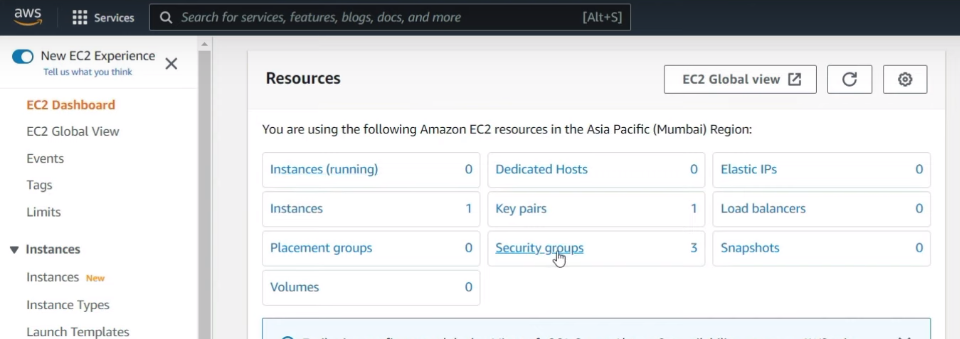
**Step 3: Initiate Security Group Creation
Within the "Security Groups" section, click on the "Create Security Group" button to start the creation process.
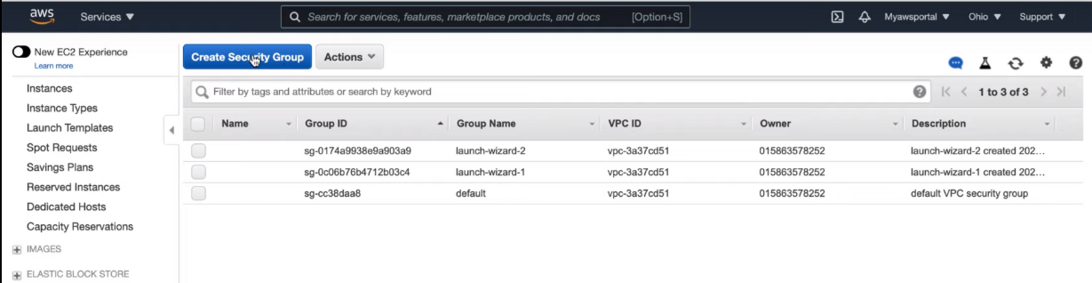
**Step 4: Define Security Group Details
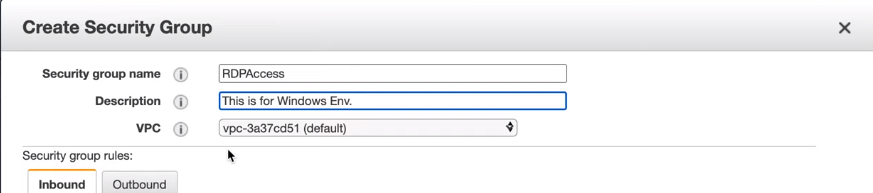
Provide the necessary details for your security group. Enter a descriptive name and a brief description. Specify the Virtual Private Cloud (VPC) where the security group will reside.

Insert your security group's information, including its name, description, and VPC. For your security group, you must also provide inbound and outgoing rules.
**Step 5: Configure Inbound Rules
To define inbound rules, select the "Inbound Rules" tab and click on the "Add Rule" button. Configure each rule by specifying the protocol, port range, source IP address or range, and a description.
**Step 6: **Configure Outbound Rules
Similarly, configure outbound rules by selecting the "Outbound Rules" tab and clicking on the "Add Rule" button. Define the protocol, port range, destination IP address, and a description for each rule.


**Step 7: Review and Create
Carefully review all the configurations and rules you have set up. Once satisfied, click on the "Create Security Group" button to finalize and create your security group.
.png)
- **Note: Inbound and outbound security Group Rules comprise four different fields: **Source, **Protocol, **Port Range & **Description.
- **Source: Typically, this is a private IP address, a subnet mask, or another security group. If you use the "anywhere (0.0.0.0/0)" option, you can also allow access to the entire internet. The everywhere (0.0.0.0/0) value must only be used when necessary, and you should be well aware of the risks involved.
- **Protocol: TCP is usually the default protocol and is often greyed out. But you can adjust the protocols if you're using specially-made rules that you wrote.
- **Port Range: Usually, port ranges are pre-filled. Still, you have the option to choose a custom port range of your choice.
- **Description: You can add a description to the rule you've generated in this area. The more specific you are, the better.
Amazon EC2 security groups for Linux instances
Amazon EC2 security groups play a pivotal role in safeguarding Linux instances hosted on the Amazon Web Services (AWS) cloud platform. They serve as virtual firewalls, controlling inbound and outbound traffic to and from EC2 instances. Understanding how to configure and manage security groups is essential for maintaining a secure and efficient computing environment. In this detailed guide, we'll delve into the intricacies of Amazon EC2 security groups for Linux instances.
Understanding EC2 Security Groups:
- **Definition: EC2 security groups act as virtual firewalls that regulate traffic to and from EC2 instances. They control inbound traffic (incoming data) and outbound traffic (outgoing data) based on defined rules.
- **Stateful Filtering: Security groups operate on a stateful filtering paradigm, meaning that responses to allowed inbound traffic are automatically allowed, regardless of outbound rules. This simplifies configuration and ensures that return traffic is permitted.
- **Default Rules: By default, all inbound traffic is denied, and all outbound traffic is allowed. You must explicitly define inbound rules to permit traffic to your instances. Outbound traffic is automatically allowed unless specific restrictions are imposed.
Change, or Delete Security Groups
Managing security groups in AWS is a crucial aspect of maintaining a secure and compliant cloud environment. Whether you need to update rules, modify associations, or remove unused security groups, the process is straightforward. Here's a simple guide on how to change or delete security groups in AWS:
Changing Security Groups:
- **Access the AWS Management Console: Log in to the AWS Management Console and navigate to the EC2 dashboard.
- **Locate Security Groups: From the EC2 dashboard, select the "Security Groups" option from the navigation pane to view all existing security groups.
- **Identify Target Security Group: Identify the security group you wish to modify and click on its name to access its configuration details.
- **Update Security Group Rules: Within the security group details, navigate to the "Inbound" or "Outbound" rules tab to modify existing rules. Click on the "Edit" button to make changes, such as adding new rules, modifying existing ones, or removing unnecessary rules.
- **Review and Apply Changes: Carefully review the updated rules to ensure they align with your security requirements. Once satisfied, click on the "Save" or "Apply Changes" button to implement the modifications.
Deleting Security Groups:
- **Access the AWS Management Console: Follow the same initial steps to access the EC2 dashboard in the AWS Management Console.
- **Locate Security Groups: From the EC2 dashboard, select the "Security Groups" option to view a list of all existing security groups.
- **Identify Target Security Group: Identify the security group you intend to delete from the list of available security groups.
- **Initiate Deletion: Select the target security group and click on the "Actions" dropdown menu. Choose the "Delete Security Group" option from the available actions.
- **Confirm Deletion: AWS will prompt you to confirm the deletion of the selected security group. Review the details and implications of the deletion carefully.
- **Confirm Deletion: If you're certain you want to proceed with the deletion, click on the "Yes, Delete" button to confirm. Otherwise, you can cancel the operation to retain the security group.
Conclusion
Security groups are a fundamental security feature in AWS, allowing you to control the traffic that is allowed to access your resources. In this article, we have discussed what a security group is and how to create it. By following the steps mentioned above, you can create security groups for your resources and ensure they are secure.