Private IP Addresses in Networking (original) (raw)
Last Updated : 13 Jan, 2026
Private IP addresses play an important role in computer networking, permitting organizations to build internal networks that communicate securely without conflicting with public addresses. In this article, we will see private IP addresses in networking.
What is a Private IP Address?
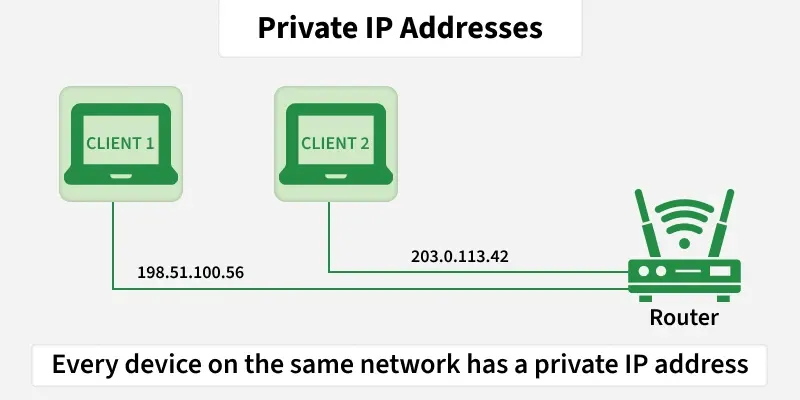
Private IP Addresses are those addresses that work within the local network. These addresses are non-routable on the Internet. The address is assigned by the network router to your particular device. The unique private IP address is provided to every device which is on the same network. In this way, devices communicate with one another on the same network without connecting to the entire Internet. Private IP addresses can provide more security within a particular network. These addresses cannot be seen on the Internet, unlike the public IP address. Only devices within the local network can see the address of one another.
What is a Private IP Address Used for?
- **Home Networks: Many domestic routers use personal IP addresses to assign unique addresses to devices in the home network. This allows more than one devices along with computers, smartphones, TVs, and IoT devices to communicate with every device securely.
- **Business Networks: In large organizations, private IP addresses are used to create inner networks that join computers, servers, printers, and other devices. This permits employees to share assets and collaborate while maintaining protection and privacy.
- **Virtual Private Networks (VPNs): VPNs create encrypted connections over public networks, allowing customers to get access to private networks remotely.
- **Cloud Computing: Many cloud provider offer virtual personal clouds (VPCs) where clients can deploy resources which includes virtual machines, databases, and containers. Private IP addresses are used within VPCs to facilitate communication between these resources at the same time as separating them from different clients' environments.
How Can You Check Your Private IP Address?
Although most people don't need to know their IP address, there are several situations where it can be useful, including when connecting a computer to another networked device.
Platforms differ when it comes to to find the IP address of a device.
- **Windows: To access the private IP address, run ipconfig in the command line prompt after searching for cmd in the Windows search bar.
- **Mac: Click on Network after selecting System Preferences to see the private IP address.
- **iPhone: Choose your settings. To see the IP address displayed under the DHCP tab, navigate to Wi-Fi and tap the i that appears next to the network it is connected to.
- **Android: After choosing Settings, selecting About, and tapping on Status, the IP address should appear.
Why Do We Need Private IP Addresses?
We need private IP addresses in order to secure and to manage our local networks. Private IPs are used internally inside a home or office network so that many devices, such as computers, smartphone, and printers, can communicate with each other using the same IP without exhausting public IPs. Public IPs are few, so conserving them through the use of private IPs would be beneficial. This private address helps in protection against harmful external attacks because they are not accessible directly from the internet. Using private IPs means that devices can communicate locally and one public IP address can connect the whole network to the internet this makes it more efficient and secure.
What are the Different Private IP Address Ranges?
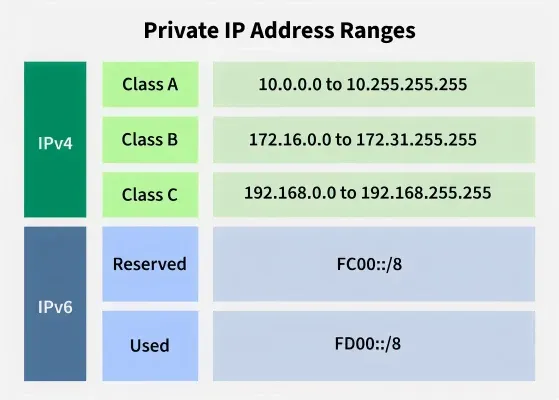
Private IP address exists within the specific ranges as reserved by the Internet Assigned Numbers Authority (IANA). Private IP address ranges are generally reserved for private networks. These include home networks, office networks, and a LAN. These are not routable on the public Internet, meaning that their primary use would be to identify the machines within the local network. There are private IP address ranges for both IPv4 and IPv6.
These private address ranges enable devices on the private network to communicate effectively without conflicting the usage of the public IP addresses, hence the need for it in network management and security.
IPv4 Private Address Ranges
Following are the three IPv4 address ranges of private IP addresses:
- In **Class A, the address range assigned to Private IP Address: **10.0.0.0 to 10.255.255.255
- In **Class B, the address range assigned to Private IP Address: **172.16.0.0 to 172.31.255.255
- In **Class C, the address range assigned to Private IP Address: **192.168.0.0 to 192.168.255.255
- Class A has **16,777,216 IP addresses and is used by **large networks and has 8 bits for the network and 24 bits for hosts.
- Class B has **1,048,576 IP addresses and is used by **medium networks and has 16 bits for the network and 16 bits for hosts.
- Class C has **65,536 IP addresses and this is the class of IP addresses that refers to **home or smaller networks with 24 bits for the network and 8 for the hosts.
IPv6 Private IP Address Range
IPv6, private addresses are referred to as Unique Local Addresses (ULA) and are defined by RFC 4193:
**Range: fc00::/7
The range is split into two parts:
- **fc00::/8: Reserved for future use.
- **fd00::/8: Used for locally assigned Unique Local Addresses (ULA).
The range except assigned to Private IP Address is used to assign Public IP Address on a network as public IP addresses are unique for each device on the Internet. Therefore, private networks can use these address ranges for allocating private IP addresses in a specific network. Private IP addresses can be reused on another network which is not possible with Public IP addresses.
Functions of Private IP Address
| **Parameter | **Private IP Address |
|---|---|
| **Scope | It is assigned locally within a specific network. |
| **Communication | It is used by devices to communicate with one another on the same network. |
| **Assigned By | It is assigned by the LAN administrator or network operator. |
| **Cost | Private IP Address is free of cost. |
| **Reused | Private IP addresses can be reused by the devices on another network. |
| **How to find it? | The **ifconfig command is used to search your Private IP address. |
| **Range | The reserved address range for different classes is as follows:Class A- 10.0.0.0 to 10.255.255.255 Class B- 172.16.0.0 to 172.31.255.255 Class C- 192.168.0.0 to 192.168.255.255 |
| **Example | Example of Private IP Address -192.168.12.40. |
Benefits of Private IP Addresses
- **Security: Private IP addresses are not directly accessible from the internet, due to which they reducing the risk of unauthorized access and cyber attacks and hence more secure.
- **Scalability: Private IP address ranges provide ample addressing space for small to large networks, accommodating the growth of devices and services within an organization.
- **Flexibility: Network administrators have full control over the management of private IP addresses, allowing for efficient allocation of resources and customization of network configurations.
- **Cost-Effectiveness: By using private IP addresses internally, organizations can avoid the need to obtain and manage large blocks of public IP addresses, reducing costs associated with internet connectivity
Limitations of Private IP Addresses
- **Limited Accessibility: Private IP addresses are not available immediately from the general public internet. While this affords safety advantages by means of hiding internal community sources.
- **Network Address Translation (NAT) Overhead: To permit information exchange among non-public IP addresses and public internet addresses, Network Address Translation (NAT) is often employed. NAT introduces overhead in terms of processing energy, latency, and complexity, in particular in big-scale deployments.
- **Management Complexity: Managing private IP deal with allocations, subnetting, and routing configurations can grow to be complex, specially in large and allotted networks.
- **Interoperability Issues: Private IP addresses may come across interoperability issues whilst integrating with external services that rely upon public IP addresses.
Difference Between Public IP and Private IP
| Public IP | Private IP |
|---|---|
| A special number given to a device with a direct internet connection | Special number given to a device on a local network |
| Available online and accessible from anywhere | Restricted to the local network |
| Internet service providers (ISPs) is the assigning authority | Assigned by network address translators (NATs) or routers |
| They are distinct throughout the whole web | Reusable across several local networks |
| Recognizing devices connected to the internet and facilitating communication between them. | Recognizing devices on a local network and enabling device-to-device communication internally. |