AWS CloudFormation Templates (original) (raw)
Last Updated : 23 Jul, 2025
CloudFormation is a popular Infrastructure as a code (Iac) tool provided by Amazon web services (AWS) that allows users to automate the provisioning of AWS services such as EC2, S3, Lamda, etc.CloudFormation manages the entire lifecycle of your infrastructure, including provisioning, updating, and deleting resources. It handles dependencies between resources and provides features like rollback and drift detection to maintain the desired state of your infrastructure.
What are CloudFormation Templates?
CloudFormation templates are JSON or YAML formatted text files that define the infrastructure resources and configurations you want to provision on AWS. It uses a declarative templating concept to model the infrastructure this template can be in JSON or YAMl formatted files, to define the AWS infrastructure resources and their configurations. Meaning users can describe your infrastructure in a declarative template, and CloudFormation handles the provisioning and configuration of those resources.
What is Infrastructure as Code (IaC)?
IAC refers to the practice of managing or automating the infrastructure of platforms such as the cloud through code instead of manually repeating these processes this means that developers write the code in files typically in formats of JSON or YAML and then translate this code into launching the infrastructure processes.
How CloudFormation Simplifies Infrastructure Management?
- **Declarative Templates: With the help of Cloudformation, users define their infrastructure in a JSON or YAML template. this template consists of the resources you need for example, ec2 instances, s3 buckets, and IAM roles by using this template you will have a single source for your infrastructure, making it easier to manage and understand
- **Dependency Management: CloudFormation manages dependencies between resources automatically. For example, if an EC2 instance depends on a security group for its creation, CloudFormation will ensure that the security group is created before the instance. This simplifies the management of complex infrastructures.
- **Version Control and Reusability: Infrastructure code written using CloudFormation templates can be stored in version control systems like Git. This allows users to track changes over time, go to previous versions if necessary, and collaborate with team members effectively. Moreover, because the infrastructure is defined in code, you can easily replicate environments across different regions or accounts.
- **Automated Provisioning: Once users create their templates, CloudFormation can provision and configure all the specified resources automatically. This eliminates the need for manually configuring these resources, reducing the risk of human error and ensuring consistency between these resources.
- **Cost Estimation: CloudFormation provides cost estimation capabilities, allowing users to estimate the cost of deploying or updating a stack before actually executing the changes. This helps individuals or companies manage budget planning and cost optimization by providing insights into the financial impact of infrastructure changes.
**Features of CloudFormationaws
- **Infrastructure as Code (IaC): CloudFormation enables users to define their infrastructure using a simple text file (in JSON or YAML format), known as a CloudFormation template. This template describes the AWS resources the user wants to provision and their configurations.
- **Version Control: CloudFormation templates can be version-controlled using Git or any other version-control system. This enables users to track changes over time, collaborate with team members, and roll back to previous versions if needed.
- **Rollback Protection: CloudFormation provides rollback protection to prevent a user's stack from getting into an inconsistent state during an update. If an update fails, CloudFormation automatically rolls back to the previous consistent state.
- **Integration with AWS Services: CloudFormation integrates with other AWS services such as AWS CloudTrail, AWS Config, and AWS CloudWatch, providing enhanced monitoring capabilities for your infrastructure.
- **Custom Resources: CloudFormation supports custom resources, which enable users to extend CloudFormation functionality by integrating with external services or performing custom actions during stack provisioning or updates.
the
Key Concepts in CloudFormation
**1. Stacks
A stack is a collection of AWS created and managed using a single cloud formation template. each stack the user created has a unique name and identifier. when a user creates a stack in cloud formation, you define a template that describes the resources users want to provision (for ex. EC2, S3, RDS).
CloudFormation manages all the things like creation, update, and deletion of resources within the stack based on the template Stacks help in organizing and managing related resources, making it easier to maintain and replicate infrastructure configurations.
**2. StackSets
StackSets allows you to provision a CloudFormation stack across a multiple aws accounts and regions with the help of single template they are primarily helpful when any user or organization want to deploy their infrastructure across multiple business units within an organization or different sdlc phases like development, testing, production etc.
**3. Change Sets
Change Sets provide a way to view the newly made changes to a CloudFormation Stack before applying them. When user create a Change Set, CloudFormation compares the current Stack details with these newly made changes specified in the template.
The Change Sets displays the differences, including new additions, modifications, and deletions of current resources, allowing user to review the impact of the changes before they execute them. Change sets significantly helps to tackle the risks associated with the infrastructure updates by enabling users to validate them.
**4. Nested Stacks
Nested Stacks reuse CloudFormation templates by nesting one template within another. this significantly helps users or organizations to break their complex infrastructures into smaller which makes easy to manage components, each will be represented by a separate template.
Nested Stacks benefits users with reusability, scalability, and maintainability of infrastructure code. also as there are separate templates versioning of each templates happens independently which will ultimately reduces the impact of changes across the entire infrastructure.
**5. Outputs
Outputs provide information about the resources created within a stack. They can be used to extract important information such as endpoint URLs or resource identifiers.Outputs serve the main purpose to expose the essentials information of resources residing in a stack which can be important for other parts of AWS infrastructure.Example of Outputs can be If any user creating an EC2 instance, you might want to expose its public IP address or DNS name as an output so that other components can communicate with it.
Applications of CloudFormation
****Application Deployment:**CloudFormation can be used to automate the deployment of complex applications consisting of multiple AWS resources, such as EC2 instances, RDS databases, S3 buckets, Lambda functions, and more. By defining the infrastructure as code in CloudFormation templates, users can consistently deploy applications across different environments, such as development, testing, and production.
- **Disaster Recovery: CloudFormation can be used to automate the setup of disaster recovery. By defining DR resources, such as cross-region replication for data storage, failover backup for databases users can ensure continuous business operations in case of unexpected outages or disasters.
- **DevOps and CI/CD Pipelines: CloudFormation integrates easily with DevOps tasks and continuous integration/continuous deployment (CI/CD) pipelines. developers can use CloudFormation templates to define the infrastructure needed for each stage of thier CI/CD pipeline, ensuring consistency across environments and automating the deployment process.
- **Highly Available Infrastructure: CloudFormation enables the creation of highly available and fault-tolerant infrastructure. By defining resources like Auto Scaling Groups, Elastic Load Balancers, and Multi-AZ RDS instances in CloudFormation templates, users can ensure that their applications remain available and resilient to failures.
- **Multi-Region Deployment: CloudFormation enables users to deploy infrastructure across multiple AWS regions simultaneously. This is particularly useful for global applications requiring low-latency access in multiple geographical locations. CloudFormation templates can define resources and their configurations in each region, ensuring consistency across different regions.
Advantages of CloudFormation Templates
- **Automation & Efficiency: Cloudformation templates eliminates the time consuming process manually launching things in infrastructure with efficient manner
- **Reduced Manual Errors: Cloudformation templates reduces errors happens during manually doing deployments, which basically leads to more consistent and reliable infrastructure
- **Faster Development & Deployment: cloudformation template's automating resources capability ultimately boosts the development and deployment lifecycle
- **Cost optimization: optimizes the overall cost based on actual usage, preventing overprovisioning and reducing costs.
Disadvantages of CloudFormation Templates
- **Specific to AWS: CloudFormation templates are specific to AWS, potentially limiting portability to other cloud providers.
- **Complex large templates: Large and complex templates can become challenging to manage, debug, and maintain.
- **Security vulnerabilities: Improper template configuration or access control settings can create security vulnerabilities.
CloudFormation Template Structure
Let's take a sample CloudFormation template structure in YAML format and get to know each section:
AWSTemplateFormatVersion: "2010-09-09"
Description: Sample CloudFormation template
Parameters:
InstanceTypeParameter:
Type: String
Default: t2.micro
AllowedValues:
- t2.micro
- m1.small
- m1.medium
Description: Enter instance type (default is t2.micro)
Mappings:
RegionMap:
us-east-1:
AMI: ami-0c55b159cbfafe1f0
us-west-1:
AMI: ami-0a10b27219a5094d7
Resources:
MyEC2Instance:
Type: AWS::EC2::Instance
Properties:
InstanceType: !Ref InstanceTypeParameter
ImageId: !FindInMap [RegionMap, !Ref "AWS::Region", AMI]
Outputs:
InstanceID:
Description: Instance ID of the EC2 instance
Value: !Ref MyEC2Instance
1.Parameters
Parameters allow users to customize the behavior of your CloudFormation stack. In this example, InstanceTypeParameter is defined as a parameter of type String with a default value of t2.micro. Users deploying the stack can choose from a list of allowed values, which are t2.micro, m1.small, and m1.medium. This parameter is used to specify the instance type for the EC2 instance.
2.Mappings
Mappings are useful for defining conditional values based on the regions. In this example, the RegionMap mapping maps AWS regions to specific AMIs. So, depending on the region in which the stack is being deployed, the appropriate AMI will be selected for the EC2 instance. _!FindInMap is an intrinsic function used to retrieve a value from the specified mapping. !Ref "AWS::Region" returns the current AWS region.
3.Resources
Resources are the actual things you want AWS to create for user In this example, it's creating EC2 instance EC2 instance named MyEC2Instance with specific settings like the size and location. The instance type is set based on the value of the InstanceTypeParameter parameter, and the image ID is determined based on the region through the mapping.
4.Outputs
Outputs allow users to define certain values that are returned after the stack is created. It is like what to show after the stack creation. In this example, an output named InstanceID provides the instance ID of the EC2 instance created by the stack. _!Ref is an intrinsic function that returns the ID of the specified resource, in this case, MyEC2Instance.
5.Intrinsic Functions
Intrinsic functions allow users to perform certain operations within a CloudFormation template. In the provided example, !Ref and !FindInMap are intrinsic functions. they're like shortcuts for performing certain actions or calculations. Other common intrinsic functions include !Sub for string substitution and !GetAtt for retrieving attributes from resources.
6.Stack Policies
Stack Policies are used to control what actions can be performed on resources within a stack. It acts like rules being applied on the stack. They can be used to prevent resources from being deleted, updated, or replaced during stack updates. Stack Policies are written in JSON format and applied to a stack to achieve desired update behaviors.\
How to define CloudFormation Templates in AWS ?
**Step 1: First of all, we need to write template which will contain our code we can write it in either in json or yaml
**Note: In this article, we are going to use yaml format template to write code you can use json too!
Description: "This is a template to run ec2 instances"
Resources:
EC2InstanceServer:
Type: AWS::EC2::Instance
Properties:
KeyName: bastionkey2
InstanceType: t2.micro
SecurityGroupIds:
- "sg-087487057ce3ace4e"
ImageId: ami-00952f27cf14db9cd
**Note: In the above code chose the parameters of ec2 instance as per your needs
**Step 2: Then login to aws management console and go to cloudformation service and click on create stack

**Step 3: After clicking on create stack then we have to upload the template which we have created
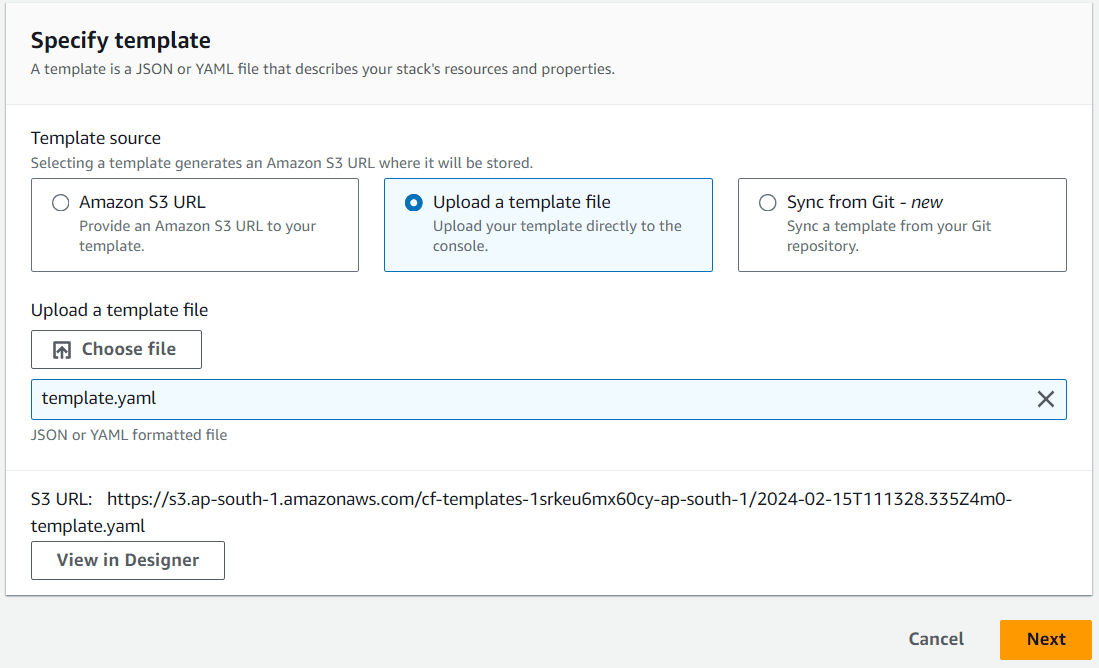
**Step 4: In the next options write your stack name and remain with the default stack options click on 'submit' button after it will show that cloudformation will be in process to launch the ec2 instance after some time it will show that creation process is completed


**Step 5: In final step, go to the ec2 ensure that whether ec2 instance launched or not here we can see that cloudformation has launched one ec2 instance for us.

**Conclusion
In this post, we've covered the basic introduction to AWS CloudFormation with its benefits and drawbacks and also got introduced with how we can execute basic cloudformation template to automate the provisioning of aws resources.