How To Use Docker Security Tools To Secure Docker Container Images (original) (raw)
Last Updated : 27 Sep, 2025
What is Container Security?
Container Security refers to the implementation of security measures for securing contents and infrastructure of containerized applications. It comes with providing the features such as data integrity, confidentiality and availability of container environments. It helps in reducing the risks associated with deploying applications in containers such as isolation breaches, unauthorized access and potential vulnerabilities.
Container Security Tools are the software solutions that are designed to provide the security to the containerized environments. These tools identifies the vulnerabilities in the container environments and enforces the access controls and monitoring activities on containers. These container security tools provide features such as vulnerability scanning and remediate weakness in container images. Security tools will restrict with minimizing the privileges if any suspicious activities are detected within containers.
The following are the some of the best open source Container Security Tools:
- **Calico: Calico is an open-source network security solution that is designed for containers and virtual machines. It provides the network policies, ingress and egress filtering and encryption of containerized environments. It provides a secure communication between containers and hosts.
- **Calir: It is an open-source vulnerability scanner for container images. It analyzes the container images for vulnerabilities by comparing the contents wit the database to know the security flaws.
- **Anchore Engine: It is an opensource container security and compliance platform that is used for scanning the container images for vulnerabilities, malware and policy violations.
- **Anchore: It is also a open source tool that provides the services through scanning the container images for detecting the vulnerabilities and provide customizable policies for image scanning and runtime montoring.
Need For Container Security
The following are the some of the needs for container Security:
- **Isolation Breach: Containers share the host OS Kernel which can leads to security gaps without proper measures.
- **Vulnerability Management: Continuous monitoring of container images are critical for preventing the attacks raised due to frequent deployments.
- **Access Control: Proper access management within the container activities helps in detecting and responding promptly to the suspicious behaviour ensuring security during runtime.
The following are some of the best container enterprise security tools:
- **Aqua Security: It provides detailed and effective security solutions for enterprise container environments, including vulnerability scanning, runtime protection and compliance automation.
- **Twistlock: It provides the advanced security features such as vulnerability management, compliance checks and runtime defense that are suitable for large-scale enterprise deployments.
- **Docker Enterprise Edition (EE): It provides a strong container security platform with features like secure image management, granular control access and integrated security scanning for enterprise grade container deployments.
Improving Container Security with Calico
The following things that can be implementable for enhancing the container security with calico here we discussed with a proper guiding:
- **Deploy Calico: Firstly begin on deploying the calico within your container environment. It can be isntalled in the environment as a Kubernetes network plugin or as deployed standalone like Docker Swarm or Mesos.
- **Network Policy Enforcement: Try on utilizing the calico's network policies for enhancing the fine-grained control over network traffic between containers. In this define the IP addresses, ports and protocols for restricting the communication and prevent the unauthorized access.
- **eBPF Data Plane: calio offers this eBPF data plane which provide efficient and scalable network traffic filtering. It provides high performance packet processing with minimal overhead ensuring the optimial performance for containerized environments.
- **Encryption: On taking the advantages of Calico's capabilites we can provide the secure communication between the containers. It supports the encryption of inter-cotnainer traffic using the techniques like IPsec and confidentiality and data integrity.
- **Integration with Kubernetes: Integration of Calico with kbuernetes provides the seamless orchestration and security mangement. It integrates natively and provide sthe levarge ovet the API for policy enforcement and management across yoru containerized environment.
Container Runtime Security Tools focuses on protecting containerized application during runtime. The following are the some of the container Runtime Security Tools:
- **Sysdig Secure: It provides the runtime security for containers with offering the features such as runtime anomaly detection,, container forensics and integration monitoring. It helps in detecting and responding to security incidents timely.
- **Sysdig Falco: It is an open source container runtime security tool that focuses on detecting the abnormal behaviours of container environments and security violations. It used the kernel-level instrumentation for monitoring the system calls and provide the alerts for suspicious activities.
- **Docker Security Scanning: It is a built-in feature of Docker Hub that scans the container images for checking vulnerabilities and security threats.
What is Trivy?
**Trivy is an open-source scanning tool that is used to scan and detect vulnerabilities in a Docker container and artifacts. It delivers the result very quickly. It can detect vulnerabilities in operating systems like Alpine, CentOS, and many more. It shows the vulnerability report in a very structured way. It classifies the issues into low-level, medium-level, high-level, and critical levels. Trivy can integrate into the CI/CD pipelines, which helps in automatic vulnerability detection. With each new update, Trivy is becoming more reliable in detecting security and vulnerability-related issues. In summary, we can say Trivy has become a powerful tool to detect the vulnerabilities of containerized applications, images, and artifacts to maintain the security of the entire infrastructure.
**Step 1: Here first create a dockerfile . Here i have used a old version of alpine linux as the base image.
FROM alpine:3.7
RUN apk add --no-cache curl

**Step 2: Now build the docker image by using docker build command.
docker build -t gfg-demo .

**Step 3: Tag the docker image and push it to the dockerhub account.
docker tag gfg-demo <_****your-username**_>/gfg-demo
docker push <_****your-username**_>/gfg-demo

**Step 4: Now run the trivy scanner to scan the docker image.
docker run --rm -v <_****any-local-path**_>:/root/.cache/ aquasec/trivy:0.18.3 image <_****your-username**_>/gfg-demo

**Step 5: Now you can observe all the issues . Here you will see two critical issues .

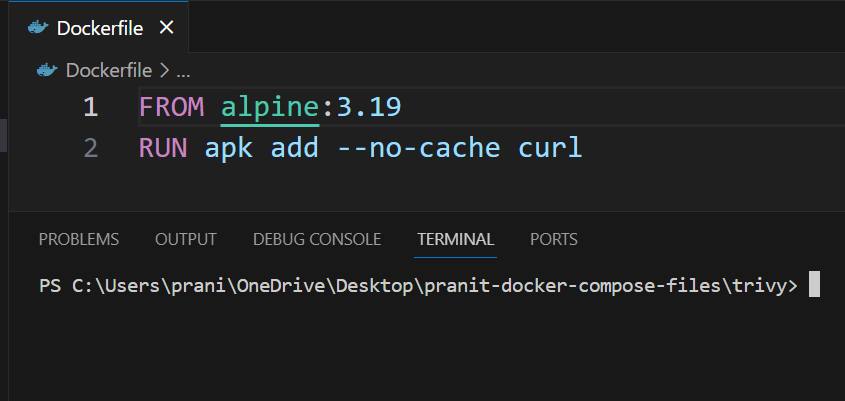
**Step 6: To fix these critical issues , now update the version of alpine in dockerfile .
FROM alpine:3.19
RUN apk add --no-cache curl
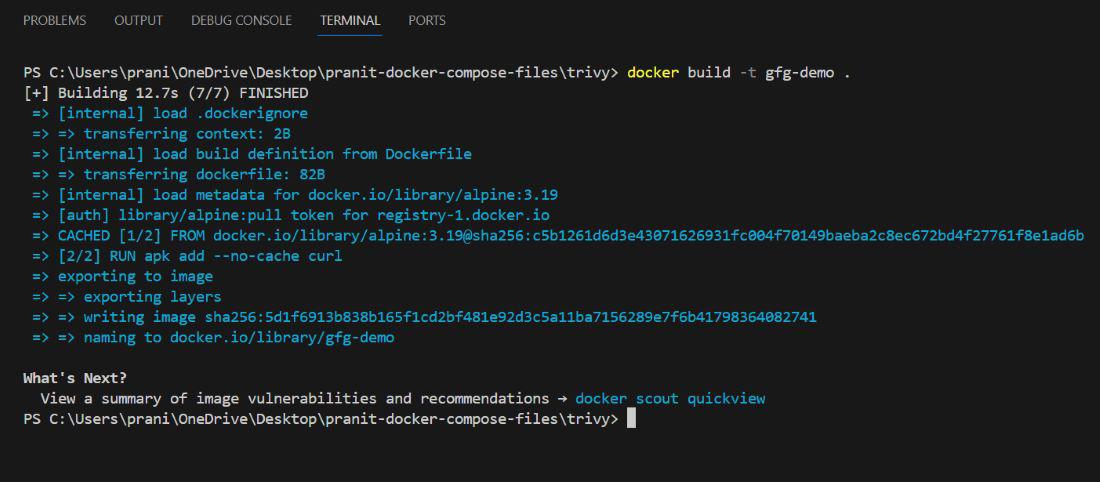
**Step 7: Again build the image from the updated dockerfile.
docker build -t gfg-demo .
**Step 8: Again tag the docker image and push it to dockerhub account .
docker tag gfg-demo <_****your-username**_>/gfg-demo
docker push <_****your-username**_>/gfg-demo

**Step 9: Now run the trivy scan for updated docker image .
docker run --rm -v <_****any-local-path**_>:/root/.cache/ aquasec/trivy:0.18.3 image <_****your-username**_>/gfg-demo

**Step 10: Now observe , there are no critical issues . With just by updating the docker base image version we have fixed all the critical issues.

Docker Scan Commands
The following are the some of the Docker Scan Commands based on the cases:
1. Scan A Local Image
- The following is the command used for scanning the local docker image:
docke scan
2. Scan an Image from Docker Hub
- The following is the command for checking the vulnerabilities and scanning the image from Dockerhub.
docker scan docker.io/
3. View Scan Results
- The following command is used for detailed scanning and displaying the results for a specific image. It helps us to make informed decisions about image security:
docker scan --accept-license
4. Schedule Scans
- The following is used for performing schedule scanning for a specific image ensuring the continuous monitoring and timely section of new vulnerabilities.
docker scan --schedule
What are Docker Scout?
Docker Scout is a software tool that is used in docker for analyze the container images for packages and vulnerabilities. It offers the remediation suggestions. The following are the its implementation guide on its setup and Usuage:
How to use Docker Scout? A Step-By-Step Guide
Step 1: Setup
- It clones the vulnerability of Node.js application repository. For performing this step execute the following command:
git clone https://github.com/docker/scout-demo-service
- Try on ensure the docker sign in, then build/push the docker image to the Dockerhub
docker build --push -t ORG_NAME/scout-demo:v1 .
Step 2: Enable Docker Scout
Enroll to your organization with the docker scout using the following command:
docker scout enroll ORG_NAME
- Enable the Scout of your image repository with the following command:
docker scout repo enable --org ORG_NAME ORG_NAME/scout-demo
Step 3: Analyze Vulnerability
- Indetify the vulnerabilities in the docker image on using the following command:
docker scout cves --only-package express
Step 4: Fix Vulnerability
- Update the vulnerability packages in the application code, rebuild and push it to the docker image:
docker build --push -t ORG_NAME/scout-demo:v2 .
Step 5: Evaluate Policy Compiance
In this step, try on configuring the organization settings with the following command, ensure to replace the ORG_NAME with your organization name:
docker scout config organization ORG_NAME
- Then Evaluate the compliance with the following command:
docker scout quickview
Step 6: Improve Compliance
Address the policy violations, adjust the Dockerfile and enable the attestations using the following command:
docker build --provenance=true --sbom=true --push -t ORG_NAME/scout-demo:v3 .
Step 7: View in Dashboard
- Finally try on accessing the Docker Scout Dashboard to view the compliance results and recommendations