What is Docker Engine? (original) (raw)
Last Updated : 21 Aug, 2025
Docker Engine is the actual technology behind building, shipping, and running container applications. However, it does its work in a client-server model, which requires using many components and services for such operations. When people refer to "Docker," they are probably referring to either Docker Engine itself or Docker Inc, the company that provides several versions of containerization technology based on Docker Engine.
Components of Docker Engine
Docker Engine is an open-source technology that includes a server running a background process called a REST API, and a command-line interface (CLI) known as 'docker'. In the following explanation, you will know how the engine works: it runs a server-side daemon that manages images, containers, networks, and storage volumes. The users can interact with this daemon with the help of the CLI, directly through the API.
An essential aspect of Docker Engine is its declarative nature. This means that administrators describe a specific desired state for the system. Docker Engine automatically works at keeping the real state aligned with the desired state at all times.
Docker Engine Architecture
Basically, Docker's client-server setup streamlines dealing with stuff like images, containers, networks, and volumes. This makes developing and moving workloads easier. As more businesses use Docker for its efficiency and scalability, grasping its engine components, usage, and benefits is key to using container technology properly.
- **Docker Daemon: The Docker daemon, called dockerd, is essential. It manages and runs Docker containers and handles their creation. It acts as a server in Docker's setup, receiving requests and commands from other components.
- **Docker Client: Users communicate with Docker through the CLI client (docker). This client talks to the Docker daemon using Docker APIs, allowing for direct command-line interaction or scripting. This flexibility enables diverse operational approaches.
- **Docker Images and Containers: At Docker's core, you find images and containers. Images act as unchanging blueprints. Containers are created from these blueprints. Containers provide the surroundings needed to run apps.
- Docker Registries: These are places where Docker images live and get shared. Registries are vital. They enable reusability and spreading of containers.
- Networking and Volumes: Docker has networking capabilities. They control how containers talk to one another and the host system. Volumes in Docker allow data storage across containers. This enhances data handling within Docker.
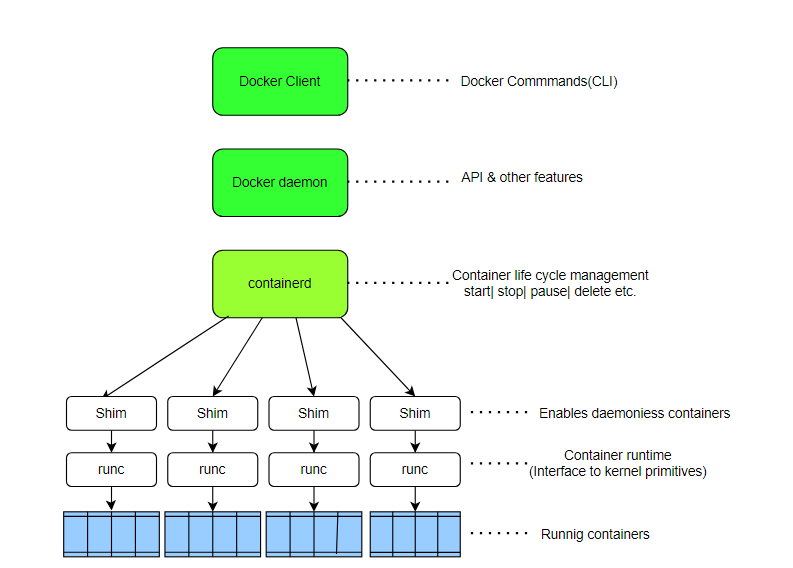
Docker Engine Architecture
To fully grasp Docker Engine architecture, it’s important to have a solid understanding of both containers and virtual machines. For a detailed comparison between the two, you can refer to this link Difference Between Virtual Machines and Containers.
Performance and Compatibility
- Docker Engine only needs 80 MB of space, making it lightweight. It works on all modern Linux systems and Windows Server 2016.
- Control groups and kernel namespaces help Docker Engine run well. They isolate resources and share them fairly between containers, keeping the system stable and fast.
Docker Engine simplifies apps deployment and management. It adapts to several computing environments, underlining its adaptability and critical software development role.
Installing Docker Engine - Ubuntu, Windows & MacOS
Docker Engine needs certain system specs before you install it. Ubuntu users should have a 64-bit version of Ubuntu - either Mantic 23.10, Jammy 22.04 (LTS), or Focal 20.04 (LTS). For Windows, you'll need Windows 10 or 11 with a 64-bit processor and at least 4GB of RAM. Your BIOS settings must support hardware virtualization, Hyper-V, WSL 2, and Container features too.
**1. Installation on Ubuntu
- Get rid of old Docker versions, like docker.io or docker-compose.
- Update apt package database. Then, let apt utilize repositories over HTTPS by installing needed packages. Finally, add Docker's official GPG key.
- Configure the stable repo. Next, install Docker Engine, containerd.io, docker-buildx-plugin, and docker-compose-plugin via commands like sudo apt-get install docker-ce docker-ce-cli containerd.io docker-buildx-plugin docker-compose-plugin. Validate installation by running sudo docker run hello-world. For detail understanding for installation refer this link How To Install and Configure Docker in Ubuntu?
**2. Installation on Windows
- Get the Docker Desktop Installer.exe file from Docker's website. During setup, make sure the Hyper-V Windows feature is on.
- Go through the installation steps. Turn on the WSL 2 feature. Also, check that the Container feature is enabled in the Windows features settings. For detail understanding for installation refer this link.
**3. Installation on MacOS
- To get Docker for macOS, download it from the official website. This package includes all required tools and services. For detail understanding for installation refer this link.
Additional Installation Options
The Docker Engine is installable using static binaries for Linux distributions, a manual option for advanced users. For easier installation, Docker Desktop for Windows and macOS streamlines setup and includes added features like Docker Compose. However, that method offers simplified installation with extra tools.
Working with Docker Engine
1. Connecting and Managing Docker Engine
- **Remote API Connections: For Docker Desktop Windows users, connecting to the remote Engine API can be achieved through a named pipe (npipe:////./pipe/docker_engine) or a TCP socket (tcp://localhost:2375). Use the special DNS name host.docker.internal to facilitate connections from a container to services running on the host machine.
- **Container Management: Windows Docker Desktop users can link to the distant Engine API by employing a named pipe (npipe:////./pipe/docker_engine) or a TCP socket (tcp://localhost:2375). Utilize the exceptional DNS name host.docker.internal for containers to effortlessly interface with services operating on the host machine. .
- **Data and Network Handling: Containers store data, so it won't disappear when they stop running. Proper setup keeps info safe between sessions. Linking containers through networking lets multi-part apps communicate smoothly. Good connection handling is key for them to work right.
2. Deployment Options
Docker Engine can run in two main modes:
- **Standalone Mode: This mode is ideal for development and small-scale deployment on a single machine.
- **Swarm Mode: A built-in orchestration feature for clustering Docker nodes, allowing you to scale applications across multiple machines.
Preparing Docker Engine for Production
For deploying Docker Engine in production, consider these best practices for security, stability, and efficiency:
1. Security Best Practices
- **Daemon Access Control: Only trusted users should access the Docker daemon; enable TLS for remote access if needed.
- **Resource Limits: Limit each container’s CPU and memory usage with
docker updateto prevent resource drain. - **Run Containers as Non-root: Enhancing security by avoiding root permissions for containers.
2. Resource Management
- **Logging and Monitoring: Use an appropriate logging driver (e.g.,
syslog,json-file) to collect logs for monitoring purposes. - **Scaling Applications: Docker Compose simplifies managing multi-container applications, making deployment easier.
Deploying Application with Docker Engine
Here’s an example of deploying a simple node-js app with Docker:
Use the official Node.js image from Docker Hub
FROM node:18-slim
Set the working directory inside the container
WORKDIR /app
Copy package.json and package-lock.json first (to leverage Docker cache for dependencies)
COPY package*.json ./
Install the app dependencies
RUN npm install
Copy the rest of the application code
COPY . .
Expose the port that the app will run on
EXPOSE 3000
Command to run the app
CMD ["node", "app.js"]
Build and Run the Image
docker build -t my-node-app .
docker run -d -p 3000:3000 my-node-app
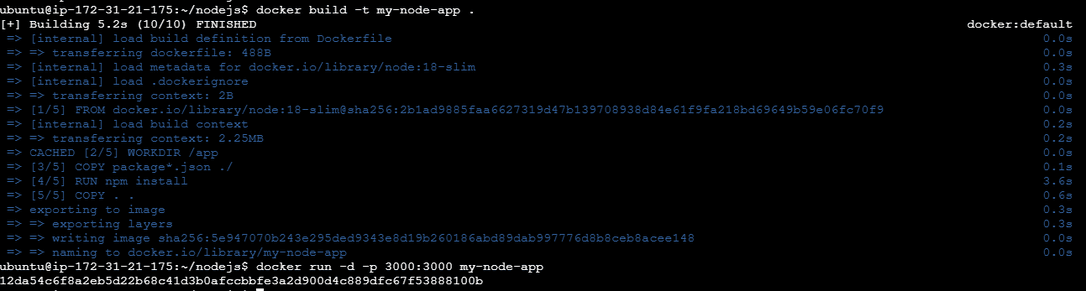
Using Docker Compose for Multi-service Applications
services:
web:
image: my-node-app
ports:
- "3000:3000"
**Run with
docker-compose up -d

Learning and Exploration with Docker
**1. Interactive Learning Platforms:
- For Mac/Windows folks, Docker Desktop is your go-to. Fire up Docker Desktop. In your terminal, run docker run -dp 80:80 docker/getting-started. Voila! Your app's live at http://localhost./
- Play with Docker lets you play in a Linux sandbox. Log into https://labs.play-with-docker.com/. Run docker run -dp 80:80 docker/getting-started:pwd in the terminal window. The port 80 badge? That's your container!
**2. Advanced Usage
- Interested in learning more? Docker provides a tutorial. You learn by doing it yourself. It covers building images, running containers, using volumes for data persistence, and defining applications with Docker Compose.
- The tutorial also explores advanced topics like networking and best practices for building images. This is essential for truly mastering Docker Engine.
Docker Engine vs Docker Machine
**Docker Engine
- The heart of Docker is the Docker Engine. What it does is run and manage containers within a host system.
- It provides everything necessary for containers to be created, run, and managed in an efficient way.
- Consisting of a server daemon (dockerd) and a command-line interface (docker), Docker Engine enables users to interact with Docker.
**Docker Machine
- On different platforms like local virtual machines, cloud providers including AWS, Azure or Google Cloud Platform etc, as well as others, docker machine serves as an automated tool for provisioning/maintaining docker hosts(machines).
- It makes setting up docker environments across different infrastructure providers much easier by automating the creation/configuration process of them.
- To create, inspect, start, stop and manage docker hosts; a command line interface named ‘docker-machine’ is used by Docker Machine.
Understanding Docker Engine and Swarm Mode
A swarm refers to a group of interconnected Docker Engines that allow administrators to deploy application services efficiently. Starting with version 1.12, Docker integrated Docker Swarm into Docker Engine and rebranded it as swarm mode. This feature serves as Docker Engine's built-in clustering and orchestration solution, although it can also support other orchestration tools like Kubernetes.
With Docker Engine, administrators can create both manager and worker nodes from a single disk image at runtime, streamlining the deployment process. Because Docker Engine operates on a declarative model, swarm mode automatically maintains and restores the declared desired state in the event of an outage or during scaling operations.
Docker Engine Plugins and Storage Volumes
- **Docker Engine Plugins: They are just like fancy add-ons that level up your Docker Engine. It may extend networking power or enhance storage capacity; the plugin makes Docker Engine more magical thus stronger and flexible.
- **Storage Volumes: Consider it to be your confidential locker which keeps your valuables. When containers go on vacation, storage volumes let your data stay behind. So whether you need them to preserve those top scores of yours or save cat videos, rest assured knowing that storage volumes will handle it.
Networking in Docker Engine
Docker Engine provides a default network drivers, that can be used by the users to create separated bridge networks for container to container communication. For better security Docker Inc. suggests that users should create their own separate bridge networks
Containers have flexibility to connect to more than one network or no network at all, and they can join or leave networks without disturbing the container operation. Docker Engine supports three major network models:
- **Bridge : Connects containers to default docker0 network.
- **None : Binds containers to a separate network stack; prevents them from accessing networks outside.
- **Host : Binds into host network stack directly. This has no isolation between host and containers.
If the users' network types do not meet the requirement, they can even develop their network driver plugins, which just like any other installed options will follow the same principles and constraints but using the plugin API.
Furthermore, Docker Engine's networking capabilities can integrate with swarm mode to create overlay networks on manager nodes without needing an external key-value store. This functionality is crucial for clusters managed by swarm mode. The overlay network is accessible only to worker nodes that need it for a particular service and will automatically extend to any new nodes that join the service. Creating overlay networks without swarm mode, however, requires a valid key-value store service and is generally not recommended for most users.
To know more about Docker Networking you can refer to this article Docker Networking.
Key Features and Updates
- Docker provides two update paths: stable and test. The stable path offers reliable versions, while the test path delivers cutting-edge features. This choice caters to diverse user needs.
- For robust security, Docker leverages user namespaces. These map container root users to non-privileged host users, significantly minimizing risks from potential container breakouts, a crucial safeguard.
- Docker's lightweight architecture stems from sharing the host OS kernel. This efficient resource utilization enables rapid deployment times, outpacing traditional virtual machines.
Advanced Docker Engine Features and Best Practices
1. Docker Security Enhancements
- **Use Trusted Docker Images: Ensure security by using official Docker images from dependable sources. These images get routine updates and checks for vulnerabilities.
- **Isolate Containers: Restricting unauthorized access between containers is vital. Configure isolation to safeguard your Docker setup's integrity.
- **Scan for Threats: Regularly scan Docker images to spot potential security risks early. This allows timely fixes. Integrated tools at Docker Hub and third-party solutions provide scanning.
2. Optimizing Docker Performance
- **Minimize Image Layers: Cutting image layers improves build pace and performance. Multi-stage builds merge commands into fewer layers.
- **Optimize Image Size: Keep images tiny for efficiency. Discard needless packages. Choose slim base images. Clean up in Dockerfile.
- **Resource Constraints: Limit container resources. Prevents one container from hogging everything. Resources get used properly. System stays stable.
3. Automation and Management
- **Docker Compose for Multi-container Setups: By using a single YAML file, Docker Compose simplifies managing applications with multiple containers. It streamlines creation and deployment processes.
- **Continuous Integration/Continuous Deployment (CI/CD): Automating Docker workflows via CI/CD pipelines reduces manual mistakes. It accelerates deployment cycles rapidly. GitHub Actions and Jenkins are commonly utilized tools.
- **Monitoring Tools: Docker provides monitoring tools like logs, stats, and events. These tools actively manage container performance and health status. They offer insights into resource usage and operational conditions.
Conclusion
Docker Engine becomes a par standard tool in modern software development with efficient management of the containers and whether it is with image management, security of environment, or scaling of application. It makes all that possibly indispensable for developers.