Virtualisation with Docker Containers (original) (raw)
Last Updated : 6 Aug, 2025
In a software-driven world where omnipresence and ease of deployment with minimum overheads are the major requirements, the cloud promptly takes its place in every picture. Containers are creating their mark in this vast expanse of cloud space with the world’s top technology and IT establishments relying on the concept for their infrastructural necessities.

Tech giants like Facebook, Google, and Microsoft use containers in their streamlined processes to facilitate a secure and easy deployment into the cloud production environments. This deployment with containers offers a technique that abstracts the application from the run-time environment offered by virtualization. The two core concepts to be explored here are:
- _How are containers built on the virtualization technique?
- _How do they offer an alternative to virtual machines?
How Containers Are Built Using Virtualization Technology?
To answer how containers enable virtualization let us discuss in detail what is virtualization and how containers come into play with this concept. Virtualization is a technique, which essentially creates an illusion of a resource such as a desktop, storage, network, or operating system. Devices, applications, and human users possess the capability of interacting with these resources. This illusion also called virtualization expands the capabilities of traditional systems, which are limited by their own physical resources. Now, containers enable this virtualization for applications that are deployed in them. Applications in containers run independently, isolated from any physical resource. Containers virtualize the OS, CPU, memory, storage, and network resources thereby providing a controlled environment that can be scaled up or down as required. A container also packages the application along with its dependencies and necessary files, which enables the application to be deployed on any environment without having to configure the server, hardware or software This still sounds similar to virtualization implemented through virtual machines right? So before we get into what more containers can do let us clear up how containers differ from virtual machines
How do They Offer An Alternative To Virtual Machines****?**
A Virtual machine is a form of hardware virtualization. The hardware is logically separated from the other resources. The hardware can be any system such as a desktop (with hardware and its own OS) called the host machine, on which several virtual machines or guest machines can run, each with their own separate operating systems. This is made possible by a firmware called the hypervisor.
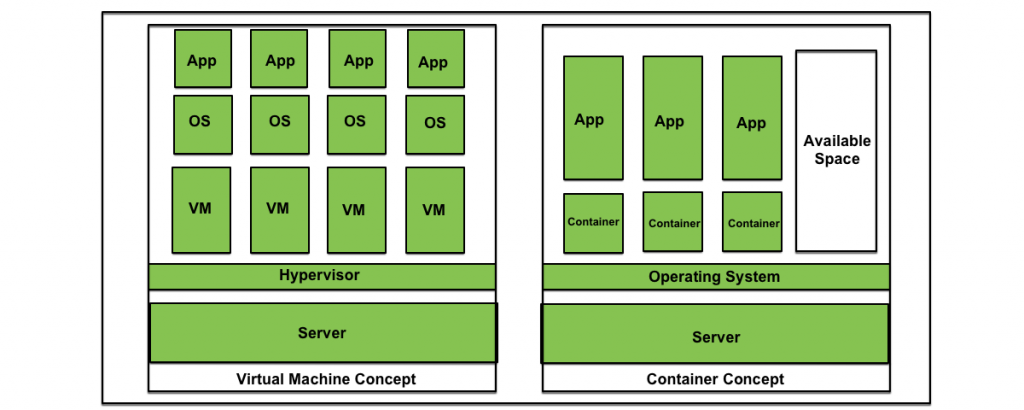
Containers like virtual machines, run on a host machine. They can also be controlled as needed and provide isolation of applications from the run-time environment. However, containers aim at operating system virtualization. Unlike virtual machines, in a containerized system guest operating systems need not be installed on the host system. Instead, the underlying host operating system is shared by all instances of containers containing the application code. This makes containers lightweight and reduces operating system overheads associated with virtual machines such as patching, upgrading, driver support, etc. Moreover, it reduces the amount of resources of the host machine consumed by the presence of individual operating systems.
What Is The Difference Between A Docker And A Virtual Machine(VM)?
The following are the main differences between a Docker and a VM:
| Aspect | Docker | Virtual Machine ( VM ) |
|---|---|---|
| Isolation | Docker comes with light weight platform, It uses containerization for Isolation environments. | Virtual Machines comes with heavy software provides full virtualization for Complete OS Isolation. |
| Resources Usage | It consumes less resources from Host OS kernel and use them more efficiently | VM are less efficient in using of resources effectively, each VM uses it own OS kernel and consumes more resources. |
| Start Time | These are faster in setting up the OS platforms( containers), typically in seconds. | These are slower in startup time often requires minutes to setup the Instances. |
| Scalability | Scaling of containers in docker is easy , it comes with less footprints. | It will be resource intensive when scaling of instances. |
| Portability | Docker provides containerized applications that are high portable, consistent across different environments. | These are also portable but it will be heavier due to its encapsulation of the entire OS. |
| Use Case | It will be effective for microservices, lightweight applications and containerized environments. | It suitable for running multiple applications in different environments. |
Similarities Between Docker And VM
The following are the main similarities between Docker and a Virtual Machine:
- **Isolation Environments: Both Docker and Virtual Machines provide some extent of isolation for the applications. Docker achieves isolation through containerization on isolating the processes whereas VM achieves full virtualizing as two entirely separate operating systems.
- **Portability Of Applications: Portability of applications can be possible on both the docker and virtual machines to run the applications consistently across various different platforms. Docker provides docker images and VM provides encapsulating the entire virtualized OS, enabling easy migration between various platforms.
- **Snapshot And Versioning: Snapshot and Versioning are supported in both platforms allowing users to capture the current state of an application at a specific point in time. It is useful for creating backups, testing, and versioning and provides an effective way of reverting to a specific known state.
- **Resource Management: Both Technologies provide an efficient resource management. Both facilitate with allocation of specific resources such as CPU, memory and storage ensuring that applications run with necessary resources without any interference from each other.
**Benefits Of Containers
- Applications can be deployed without any worry about the run time environment. As a result, an application can easily be moved through the software development cycle and can run anywhere, for example, on Mac OS, Linux, Windows, and even in data centers. This results in less expenditure of time on examining the environment and more time can be time on developing new functionality.
- Multiple containers with applications can be run on the same instance of physical resource sharing an operating system. These containers being lightweight are fast and efficiently utilize the computing resources available.
- Containers are isolated from one another, which gives the developer the leeway to split application services into different containers. These containers do not share any dependencies and each can be manipulated and updated by the developer at will.
- Containers come with the inbuilt capability of version control.
Benefits Of Virtual Machines
- **Isolation And Security: VMs provide strong isolation by running the applications on fully virtual Separate Operating Systems on a single physical machine. Isolation provides security for the applications in the environments.
- **Versatility And Compatibility: VM comes with supporting various operating systems allowing for a wide range of applications to run on the same physical hardware. Its versatility makes it suitable for hosting multiple applications as per their specified environments.
- **Snapshots And Rollbacks: Virtual machines facilitate taking snapshots and capturing the complete state of the VM at a specific point in time. It provides the facility for the users to roll back their known and required states in case of updates or any issues.
- **Resource Optimization: Virtualization provides efficient allocation and utilization of resources providing dynamic configuration of hardware resources such as RAM, CPU, and Storage for specific amounts. Its flexibility enhances resource management and scalability in virtualized environments.
When to Use: Docker Vs Virtual Machine
1. Use The Docker In The Following Cases
- **Lightweight Isolation Is Sufficient: Docker is effective in situations where lightweight process isolation is sufficient. It is effective in usage with microservices architectures and for efficient containerized applications with minimal overhead.
- **Fast Deployment And Scaling: Docker containers will start the applications quickly, making them suitable for dynamic environments that require rapid deployment and scaling.
- **Consistent Development And Deployment: Docker provides consistency between development and deployment environments for applications. It ensures that applications behave in the same way across different stages of the development lifecycle.
2. Use The Virtual Machines In The Following Cases
- **Fully Operating System Isolation Is Required: If your application needs complete isolation as separate operating systems, then Virtual Machines are the preferable choice. VM provides a stronger isolation, making it suitable for applications to run on diverse OS requirements.
- **Legacy Applications And Compatability: VMs are preferable for hosting legacy type of applications that can't be containerized easily. They support a wide range of Operating Systems making the applications compatible with specific OS versions and configurations.
- **Resource-Intensive Workloads: VM can be used in scenarios where there is a need for intensive computations for workloads, we can go for VM for having granular control over the resource allocations and making them better suited for the cases.
Conclusion
In conclusion, container usage enhances the virtualization technology for creating a light weighted, portable software applications for deployments. Containers share the host operating system to reduce the resources overhead and improve the efficiency of virtual computers. **Container platforms like Docker provide the advantage of scaling, rapid deployment, and maintaining uniform development. It facilitates well in customizing the dynamic and lightweight providing strong isolation and support for different types of OS systems.