White box Testing Software Engineering (original) (raw)
Last Updated : 28 Apr, 2026
White box testing is a software testing technique that focuses on examining the internal structure and working of an application. It ensures that the code logic, flow, and implementation behave correctly as per requirements.
- Provides complete access to source code, design, and architecture, allowing testing from an inside-out perspective.
- Validates internal logic such as conditions, loops, branches, and execution paths to ensure correct behavior.
- Ensures thorough code coverage by creating test cases for different paths, including techniques like statement coverage.
**White Box Testing Across Testing Levels
White box testing is applied at different stages of the software testing process to verify the internal logic and code structure at each level. It ensures that the application behaves correctly from individual components to the complete system.
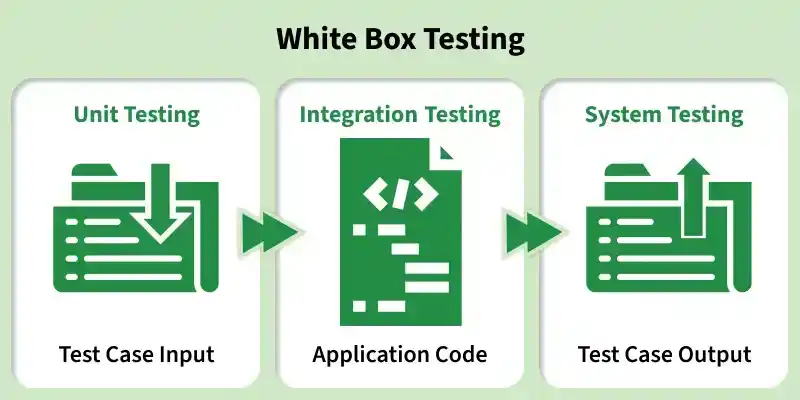
White Box Testing at Different Levels
- **Unit Testing: Focuses on testing individual functions or components by validating their internal logic and code behavior.
- **Integration Testing: Ensures that multiple modules work together correctly by verifying data flow and interactions between integrated components.
- **System Testing: Validates the complete application by checking the overall flow, ensuring that all integrated parts function correctly together.
Architecture for White Box Testing
White box testing, also known as structural or glass box testing, focuses on examining the internal structure and code of an application. It ensures that the logic, control flow, and data handling work correctly at the code level.
- **Code Analysis: Involves examining the source code to understand logic, detect dead or unreachable code, and measure coverage using techniques like statement, branch, and condition coverage.
- **Control Flow & Path Identification: Includes creating control flow graphs (CFG) and using cyclomatic complexity and path testing to identify all important execution paths.
- **Test Case Design: Test cases are designed based on internal code structure to achieve maximum path coverage, with well-defined inputs and expected outputs.
- **Execution & Reporting: Tests are executed at unit and integration levels, and detailed reports are generated highlighting coverage metrics, defects, and overall code quality.
Workflow for White Box Testing
White box testing, also known as structural or glass-box testing, involves testing the internal code, logic, and structure of an application. The workflow focuses on validating code paths, branches, loops, and data flow to achieve high coverage and early defect detection.
Step 1: Code Understanding & Analysis
Review the source code, design, and requirements. Identify key components such as functions, decision points, loops, and data flow, and assess complexity.
Step 2: Path Identification
Create control flow graphs (CFG) to map execution paths. Identify independent paths and conditions using techniques like basis path testing and coverage methods.
Step 3: Test Case Design
Develop detailed test cases with appropriate inputs to cover maximum code paths. Ensure different conditions, loops, and edge cases are included, and clearly define expected outputs based on the program logic.
Step 4: Test Execution & Coverage Measurement
Execute the test cases at unit and integration levels. Use testing tools to measure code coverage (such as statement and branch coverage) and identify any untested or weak areas in the code.
Step 5: Result Analysis & Reporting
Compare actual results with expected outcomes to identify defects. Log and track issues, perform re-testing after fixes, and generate a comprehensive report including coverage metrics, defects found, and suggestions for code improvement.
Areas of White Box Testing
White box testing focuses on the internal workings of an application, ensuring that its logic, structure, and flow operate correctly. It involves directly examining the source code to validate how the system functions internally.
1. **Code Logic and Flow
Ensures that the program logic and control structures operate correctly and interact as expected across different modules.
- Verifies the correctness of conditions such as if-else statements and switch cases.
- Checks loop execution to ensure proper iteration and termination.
- Ensures smooth interaction between functions, classes, and modules.
2. Code Coverage
Ensures that maximum portions of the code are tested to minimize the risk of hidden defects.
- Statement coverage ensures that every line of code is executed at least once.
- Branch coverage validates all possible decision outcomes like true/false conditions.
- Path coverage ensures that different execution paths in the program are tested.
3. Data Flow and Variables
Focuses on verifying how data is used, modified, and transferred throughout the application.
- Ensures variables are properly initialized before use.
- Validates correct updating and usage of variables during execution.
- Prevents unexpected behavior caused by improper data handling.
4. Internal Functions and Methods
Ensures that individual components of the code perform their intended operations accurately.
- Tests functions and methods for correct input-output behavior.
- Validates business logic and internal computations.
- Helps identify issues in reusable code components early.
5. Boundary Conditions
Examines how the system behaves at extreme or limit values of input.
- Tests minimum, maximum, and edge input values.
- Checks system stability when handling unusual or boundary cases.
- Ensures the application does not fail under limit conditions.
6. Error Handling and Exception Management
Ensures that the application can handle errors and unexpected inputs gracefully.
- Verifies proper handling of exceptions and invalid inputs.
- Ensures meaningful error messages are displayed to users.
- Confirms that the system remains stable and does not crash.
Types of White Box Testing
White box testing can be performed at different stages of development to validate various aspects of the internal code structure. The following are the main types of white box testing
1. Path Testing
Path Testing focuses on testing all possible execution paths in the program to ensure each path behaves as expected.
- Verifies logical conditions, branches, and decision points.
- Ensures all code paths are executed at least once.
- Helps improve efficiency by identifying redundant or unused paths.
2. Loop Testing
Loop Testing ensures that loops in the program execute correctly under different conditions.
- Validates loop initialization, execution, and termination.
- Detects issues like infinite loops or incorrect iteration counts.
- Checks loop behavior with minimum, maximum, and boundary values.
3. Unit Testing
Unit Testing tests individual components or functions of the application in isolation.
- Ensures each unit performs its intended functionality correctly.
- Validates logic against design requirements during development.
- Helps detect defects early at the smallest level of code.
4. Mutation Testing
Mutation Testing evaluates the quality of test cases by making small changes (mutations) in the code.
- Introduces minor code modifications to check test effectiveness.
- Ensures existing test cases can detect errors.
- Helps improve overall test coverage and robustness.
5. Integration Testing
Integration Testing checks how different modules or components work together as a system.
- Verifies interaction between integrated units after unit testing.
- Ensures smooth data flow across modules.
- Identifies interface and communication issues.
6. Penetration Testing
Penetration Testing simulates cyber-attacks to identify vulnerabilities in the system.
- Detects security weaknesses in the application.
- Ensures protection against unauthorized access.
- Helps strengthen system security before deployment.
White Box Testing Techniques
White box testing uses different techniques to achieve maximum code coverage and ensure that all parts of the application are thoroughly tested. These techniques focus on validating logic, conditions, and execution paths.
1. Statement Coverage
Ensures that every statement in the code is executed at least once during testing.
- Covers each line of code to detect errors or unused statements.
- In a flowchart, every node is traversed at least once.
- Helps identify faulty or redundant code effectively.
As shown in the flowchart, every node is traversed at least once, ensuring that all lines of code are executed and helping identify faulty code.
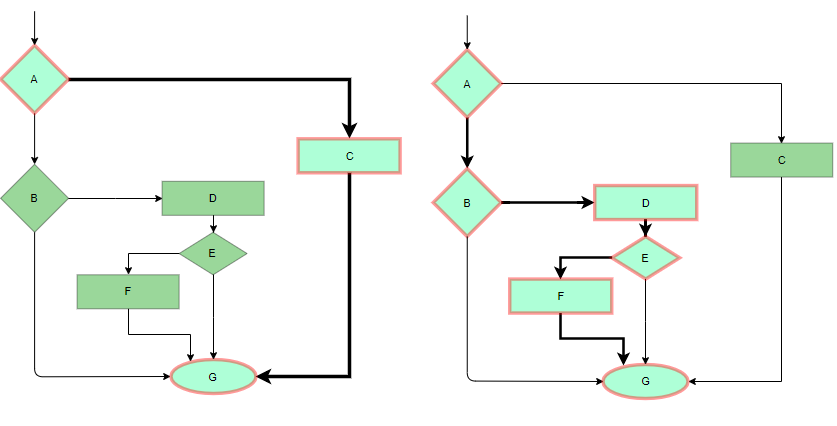
Statement Coverage flowchart
2. Branch Coverage
Focuses on testing all decision points and their possible outcomes.
- Ensures both true and false conditions are tested.
- Covers all branches from each decision point.
- In a flowchart, all edges are traversed at least once.
In a flowchart all edges must be traversed at least once.
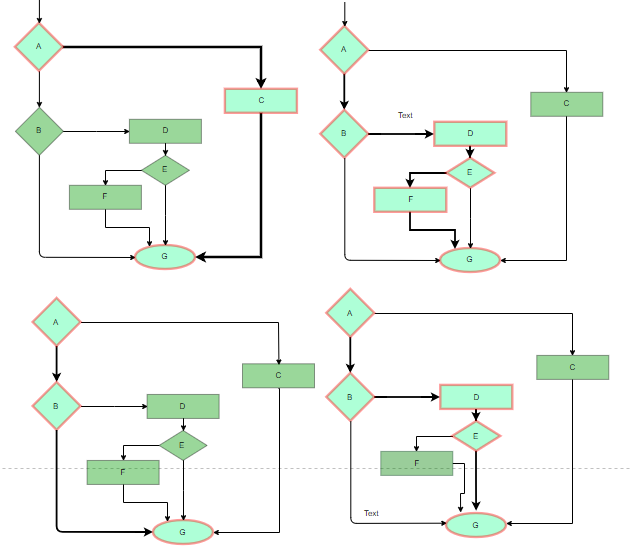
Branch Coverage flowchart
3. Condition Coverage
Condition Coverage ensures that each individual condition in a decision statement is evaluated independently. It verifies that every condition takes both true and false values.
- Tests each condition separately (not the whole decision)
- Ensures every condition evaluates to true and false
- Helps detect logical errors in complex conditions
Condition: if (X > 0 && Y > 0)
**Example:
- X = 5, Y = 10 -> X = True, Y = True
- X = 0, Y = 55 -> X = False, Y = True
- X = 5, Y = 0 -> X = True, Y = False
This ensures both X and Y conditions are tested for true and false values.
4. Multiple Condition Coverage
Multiple Condition Coverage tests all possible combinations of conditions in a decision statement. It ensures every condition is evaluated in all true/false combinations for thorough validation.
- Covers all combinations of conditions (T/F)
- Provides deeper testing than simple condition coverage
- Helps detect complex logical errors
Condition: if (X > 0 && Y > 0)
**Example:
- X = 0, Y = 0 -> (False, False)
- X = 0, Y = 5 -> (False, True)
- X = 55, Y = 0 -> (True, False)
- X = 55, Y = 5 -> (True, True)
All 4 combinations (TT, TF, FT, FF) are covered.
5. Basis Path Testing
Basis Path Testing focuses on identifying and testing all independent execution paths in a program using control flow analysis. It ensures thorough coverage of program logic.
- Uses Control Flow Graph (CFG) to identify independent paths
- Ensures each path is executed at least once
- Helps determine minimum number of test cases required
**Steps:
- Create Control Flow Graph (CFG)
- Calculate Cyclomatic Complexity
- Design test cases for each independent path
**Formula (Cyclomatic Complexity): V(G)=E−N+2V(G) = E - N + 2V(G)=E−N+2
- E = Number of edges
- N = Number of nodes
**Example:
If a program has E = 10 edges and N = 8 nodes
V(G) = 10 − 8 + 2 = 4
Minimum 4 test cases are required to cover all independent paths.
6. Loop Testing
Loop Testing checks whether loops work correctly under different conditions, especially at boundary values where errors are common.
- Validates loop execution (start, run, stop)
- Tests boundary cases like 0, 1, and maximum iterations
- Helps detect infinite loops and logic errors
**Types of Loop Testing
- Simple Loops:
Tests a single loop for 0, 1, multiple, and boundary iterations - Nested Loops:
Tests loops inside loops, starting from the innermost loop - Concatenated Loops:
Tests multiple loops running one after another (independent/dependent)
**Example:
For a loop running from 1 to n:
- Test with n = 0 (no execution)
- Test with n = 1 (single iteration)
- Test with n = max value (boundary case)
White Box Testing tools analyze internal code, logic, and structure to ensure correctness, coverage, and security. They help detect defects early and improve code quality.
**StrykerJS
A mutation testing tool for JavaScript that checks test strength by modifying code.
- Introduces small code changes
- Identifies weak test cases
PITest (PIT)
A mutation testing framework for Java to improve test quality.
- Detects ineffective tests
- Enhances code coverage
AFL++
A fuzz testing tool that uses random inputs to find issues.
- Detects crashes and vulnerabilities
- Improves software security
JaCoCo
A code coverage tool mainly used for Java applications.
- Measures executed code
- Highlights untested areas
CodeQL
A semantic code analysis tool for security and quality checks.
- Finds vulnerabilities
- Detects coding errors
Infer
A static analysis tool for identifying bugs in code.
- Detects memory leaks and null errors
- Improves code reliability
Advantages of White Box Testing
White box testing provides deep insight into the internal structure of an application, improving code quality, reliability, and performance.
- **Thorough Code Coverage: Ensures detailed testing of internal logic, control structures, and execution paths, reducing the chances of untested or hidden code.
- **Code Optimization: Helps identify redundant, unused, or inefficient code, leading to better performance and improved code maintainability.
- **Early Defect Detection: Allows testing to start early in the development phase, enabling quick identification and fixing of defects before they become complex.
- **Easy SDLC Integration: Can be seamlessly integrated into different phases of the Software Development Life Cycle, supporting continuous testing and improvement.
- **Detection of Complex Defects: Helps uncover critical and hidden issues within the code that may not be detected through other testing techniques.
Disadvantages of White Box Testing
White Box Testing focuses on internal code structure and logic, but it has several limitations related to complexity, cost, and maintenance.
- **Requires Programming Knowledge: Testers must have strong coding and technical skills to understand and test internal logic effectively.
- **Time-Consuming Process: Writing, executing, and maintaining detailed test cases takes significant time, especially for complex systems.
- **High Cost: Requires skilled professionals and specialized tools, increasing overall testing expenses.
- **Limited to Code-Level Testing: Focuses only on internal logic and may miss missing requirements, UI issues, or usability problems.
- **Not Scalable for Large Systems: Testing all paths and conditions becomes difficult as application size and complexity increase.
- **High Maintenance Effort: Test cases need frequent updates whenever there are changes in the code, increasing maintenance workload.
Black Box vs White Box vs Gray Box Testing
These are three major software testing approaches based on how much internal knowledge of the system is used. Each has a different focus, level of access, and purpose.
| Aspect | Black Box Testing | White Box Testing | Gray Box Testing |
|---|---|---|---|
| **Definition | Tests functionality without knowing internal code | Tests internal code, logic, and structure | Tests with partial knowledge of internal code |
| **Knowledge Required | No programming knowledge | Strong programming knowledge required | Basic understanding of code |
| **Focus Area | Inputs and outputs | Internal logic and code paths | Both functionality and internal logic |
| **Test Design | Based on requirements/specifications | Based on code structure | Based on both requirements and design |
| **Performed By | Testers / QA | Developers / Testers | Testers with some technical knowledge |
| **Level of Testing | System, Acceptance | Unit, Integration | Integration, System |
| **Techniques | Equivalence Partitioning, BVA | Statement, Branch, Path Coverage | Combination of both techniques |
| **Access to Code | No access | Full access | Partial access |
| **Main Goal | Validate functionality | Ensure code correctness | Improve coverage with limited access |