Android Interview Questions and Answers SDE I to SDE (original) (raw)
Last Updated : 6 Jun, 2026
Android is an open-source operating system based on Linux, created by Andy Rubin. It is the most widely used mobile OS in the world, holding a major share of the smartphone market. Because of its popularity, Android development remains a highly in-demand career path.
- Android is built on a Linux-based open-source framework.
- It holds around 70%+ global smartphone market share.
- Android developers are in high demand across all experience levels (SDE I to SDE III).
1. What do you understand by the term "Android" and what is the latest version of Android?
Android is a Linux-based open-source operating system developed by Google for mobile and smart devices. It is widely used in smartphones, tablets, wearables, TVs, and automotive systems. It provides a flexible platform for modern app development with regular updates and security improvements.
- Open-source OS based on Linux, developed and maintained by Google.
- Used in smartphones, tablets, smart TVs, wearables, and cars.
- Latest stable version: Android 16 (API level 36).
2. What's Activity in Android?
An Activity in Android represents a single screen with a user interface where the user can interact with the app. It is a core component of Android and acts as an entry point for user interaction in an application. Each activity has its own lifecycle managed by the Android system.
- Represents a single screen in an Android application.
- Handles user interaction with UI components.
- Has its own lifecycle (created, started, resumed, paused, destroyed).
****3.**Why is XML used for frontend development in Android?
XML is used in Android for frontend development because it allows developers to design user interfaces separately from the app’s logic. It makes the UI structure clear, reusable, and easier to manage compared to writing UI in code. It also helps in supporting different screen sizes and layouts efficiently.
- Separates UI design from application logic (clean architecture).
- Easy to maintain, reuse, and modify layouts.
- Supports multiple screen sizes and device configurations.
4. What are the components of the Android Application?
Android applications are built using four main components that define how an app behaves and interacts with the system. These components work together to provide functionality, user interaction, and background processing in an Android app.
- **Activities: Represent UI screens for user interaction.
- **Services: Handle background tasks without UI.
- **Broadcast Receivers: Respond to system-wide broadcast messages/events.
- **Content Providers: Manage and share app data between applications.
5. What is the Dalvik Virtual Machine?
Dalvik Virtual Machine (DVM) is a process virtual machine used in older versions of Android to run Android applications. It executes .dex (Dalvik Executable) files, which are optimized for low memory usage and better performance on mobile devices. DVM is designed specifically for mobile environments with limited resources.
- Virtual machine used in older Android versions to run apps.
- Executes .dex bytecode optimized for mobile devices.
- Replaced by ART (Android Runtime) in modern Android versions.
6. What are the differences between Dalvik and ART?
| Feature | Dalvik Virtual Machine (DVM) | Android Runtime (ART) |
|---|---|---|
| Compilation | Uses Just-In-Time (JIT) compilation | Uses Ahead-Of-Time (AOT) compilation |
| Performance | Slower execution | Faster execution |
| App Installation | Faster installation | Slightly slower installation (due to pre-compilation) |
| Battery Usage | Higher battery consumption | Better battery efficiency |
| Memory Usage | Less optimized | More optimized memory management |
| Usage | Used in older Android versions | Used in modern Android versions (Android 5.0+) |
Read More:Dalvik vs ART
7. How does an Android App Work?
An Android app works by compiling source code into an APK file, which is then installed and executed on a device using the Android Runtime (ART). When launched, the system loads the app components and manages execution through Android’s lifecycle and system services.
- Source code is compiled and converted into an APK file containing code, resources, and metadata.
- APK is installed on device/emulator using ADB and system processes.
- At runtime,
.dexfiles are executed by ART (converted to optimized OAT format for performance).
8. What is Toast in Android?
A Toast in Android is a small pop-up message that appears on the screen for a short duration and disappears automatically without user interaction. It is used to display simple feedback or notifications to the user.
- Displays a short, temporary message to the user.
- Does not require any user action or input.
- Commonly used for alerts like “Saved successfully” or “Login failed”.
9. What are Services in Android?
A Service in Android is an application component that runs in the background to perform long-running operations without a user interface. It helps the app continue tasks even when the user is interacting with other applications or the app is not in the foreground.
- Runs in the background without any UI.
- Used for tasks like music playback, data sync, location tracking, and file downloads.
- Types include Foreground Service, Background Service, and Bound Service (for IPC).
10. What is a Content Provider in Android?
A Content Provider in Android is a component used to manage and share data securely between different applications. It acts as a central repository that allows controlled access to data such as contacts, images, audio, videos, or database records using a standard interface.
- Enables secure data sharing between different applications.
- Uses URI to uniquely identify and access data.
- Works with Content Resolver, Cursor, and Contract Class for data operations (CRUD).
11. What are Broadcast Receivers in Android?
A Broadcast Receiver in Android is a component that listens for system-wide or app-level broadcast messages and responds to them. These broadcasts can come from the system (like battery low, boot completed) or from other apps.
- Listens for system or application broadcast events.
- Responds to events like battery low, network change, or device boot.
- Works without a user interface and triggers actions in the app.
12. What is Gradle and write down its usage in Android?
Gradle is an open-source build automation tool used in Android development to compile, package, test, and deploy applications. It processes source files such as Java, Kotlin, and XML, manages dependencies, and generates the APK or AAB file used for installation.
- Automates the build, testing, and deployment process.
- Manages project dependencies and build configurations through build.gradle files.
- Converts source code into DEX files and packages them into an APK/AAB.
13. What is a Fragment in Android?
A Fragment is a reusable and modular part of an Activity that represents a portion of the user interface and its behavior. Multiple fragments can be combined within a single activity to create flexible and dynamic UI designs.
- Represents a reusable portion of an Activity's UI.
- Helps create dynamic and responsive user interfaces.
- Has its own lifecycle but is dependent on the host Activity.
14. What's RecyclerView in Android & How it works?
RecyclerView is a flexible and efficient Android UI component used to display large sets of data in a scrolling list or grid. It improves performance by reusing existing item views instead of creating new ones for every item.
- Displays large datasets efficiently in lists or grids.
- Recycles and reuses item views to improve performance and reduce memory usage.
- Uses three main components: Adapter, ViewHolder, and LayoutManager.
15. What's the Difference Between Intent and Intent filters?
An **Intent is a messaging object used to request an action from another app component, such as starting an Activity or Service. An **Intent Filter defines which intents a component can respond to and is declared in the AndroidManifest.xml file.
| Feature | Intent | Intent Filter |
|---|---|---|
| **Definition | A message used to request an action. | A declaration of the intents a component can handle. |
| **Purpose | Starts Activities, Services, or Broadcast Receivers. | Specifies which intents a component can receive. |
| **Usage | Created in Java/Kotlin code. | Defined in AndroidManifest.xml. |
| **Example | Opening another Activity. | Allowing an Activity to open web links or share data. |
**Read More:Difference Between Implicit Intent and Explicit Intent in Android
16. What is the AndroidManifest.xml?
AndroidManifest.xml is a configuration file that contains essential information about an Android application. It informs the Android system about the app's components, permissions, hardware requirements, and other configuration details before the app is executed.
- Declares app components such as Activities, Services, Broadcast Receivers, and Content Providers.
- Specifies permissions required by the application (e.g., Internet, Camera, Location).
- Defines app metadata, hardware/software requirements, and intent filters.
17. What's Android SDK and its Components?
The Android SDK (Software Development Kit) is a collection of tools, libraries, and APIs used to develop, test, and debug Android applications. It provides everything needed to build and run Android apps on devices and emulators.
- **SDK Tools: Build, debug, and manage Android applications.
- **Android Platform & APIs: Provide libraries and APIs for app development.
- **AVD Manager & Emulator: Used to create and test apps on virtual Android devices.
**18. What are the Disadvantages of Android?
Android is a popular and flexible operating system, but it also has some limitations. Due to its open-source nature and availability across many devices, developers may face challenges related to security, compatibility, and updates.
- **Fragmentation: Different devices run different Android versions, causing compatibility issues.
- **Security Risks: Open-source nature can make it more vulnerable to malware and malicious apps.
- **Delayed Updates: Software updates often depend on device manufacturers and carriers.
19. Explain the Activity Lifecycle in brief.
These are the different stages of the Activity Lifecycle:
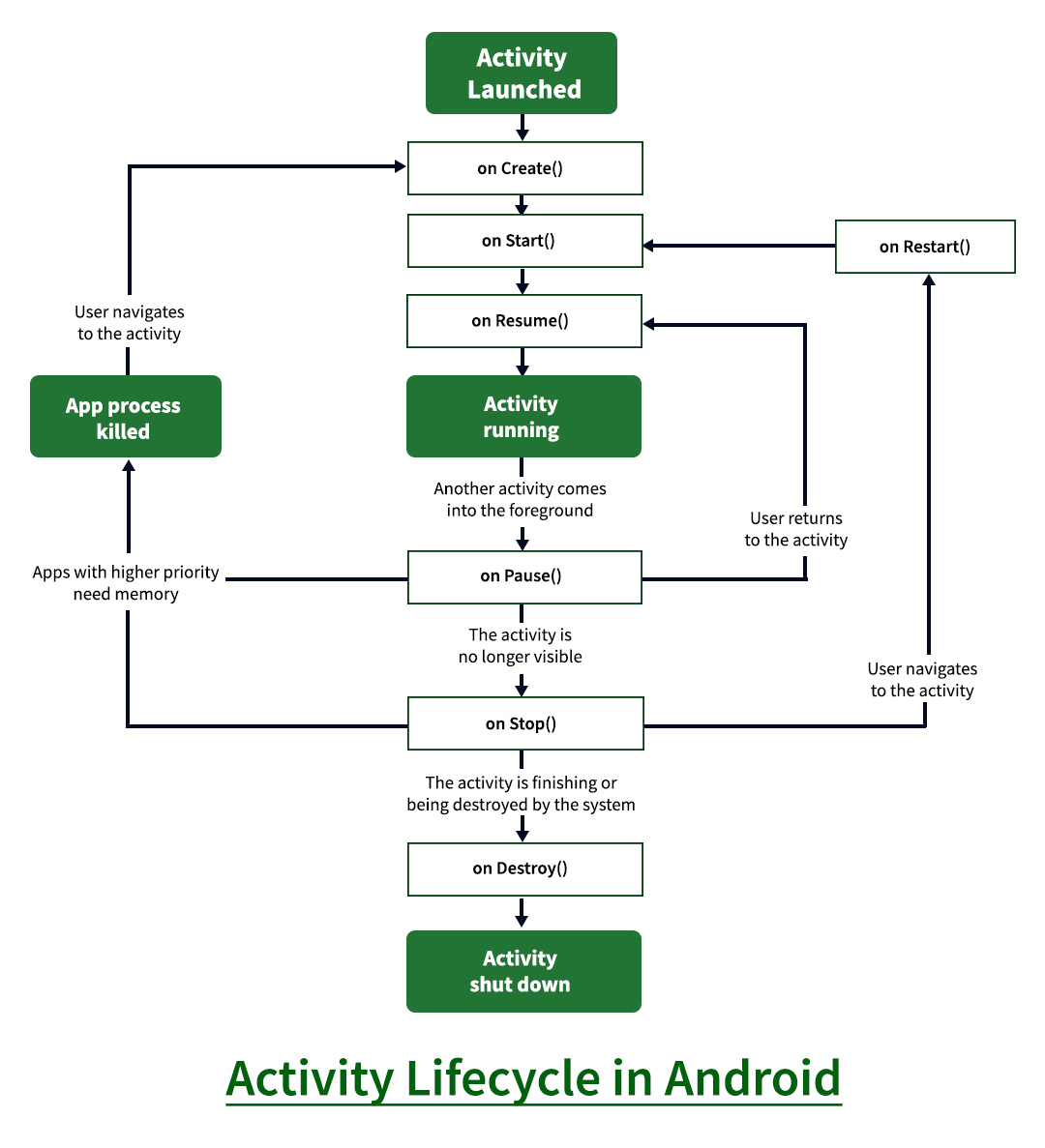
- **onCreate(): It is called when the activity is first created. This is where all the static work is done like creating views, binding data to lists, etc.
- **onStart(): It is invoked when the activity is visible to the user. It is followed by onResume() if the activity is invoked from the background.
- **onRestart(): It is invoked after the activity has been stopped and prior to its starting stage and thus is always followed by onStart() when any activity is revived from background to on the screen.
- **onResume(): It is invoked when the activity starts interacting with the user. At this point, the activity is at the top of the activity stack, with a user interacting with it.
- **onPause(): It is invoked when an activity is going into the background but has not yet been killed. It is a counterpart to onResume()
- **onStop(): It is invoked when the activity is not visible to the user. It is followed by onRestart() when the activity is revoked from the background, followed by onDestroy() when the activity is closed or finished, and nothing when the activity remains on the background only.
- **onDestroy(): The final call received before the activity is destroyed. This can happen either because the activity is finished (when finish() is invoked) or because the system is temporarily destroying this instance of the activity to save space.
**20. Why do we need to call setContentView() in onCreate() of an Activity class?
The setContentView() method is used to set the user interface layout for an Activity. It is typically called inside onCreate() because this method is executed when the Activity is first created, ensuring that the UI is loaded and ready before the user interacts with the application.
- Sets the Activity's layout defined in an XML file.
- Usually called in
onCreate()when the Activity is initialized. - Ensures UI components are available for user interaction and further processing.
21. Explain the Fragment Lifecycle in Brief.
The Fragment Lifecycle consists of a series of callback methods that manage a Fragment from its creation to destruction. It is similar to the Activity lifecycle but is closely tied to the lifecycle of its host Activity.
| Method | Description |
|---|---|
| onAttach() | Called when the Fragment is attached to an Activity. |
| onCreate() | Initializes the Fragment and its components. |
| onCreateView() | Creates and returns the Fragment's UI layout. |
| onViewCreated() | Called after the Fragment's view has been created. |
| onStart() | Fragment becomes visible to the user. |
| onResume() | Fragment is active and ready for user interaction. |
| onPause() | Fragment loses focus and user interaction stops. |
| onStop() | Fragment is no longer visible. |
| onDestroyView() | Cleans up resources related to the Fragment's view. |
| onDestroy() | Final cleanup before the Fragment is destroyed. |
| onDetach() | Fragment is detached from the host Activity. |
Read More:Fragment Lifecycle in Android.
22. What is the difference between a Fragment and an Activity?
| Feature | Activity | Fragment |
|---|---|---|
| Definition | A complete screen with UI. | A reusable part of an Activity's UI. |
| Dependency | Can exist independently. | Must be hosted by an Activity. |
| Lifecycle | Has its own lifecycle. | Has its own lifecycle but depends on the Activity. |
| Reusability | Less reusable. | Highly reusable across multiple Activities. |
| Usage | Represents a full user screen. | Represents a portion of a screen. |
23. What's Context in Android?
Context in Android is a reference to the current state of the application or Activity. It provides access to application-specific resources, services, and system features, allowing components to interact with the Android system.
- Used to access resources, databases, preferences, and system services.
- Helps start Activities, Services, and Broadcast Receivers.
- Common types are Application Context and Activity Context.
24. Top Image Loading Libraries in Android.
Image loading libraries are used in Android to efficiently load, cache, and display images from local storage or the internet. They help improve app performance, reduce memory usage, and provide smooth image rendering.
- **Glide: Fast and memory-efficient library developed by Google, widely used for image loading and caching.
- **Picasso: Simple and easy-to-use library by Square for loading images from URLs into ImageViews.
- **Coil: Modern Kotlin-based image loading library optimized for Android applications.
**25. What is View in Android?
A View is the basic building block of the Android user interface (UI). It represents a rectangular area on the screen that displays content and handles user interactions such as clicks, touches, and text input.
- Base class for all UI components in Android.
- Used to display content and receive user input.
- Examples include TextView, Button, EditText, and ImageView.
26. Difference Between View and ViewGroup in Android
| Feature | View | ViewGroup |
|---|---|---|
| Definition | Basic UI element. | Container that holds Views and other ViewGroups. |
| Purpose | Displays content and handles user input. | Organizes and manages child views. |
| Children | Cannot contain other Views. | Can contain multiple Views and ViewGroups. |
| Examples | TextView, Button, ImageView, EditText | LinearLayout, RelativeLayout, FrameLayout, ConstraintLayout |
27. What is Kotlin Coroutine on Android?
Kotlin Coroutines are a lightweight concurrency framework used to perform asynchronous and background tasks without blocking the main UI thread. They simplify handling long-running operations such as network requests, database access, and file processing.
- Used for asynchronous and background programming in Android.
- Helps keep the UI responsive by avoiding main thread blocking.
- Common components include CoroutineScope, Dispatchers, and suspend functions.
28. How Garbage Collector Works in Android?
The **Garbage Collector (GC) in Android is an automatic memory management mechanism that identifies and removes objects that are no longer being used by the application. This helps free up memory and prevents memory leaks, improving app performance.
- Automatically removes unused objects from memory.
- Frees memory to improve application performance and stability.
- Runs in the background and is managed by the Android Runtime (ART).
29. Describe the architecture of your last app.
When developers work on a real mobile application whose nature is dynamic and will expand its features according to the user’s need, then it is not possible to write core logic in activities or fragments. To structure the project’s code and to give it a modular design(separated code parts), architecture patterns are applied to separate the concerns. The most popular Android architectures used by developers are the following:
- MVC (Model — View — Controller)
- MVP (Model — View — Presenter)
- MVVM (Model — View — ViewModel)
So you have to tell the architecture of the last app you have developed during the college time project or in a real industry project.To learn about the concept refer this articleAndroid Architecture Patterns.
30. MVC vs MVP vs MVVM architecture and which one we should choose?
| Feature | MVC (Model-View-Controller) | MVP (Model-View-Presenter) | MVVM (Model-View-ViewModel) |
|---|---|---|---|
| Components | Model, View, Controller | Model, View, Presenter | Model, View, ViewModel |
| Communication | View ↔ Controller ↔ Model | View ↔ Presenter ↔ Model | View ↔ ViewModel ↔ Model |
| Coupling | Tight coupling between View and Controller | Loosely coupled | Very loosely coupled |
| Testability | Difficult | Good | Excellent |
| Code Maintenance | Moderate | Better | Best |
| Data Binding | Not supported | Not supported | Supported |
| Complexity | Simple | Moderate | Moderate to High |
| Boilerplate Code | Less | More | Less (with Data Binding) |
| Suitable For | Small applications | Medium-sized applications | Large and scalable applications |
| Android Usage | Rarely used | Used in some projects | Most preferred in modern Android development |
**Which one should we choose?
For modern Android applications, **MVVM is generally recommended because it provides clear separation of concerns, easier maintenance, better scalability, and seamless integration with Android Jetpack libraries..
**Read More: MVC Vs MVP Vs MVVM Architecture Pattern in Android.
31. How to Reduce APK size in Android?
APK size can be reduced by removing unused code and resources, optimizing assets, and generating device-specific packages. This improves app performance, download speed, and storage efficiency.
- Use R8/ProGuard to remove unused code and perform code shrinking.
- Enable Resource Shrinking and optimize images using WebP format.
- Use Android App Bundle (AAB) to generate optimized APKs for different devices.
- Remove unnecessary libraries and dependencies.
- Split APKs based on language, screen density, or CPU architecture when needed.
**Read More: Reduce APK Size in Android.
32. What's the Android jetpack and its Key Benefits?
Jetpack is nothing but a set of software components, libraries, tools, and guidance to help in developing great Android apps. Google launched **Android Jetpack in 2018. Key Benefits of Android Jetpack
- Forms a recommended way for app architecture through its components
- Eliminate boilerplate code
- Simplify complex task
- Provide backward compatibility as libraries like support are unbundled from Android API and are re-packaged to **androidx.* package
- Inbuilt productivity feature of the Kotlin Integration
33. What are the different software components of Android Jetpack?
The software components of Android Jetpack has been divided into 4 categories:
- **Foundation Components: AppCompat, Android KTX, Test, Multidex
- **Architecture Components: Room, WorkManager, Lifecycle, ViewModel, Paging, Navigation
- **Behavior Components: DownloadManager, Permissions, Sharing, Slices
- **UI Components: Animation & Transition, Auto, Fragment, Palette, Layout
34. What's Jetpack Compose and its Benefits?
Jetpack Compose is a modern UI toolkit recently launched by Google which is used for building native Android UI. It simplifies and accelerates the UI development with less code, Kotlin APIs, and powerful tools.
- Declarative
- Compatible
- Increase development speed
- Concise and Idiomatic Kotlin
- Easy to maintain
- Written in Kotlin
35. What are the **Architecture Components of Android?
Android Architecture Components are a set of libraries provided by Google to help build robust, maintainable, and lifecycle-aware applications. They simplify common development tasks and improve app architecture.
- **Room: Simplifies SQLite database operations and local data storage.
- **WorkManager: Executes background tasks reliably, even after the app is closed.
- Lifecycle: Manages lifecycle-aware components and prevents memory leaks.
- **ViewModel: Stores and manages UI-related data across configuration changes.
- **LiveData: Provides observable data that automatically updates the UI.
- **Navigation: Handles navigation between screens and manages the back stack.
- **Paging: Loads large datasets efficiently in smaller chunks.
- **Data Binding: Binds UI components directly to data sources, reducing boilerplate code.
36. How to Improve RecyclerView Scrolling Performance in Android?
- Avoid dynamic image resizing by setting a specific width and height to ImageView in RecyclerView items
- Avoid nesting RecyclerView inside another, this will result in lagging, use ConcatAdapter instead.
- Enable setHasFixedSize(true) to improve performance by letting recyclerview know that the size won't change.
- Use image loading libraries like Glide, Coil or Picasso for efficiently loading images
- Avoid heavy operations in the OnBindViewHolder method like calculation, database calls, etc.
- Use notifyItemInserted(), notifyItemRemoved(), etc instead of the notifyDataSetChanged() for better performance.
**Read More: How to Improve RecyclerView Scrolling Performance in Android?
37. What is Volley Library in Android?
Volley is an HTTP networking library developed by Google that simplifies sending and managing network requests in Android applications. It provides features such as request queuing, caching, image loading, and efficient network communication.
- Used to perform network operations such as GET, POST, PUT, and DELETE requests.
- Provides automatic request scheduling, caching, and response parsing.
- Suitable for applications that require frequent and lightweight network communication.
- Simplifies API integration and reduces networking boilerplate code.
38. What's Retrofit in Android?
Retrofit is a type-safe HTTP client library for Android and Java developed by Square. It simplifies API communication by converting REST API responses into Kotlin/Java objects automatically, making network operations easier and more efficient.
- Used for making REST API calls and handling network requests.
- Automatically converts JSON responses into Kotlin/Java objects using converters like Gson or Moshi.
- Supports asynchronous operations with Coroutines, RxJava, and Callbacks.
- Widely used in modern Android applications for API integration.
39. Describe MVVM
Model — View — ViewModel (MVVM) is the industry-recognized software architecture pattern that overcomes all drawbacks of MVP and MVC design patterns. MVVM suggests separating the data presentation logic(Views or UI) from the core business logic part of the application.
**The separate code layers of MVVM are:
- **Model: This layer is responsible for the abstraction of the data sources. Model and ViewModel work together to get and save the data.
- **View: The purpose of this layer is to inform the ViewModel about the user’s action. This layer observes the ViewModel and does not contain any kind of application logic.
- **ViewModel: It exposes those data streams which are relevant to the View. Moreover, it serves as a link between the Model and the View.
**Read More: MVVM (Model View ViewModel) Architecture Pattern in Android
40. What are the reasons your Android app is lagging?
Android apps may lag due to inefficient code, excessive resource usage, or poor UI rendering, which affects performance and user experience.
- **Heavy Operations on the Main Thread: Running network calls, database queries, or complex calculations on the UI thread can freeze the app.
- **Memory Leaks: Unreleased objects consume memory and slow down application performance.
- **Unoptimized RecyclerView/ListView: Inefficient view binding or loading large datasets can cause scrolling lag.
- **Large Image Files: High-resolution images increase memory usage and rendering time.
- **Excessive Layout Nesting: Deeply nested layouts require more time to measure and draw views.
- **Frequent Garbage Collection: Creating too many temporary objects leads to frequent memory cleanup, causing delays.
- **Poor Network Handling: Slow API calls or improper network management can make the app appear unresponsive.
- **Inefficient Database Queries: Long-running or unoptimized queries can block app operations.
- **Too Many Background Services: Excessive background tasks consume CPU, memory, and battery resources.
- **Animation Overuse: Complex or unnecessary animations may reduce frame rates and cause UI stuttering.
41. What is AIDL?
AIDL (Android Interface Definition Language) is used to enable communication between different Android applications or processes through Inter-Process Communication (IPC).
- **Defines Interfaces: Specifies methods that can be called across process boundaries.
- **Supports IPC: Allows apps running in different processes to communicate.
- **Uses Client-Server Model: One process provides services while another accesses them.
- **Generates Boilerplate Code: Android automatically creates the required communication code.
- **Used for Bound Services: Commonly used when a service needs to interact with clients from other apps.
42. What is ANR and How can it be Prevented in Android?
**ANR (Application Not Responding****)** occurs when an Android app fails to respond to user input within a specified time, causing the system to display an ANR dialog.
**Prevention of ANR:
- **Avoid Long Tasks on UI Thread: Run time-consuming operations in background threads.
- **Use Async Operations: Perform network calls and file operations asynchronously.
- **Optimize Database Queries: Keep database operations fast and efficient.
- **Reduce Heavy Computations: Move complex calculations away from the main thread.
- **Use WorkManager or Services: Handle lengthy background tasks properly.
- **Optimize UI Rendering: Keep layouts simple and avoid excessive view nesting.
- **Monitor Performance: Use Android Profiler and ANR reports to identify bottlenecks.
43. What is Android NDK and why is it useful?
The NDK (Native Development Kit) is a tool that allows developers to write part of their code in C/C++ rather than Java/Koltin. It allows the app to interact with low level system components and provide access to native libraries to increase performance. NDK can be useful for cases in which you need to do one or more of the following:
- Squeeze extra performance out of a device to achieve low latency or run computationally intensive applications, such as games or physics simulations.
- Reuse your own or other developers' C or C++ libraries.
- Access low level system components like sensors, camera or graphics.
- For manual memory management, avoiding Java/Kotlin's Garbage Collection (GC) pauses that can introduce latency.
44. Explain the JUnit test in brief.
JUnit is a popular unit testing framework used in Android and Java applications to test individual units of code. It helps developers verify that methods and classes work as expected, improving code quality and reliability.
- Used for writing and executing unit test cases.
- Helps identify bugs early and ensures code correctness.
- Supports annotations such as @Test, @Before, and @After for test execution and setup.
- Integrated with Android Studio for automated testing.
45. What's Dagger and When to use Dagger?
Dagger is a Dependency Injection (DI) framework automatically sets up dependency injection by generating boilerplate code at compile time. Dagger is faster, more efficient and well suited for Android Development unlike other DI frameworks.
When to use a dagger?
| Project Size | Recommended DI Approach |
|---|---|
| Small | Manual DI/Service Locator |
| Medium | Service Locator/Dagger |
| Larger | Dagger |
46. What's LiveData in Android Architecture Component and its Advantages?
LiveData is a lifecycle-aware observable data holder class that is part of Android Jetpack Architecture Components. It allows the UI to automatically update whenever the underlying data changes while respecting the lifecycle of Activities and Fragments.
- Automatically updates the UI when data changes.
- Lifecycle-aware, preventing memory leaks and crashes.
- Works seamlessly with ViewModel to manage UI-related data.
- Reduces boilerplate code required for observing data changes.
**Advantages:
- Lifecycle awareness ensures updates are sent only to active UI components.
- Prevents memory leaks by automatically removing inactive observers.
- Simplifies communication between ViewModel and UI.
- Improves code maintainability and readability.
.jpg)
**Read More:Jetpack Architecture Components in Android.
47. What's Data Binding in Android?
Data Binding is an Android library that allows UI components in XML layouts to directly bind to data sources, reducing boilerplate code.
- **Direct UI Binding: Connects UI elements directly with data objects in XML.
- **Reduces Boilerplate Code: Minimizes the need for
findViewById()calls. - **Supports Two-Way Binding: Automatically updates data and UI when either changes.
- **Improves Maintainability: Keeps UI logic separate from business logic.
- **Enhances Performance: Updates only the affected UI components when data changes.
48. What is Room in Android Architecture Component?
Room is an Android Architecture Component that provides an abstraction layer over SQLite, making database operations easier and more efficient.
- **SQLite Abstraction: Simplifies working with SQLite databases.
- **Compile-Time Verification: Checks SQL queries for errors during compilation.
- **Uses DAOs: Accesses database operations through Data Access Objects (DAOs).
- **Supports LiveData and Flow: Enables automatic UI updates when data changes.
- **Reduces Boilerplate Code: Minimizes the amount of database-related code developers need to write.

Read More:Jetpack Architecture Components in Android.
49. What is ViewModel in Android?
ViewModel is a lifecycle aware jetpack component in Android whose main responsibility is to store and manage UI related data while surviving sudden lifecycle changes like screen rotation. It helps in separation of concerns to separate UI code with business logic. This helps is managing the app more easily and making it more maintainable.

50. What is Android KTX?
Android KTX (Kotlin Extensions) is a set of Kotlin libraries that make Android development more concise, readable, and developer-friendly.
- **Kotlin-Friendly APIs: Provides extensions designed specifically for Kotlin.
- **Reduces Boilerplate Code: Simplifies common Android development tasks.
- **Uses Extension Functions: Adds useful functionality to existing Android classes.
- **Improves Readability: Makes code shorter and easier to understand.
- **Enhances Productivity: Helps developers write Android apps faster with less code.
Additional Questions in Android
1. What is Pagination?
Pagination is a technique used to load and display large amounts of data in smaller chunks or pages instead of loading everything at once.
- **Loads Data Incrementally: Fetches data page by page as needed.
- **Improves Performance: Reduces memory usage and loading time.
- **Enhances User Experience: Provides smoother scrolling and faster response.
- **Reduces Network Load: Downloads only the required data.
- **Commonly Used with RecyclerView: Displays large datasets efficiently in Android applications.
**Read More: Paging Library in Android
2. What is an inline function?
An inline function is a Kotlin function whose code is copied directly at the call site during compilation, reducing function call overhead and improving performance.
- **Improves Performance: Eliminates function call overhead.
- **Used with Higher-Order Functions: Efficiently handles lambda expressions.
- **Reduces Object Creation: Avoids creating unnecessary function objects.
- **Declared with
inlineKeyword: Marked using theinlinemodifier. - **Optimizes Runtime Execution: Makes frequently called functions faster.
inline fun greet(name: String) {
println("Hello, $name")
}
3. What is Multidex?
Multidex is an Android feature that allows an application to exceed the 65,536 method limit of a single DEX (Dalvik Executable) file by using multiple DEX files.
- **Overcomes Method Limit: Supports apps with more than 65,536 methods.
- **Uses Multiple DEX Files: Splits the app code into multiple DEX files.
- **Required for Large Apps: Useful when an app includes many libraries and dependencies.
- **Enabled in Gradle: Activated by setting
multiDexEnabled true. - **Improves App Scalability: Allows larger and more complex applications to be built.
4. What is the difference between Launch and Async in Kotlin Coroutines?
Both **Launch and **Async has a similar use case, which is to start coroutines in Kotlin, but the basic difference between them is how they return the results and how they are used.
- **Launch: Launch is used for the **Fire & Forget case. This is when you want to launch a coroutine but don't want a result and don't need to wait for it to finish. For eg. Updating UI, logging, network calls, etc.
- **Async: Async is used when you want a result after you wait for the coroutine to finish. For eg, fetching data for API, database queries, etc.
To read more, refer to the articleLaunch vs Async in Kotlin Coroutines.
5. Explain the Android App Startup Process: Cold, Warm and Hot Start
When we run an app, the startup experience varies on whether the app is starting from scratch, or its partially in memory or its already running in the foreground.
These states are divided into three ways:
- **Cold Start: This happens when the app is launched after a complete reboot and the system killed the app to free up memory.
- **Warm Start: This happens when the app was recently closed but is still in the memory. For eg. waking up a laptop from sleep mode.
- **Hot Start: This happens when the app is still running in the foreground and the user just returns to it. For eg. switching between apps from recent tabs.
6. Explain @JVMStatic, @JVMOverloads, and @JVMField in Kotlin.
The JVMStatic, JVMOverloads, and JVMField annotations help Kotlin interoperate smoothly with Java by modifying how Kotlin properties and functions are exposed to Java.
- **JVMStatic: This marks a method inside a companion object or object as a static method in Java. Use when you need a static method in Java without requiring a Companion reference.
- **JVMOverloads: This generates multiple overloaded methods for functions with default arguments when called from Java. Use when you want Kotlin's default arguments to work as overloaded methods in Java.
- **JVMField: This exposes a Kotlin property directly as a public field in Java, bypassing getters and setters. Use when you want direct field access in Java without generating getters/setters.
7. What is onViewCreated() in Fragment lifecycle?
onViewCreated() is a Fragment lifecycle callback that is invoked immediately after the Fragment's view has been created using onCreateView().
- **Called After
onCreateView(): Executes once the Fragment's UI view is ready. - **Initialize Views: Commonly used to find and set up UI components.
- **Set Listeners: Ideal for attaching click listeners and adapters.
- **Observe LiveData: Often used to start observing ViewModel data.
- **View is Available: The
Viewobject can be safely accessed here. Kotlin `
override fun onViewCreated(view: View, savedInstanceState: Bundle?) { super.onViewCreated(view, savedInstanceState)
val button = view.findViewById<Button>(R.id.btnSubmit)
button.setOnClickListener {
    // Handle button click
}
}
`
onViewCreated() is the preferred place to initialize views, set adapters, attach listeners, and observe data because the Fragment's view hierarchy is fully created at this point.