Docker Using Public Repositories To Host Docker Images (original) (raw)
Last Updated : 23 Jul, 2025
Docker is a software platform for creating isolated virtualized environments for building, deploying, and testing applications with ease. In this tutorial, we will learn how to host public repositories on docker hub which is a hosted repository service provided by Docker for finding and sharing container **images. Just like GitHub allows the hosting of code of our application, DockerHub allows the hosting of Images of our applications.
Docker Image
In order to run these applications, we first need to create an image of the current application state. An image can be sometimes referred to as a snapshot of our project. Images are read-only in nature and consist of file that contains the source code, libraries, dependencies, tools, and other files needed for an application to run. A Docker image is a read-only template that contains a set of instructions for creating a container which can run on the Docker platform.
What is Docker Registry?
A Docker registry is a service that stores and manages Docker images. A Docker registry could be hosted by a third party, as a public or private registry. Some examples of Docker registries are as follows:
- Docker Hub
- GitLab
- AWS Container Registry
- Google Container Registry
- Docker - Private Registries
- Git Hub container Registry
Docker Hub
For all of the images that your Docker containers may require, DockerHub serves as a sizable storage area. There are two kinds: private and public.
- **Public Repositories: These imitate public shelves where anyone can take a picture. Just know the name of the Jenkins continuous integration server, like "jenkins/jenkins."
- **Private Repositories: These like locked storage spaces to which only specific individuals possess the key. They are handy if you want to restrict who can view and access your images.
- **Official Repositories: Consider themselves to be the standard. They undergo security and best practices checks, so you can be sure they are reliable. You only need to provide the image name, such as "nginx," without providing the user name or company.
- **Automated Builds: One of DockerHub's many distinctive characteristics is its capacity to produce images automatically anytime the source code is updated. It feels like a robot is doing the hard work for you!
- **Security Scanning: Like a security guard checking packages for any hidden threats, DockerHub can also check your images for vulnerabilities.
Common Operations Using DockerHub
- **Pushing Images: You can push your locally produced Docker image to DockerHub. This enables you just to set up it on additional machines and makes it accessible to others.
- **Pulling Images: Images can be downloaded to your local system from DockerHub. When you need to start a service or application that is available as a Docker image, this is useful.
- **Creating Repositories: You may arrange your Docker images through setting up repositories with DockerHub. According to your requirements, you may create both private and public repositories.
- **Managing Repositories: Repositories can be controlled by adding contributors to private repositories, editing their descriptions, and changing their visibility settings (public or private).
- **Enabling Automated Builds: When changes are posted to a connected source code repository (such as GitHub), DockerHub may automatically construct Docker images. This feature makes automated builds possible. By doing this, you can be sure that your Docker images reflect the most recent modifications to your code.
- **Monitoring Build Logs: DockerHub offers build logs upon the initiation of automated builds, enabling you to track the progress of the build and address any potential problems.
- **Security Scanning: Docker images can have their known vulnerabilities automatically scanned by DockerHub. It offers a thorough analysis that lists all security flaws in the picture layers and ranks them according to severity.
- **Versioning: You may easily manage different versions of your application or service by tagging images with version numbers using DockerHub.
- **Integration with Source Control: Source control systems such as GitHub and Bitbucket can be integrated with DockerHub, giving you the ability to schedule builds in response to changes in your code and guaranteeing that your Docker images are always updated with your source code.
- **Collaboration: DockerHub facilitates teamwork by enabling numerous users to collaborate on the same repository. In addition to managing settings and pulling and pushing photos, collaborators can participate in the development process.
Private Registries
- **Internal Network Distribution: You wish to distribute Docker images inside your company without using the internet. This maintains speed and security.
- **Faster CI/CD Pipelines: Using an on-premise private registry will speed up the development process. In particular for on-premise environments, pulling and pushing pictures within your own network quicker results in quicker deployments.
- **Large Cluster Deployments: A private registry makes the process of deploying a new image across several devices more streamlined and effective. Deployments occur more quickly and with more dependability since you are not reliant on external servers.
- **Tight Control Over Storage: Your are in full ownership of where images are kept while using a private registry. For security and compliance objectives, this is important.
How Do I Choose the Right Container Registry?
Here's a simple approach to choosing the right container registry:
- **Know Your Needs: Identify the features you require in the register. Which should you prefer—on-site or in the cloud? What features are required for your procedure?
- **Check Features: Essential characteristics to look for include access control, security scanning, and interaction with current tools. Select a registry which has the features you require.
- **Security First: Ensuring that security and compliance come first in the registry. Check for encryption, access controls, and compliance to regulations such as HIPAA and GDPR.
**Docker Repository
A Docker repository is a collection of different Docker images with the same name, that have different tags. Tags basically are identifiers of the image within a repository. In this tutorial, we will use Docker Hub to host our repositories, which is free for public use.
**Step 1: Creating An Account On Docker Hub. Go to DockerHub and create a new account or log in to your existing account.

**Step 2: Creating A Repository (optional)
On the docker hub, you can create a repository by clicking on create repository button. Give the repository a name and description and make sure it is marked as **public. This step is not necessary when you are hosting a public repository. It is used while hosting a private one.

Repository Name image widget.
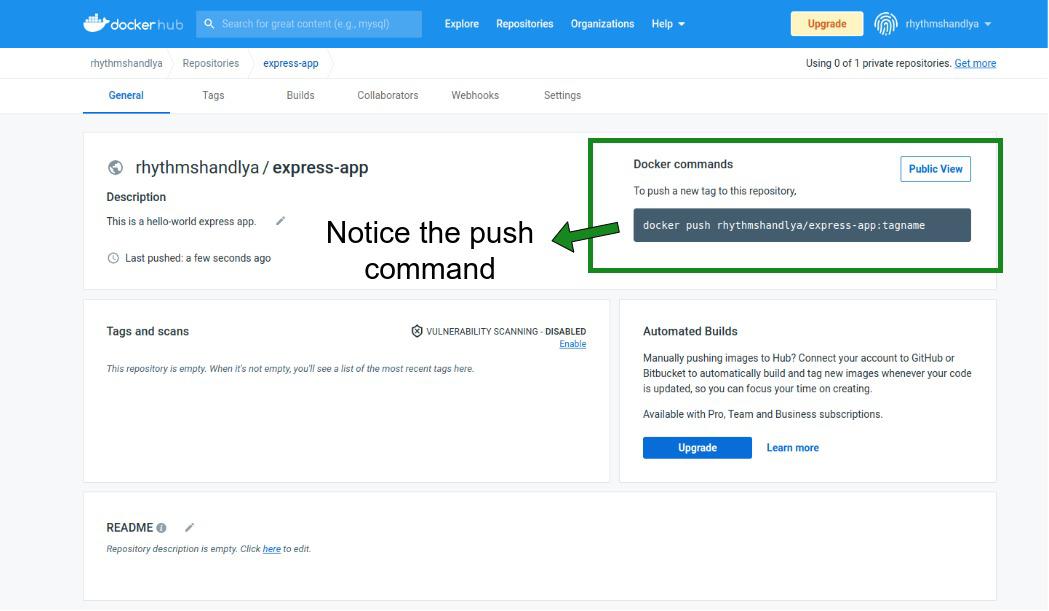
**Step 3: Build a Docker Image
Now we will generate a basic express application and create an Image out of it.
$ mkdir express-app && cd express-app
$ npx express-generator -e

Now, create a Dockerfile for the application and copy the content as shown below:
$ touch Dockerfile
FROM node:16
Create app directory
WORKDIR /usr/src/app
Install app dependencies
A wildcard is used to ensure both package.json
AND package-lock.json are copied
where available (npm@5+)
COPY package*.json ./
RUN npm install
If you are building your code for production
RUN npm ci --only=production
Bundle app source
COPY . .
EXPOSE 3000
CMD [ "npm", "start" ]

You can now build this Dockerfile with the docker build command.
$ docker build -t rhythmshandlya/express-app .

One thing to notice is as did not specify the tag name, it will be given the ****: latest** tag.
**Step 4: Run This Image Locally.
$ docker run -p 3000:3000 rhythmshandlya/express-app

**Step 5: Push Image to docker hub. To push a local Image to the docker hub we will need to log in to the docker hub with our terminal.
$ docker login

$ docker push rhythmshandlya/express-app
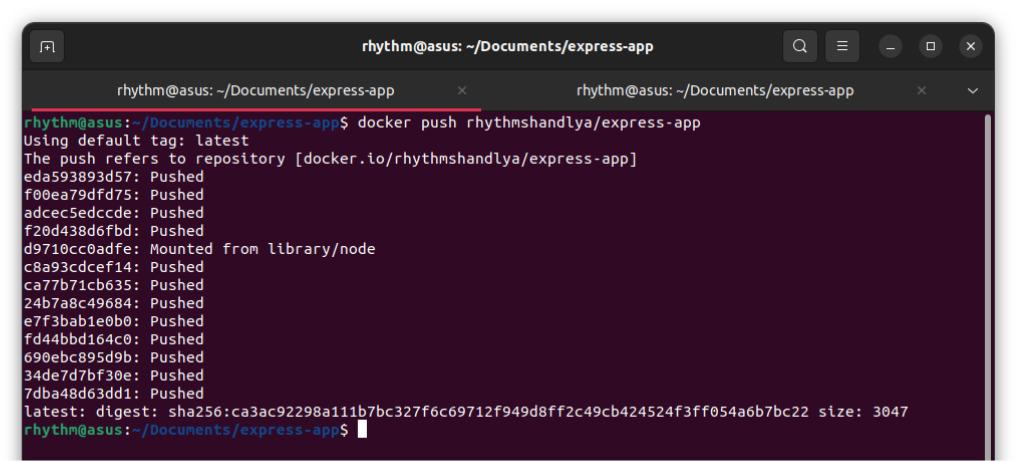

**Step 6: Playing With Tags. We can make changes to this application and give it a version tag of 0.0.1
$ docker build -t rhythmshandlya/express-app:0.0.1 .
$ docker push rhythmshandlya/express-app:0.0.1
**Output:
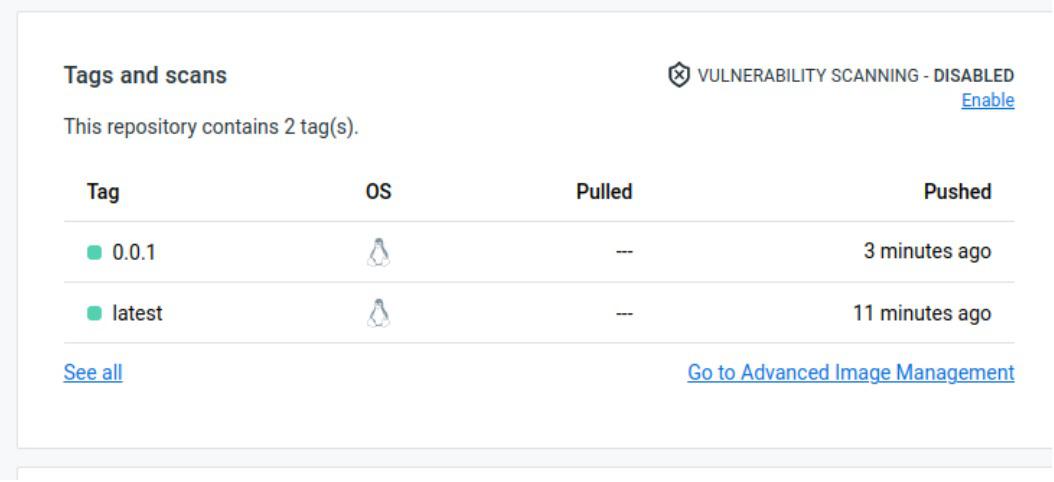
Now that we have hosted our image in public anyone can pull and run them on their machines.
$ docker pull rhythmshandlya/express-app:latest
OR
$ docker push rhythmshandlya/express-app:0.0.1
What are the Top Container Registries Available?
Docker Hub
Millions of Docker images are hosted on the biggest public container registry, Docker Hub. It provides automatic builds, image vulnerability scanning, interaction with Bitbucket and GitHub, and both public and private repositories. Official repositories with validated images for security and best practices are also made available by Docker Hub.
Amazon ECR
AWS offers a completely managed container registry service called Amazon ECR. The seamless integration of Amazon ECS and Amazon EKS with other AWS services facilitates the deployment of containerized applications on AWS with ease. ECR provides features like lifecycle policies for image management, image scanning with Amazon ECR Public Vulnerability Insights, and encryption at rest.
Google Container Registry (GCR)
Google Kubernetes Engine (GKE) and additional Google Cloud Platform (GCP) services are integrated with Google Cloud's managed container registry service, GCR. Features provided by GCR include vulnerability scanning using Container Analysis, access control with IAM roles, and connection with Google Cloud Build for automated builds.
Azure Container Registry (ACR)
Azure Kubernetes Service (AKS) and further Azure services are integrated with Microsoft's managed container registry service, ACR. High availability geo-replication, role-based access control (RBAC) with Azure Active Directory, and image signing with Docker Content Trust are just a few of the capabilities that ACR provides.
Harbor
Harbor is an open-source container registry project that includes enterprise-grade capabilities such as role-based access control, image replication, vulnerability screening, and policy-based image preservation. Harbor can be deployed on-premises or in the cloud and interfaces with Kubernetes, Docker, and other container technologies.
GitLab Container Registry
Because GitLab's integrated container registry and CI/CD pipelines are tightly coupled, developers can create, test, and launch containerized applications right from GitLab. It has built-in container scanning, access control with project permissions, and picture versioning, among other things.
JFrog Artifactory
Docker images are supported by JFrog Artifactory, an all-purpose artifact repository manager that also works with other package formats including Maven, npm, and NuGet. Features like replication, access control, metadata management, and sophisticated search capabilities are offered by Artifactory.