Wine Quality Prediction Machine Learning (original) (raw)
Last Updated : 6 Aug, 2025
Here we will predict the quality of wine on the basis of given features. We use the wine quality dataset available on Internet for free. This dataset has the fundamental features which are responsible for affecting the quality of the wine. By the use of several Machine learning models, we will predict the quality of the wine.
Importing libraries and Dataset:
- **Pandas is a useful library in data handling.
- **Numpy library used for working with arrays.
- **Seaborn****/****Matplotlibare used for data visualisation purpose.
- Sklearn - This module contains multiple libraries having pre-implemented functions to perform tasks from data preprocessing to model development and evaluation.
- **XGBoost - This contains the eXtreme Gradient Boosting machine learning algorithm which is one of the algorithms which helps us to achieve high accuracy on predictions. Python `
import numpy as np import pandas as pd import matplotlib.pyplot as plt import seaborn as sb
from sklearn.model_selection import train_test_split from sklearn.preprocessing import MinMaxScaler from sklearn import metrics from sklearn.svm import SVC from xgboost import XGBClassifier from sklearn.linear_model import LogisticRegression
import warnings warnings.filterwarnings('ignore')
`
Now let's look at the first five rows of the dataset.
Python `
df = pd.read_csv('winequality.csv') print(df.head())
`
**Output:
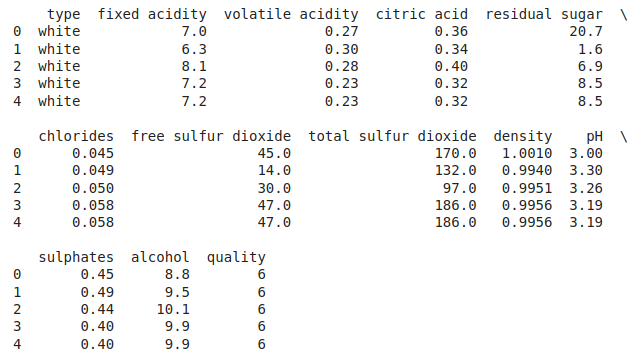
First Five rows of the dataset
Let's explore the type of data present in each of the columns present in the dataset.
Python `
df.info()
`
**Output:
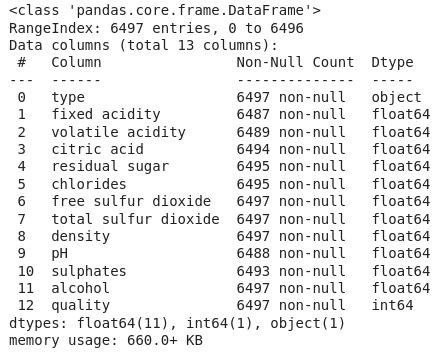
Information about columns of the data
Now we'll explore the descriptive statistical measures of the dataset.
Python `
df.describe().T
`
**Output:
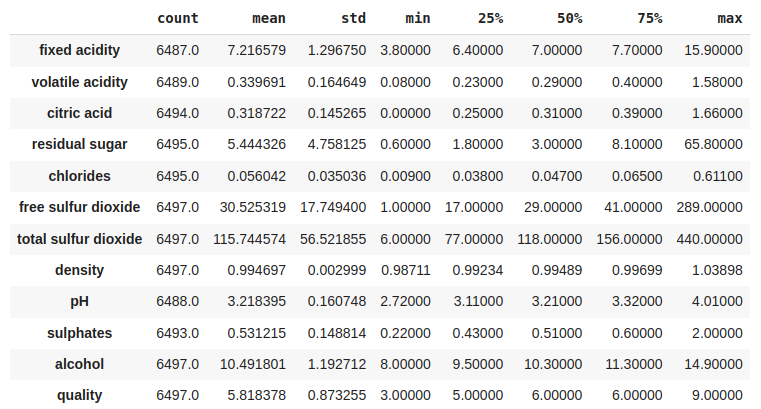
Some descriptive statistical measures of the dataset
Exploratory Data Analysis
EDA is an approach to analysing the data using visual techniques. It is used to discover trends, and patterns, or to check assumptions with the help of statistical summaries and graphical representations. Now let's check the number of null values in the dataset columns wise.
Python `
df.isnull().sum()
`
**Output:
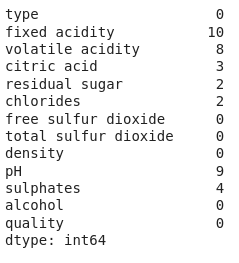
Sum of null values column wise
Let's impute the missing values by means as the data present in the different columns are continuous values.
Python `
for col in df.columns: if df[col].isnull().sum() > 0: df[col] = df[col].fillna(df[col].mean())
df.isnull().sum().sum()
`
**Output:
0
Let's draw the histogram to visualise the distribution of the data with continuous values in the columns of the dataset.
Python `
df.hist(bins=20, figsize=(10, 10)) plt.show()
`
**Output:
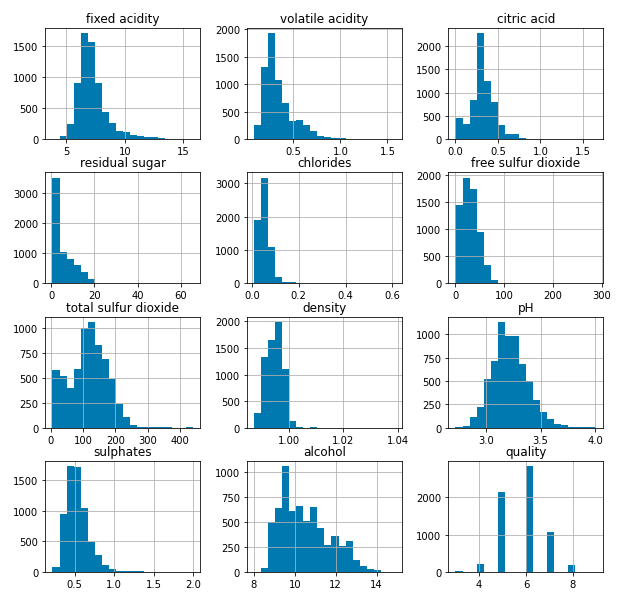
Histograms for the columns containing continuous data
Now let's draw the count plot to visualise the number data for each quality of wine.
Python `
plt.bar(df['quality'], df['alcohol']) plt.xlabel('quality') plt.ylabel('alcohol') plt.show()
`
**Output:
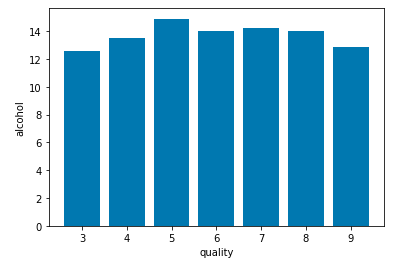
Count plot for each quality of wine
There are times the data provided to us contains redundant features they do not help with increasing the model's performance that is why we remove them before using them to train our model.
Python `
Convert 'object' columns to numerical if they represent numbers
for col in df.columns: if df[col].dtype == 'object': try: df[col] = pd.to_numeric(df[col], errors='coerce') # Convert to numeric, replace non-convertibles with NaN except: pass # Skip columns that cannot be converted
plt.figure(figsize=(12, 12)) sb.heatmap(df.corr() > 0.7, annot=True, cbar=False) plt.show()
This code is modified by Susobhan Akhuli
`
**Output:
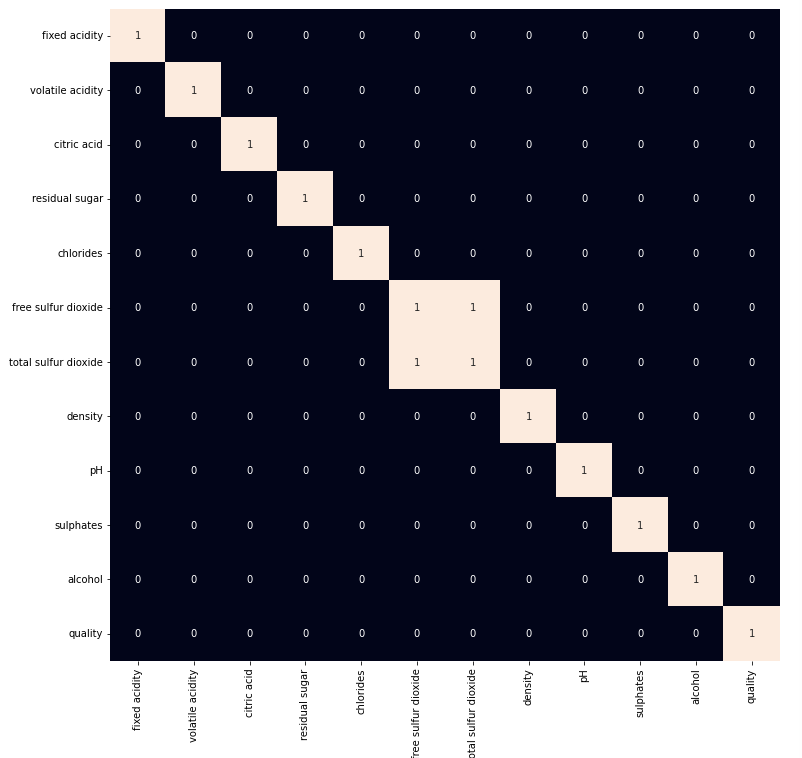
Heat map for highly correlated features
From the above heat map we can conclude that the '**total sulphur dioxide' and '**free sulphur dioxide' are highly correlated features so, we will remove them.
Python `
df = df.drop('total sulfur dioxide', axis=1)
`
Model Development
Let's prepare our data for training and splitting it into training and validation data so, that we can select which model's performance is best as per the use case. We will train some of the state of the art machine learning classification models and then select best out of them using validation data.
Python `
df['best quality'] = [1 if x > 5 else 0 for x in df.quality]
`
We have a column with object data type as well let's replace it with the 0 and 1 as there are only two categories.
Python `
df.replace({'white': 1, 'red': 0}, inplace=True)
`
After segregating features and the target variable from the dataset we will split it into 80:20 ratio for model selection.
Python `
features = features.fillna(features.mean()) features = df.drop(['quality', 'best quality'], axis=1) target = df['best quality']
xtrain, xtest, ytrain, ytest = train_test_split( features, target, test_size=0.2, random_state=40)
Impute missing values after splitting
from sklearn.impute import SimpleImputer imputer = SimpleImputer(strategy='mean') # Or another strategy like 'median' xtrain = imputer.fit_transform(xtrain) xtest = imputer.transform(xtest)
xtrain.shape, xtest.shape
This code is modified by Susobhan Akhuli
`
**Output:
((5197, 10), (1300, 10))
**Normalising the data before training help us to achieve stable and fast training of the model.
Python `
norm = MinMaxScaler() xtrain = norm.fit_transform(xtrain) xtest = norm.transform(xtest)
`
As the data has been prepared completely let's train some state of the art machine learning model on it.
Python `
models = [LogisticRegression(), XGBClassifier(), SVC(kernel='rbf')]
for i in range(3): models[i].fit(xtrain, ytrain)
print(f'{models[i]} : ')
print('Training Accuracy : ', metrics.roc_auc_score(ytrain, models[i].predict(xtrain)))
print('Validation Accuracy : ', metrics.roc_auc_score(
    ytest, models[i].predict(xtest)))
print()
`
**Output:
LogisticRegression() :
Training Accuracy : 0.6975101024661644
Validation Accuracy : 0.6855058693719925
XGBClassifier() :
Training Accuracy : 0.9762240429934201
Validation Accuracy : 0.8045662590288206
SVC() :
Training Accuracy : 0.7203202525576721
Validation Accuracy : 0.7073819229472522
Model Evaluation
From the above accuracies we can say that Logistic Regression and SVC() classifier performing better on the validation data with less difference between the validation and training data. Let's plot the confusion matrix as well for the validation data using the Logistic Regression model.
Python `
from sklearn.metrics import confusion_matrix, ConfusionMatrixDisplay import matplotlib.pyplot as plt
Assuming 'models[1]' is your trained classifier
cm = confusion_matrix(ytest, models[1].predict(xtest)) disp = ConfusionMatrixDisplay(confusion_matrix=cm, display_labels=models[1].classes_) # Assuming your model has a 'classes_' attribute disp.plot() plt.show()
This code is modified by Susobhan Akhuli
`
**Output:
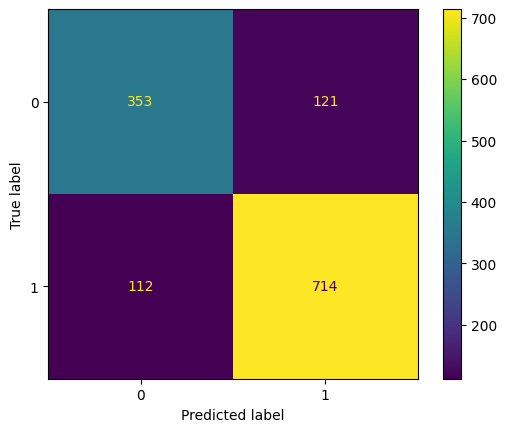
Confusion matrix drawn on the validation data
Let's also print the c**lassification reportfor the best performing model.
Python `
print(metrics.classification_report(ytest, models[1].predict(xtest)))
`
**Output:
          precision    recall  f1-score   support

       0       0.76      0.74      0.75       474
       1       0.86      0.86      0.86       826

accuracy                           0.82      1300
macro avg 0.81 0.80 0.81 1300
weighted avg 0.82 0.82 0.82 1300
Get the Complete Notebook
**Notebook: **click here.
Dataset : **click here.