SQL Commands | DDL, DQL, DML, DCL and TCL Commands (original) (raw)
Last Updated : 22 May, 2026
SQL commands are fundamental building blocks used to perform given operations on database. The operations include queries of data. Creating a table, adding data to tables, dropping the table, modifying the table and setting permissions for users. Before learning SQL command types, it is important to understand some basic terms:
- **Database: A collection of organized data.
- **Table: Stores data in rows and columns.
- **Row (Record): A single entry in a table.
- **Column (Field): An attribute of the data.
- **Primary Key: Uniquely identifies each record.
- **Query: A request to access or modify data.
- **Constraint: Rules applied to ensure valid data.
SQL Commands are mainly categorized into five categories:
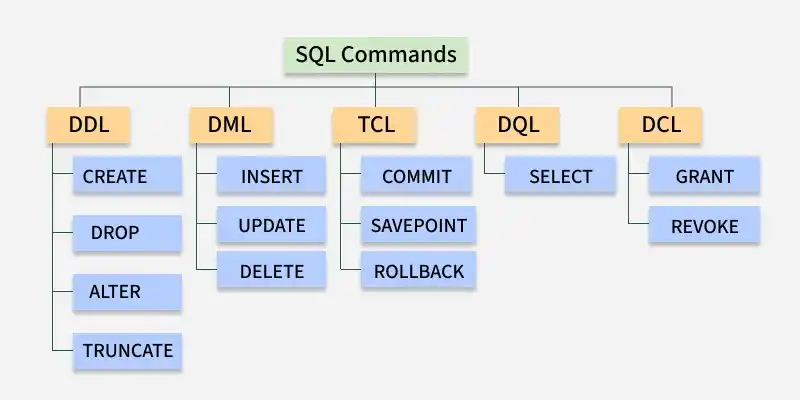
SQL COMMANDS
1. DDL - Data Definition Language
DDL (Data Definition Language) consists of SQL commands that can be used for defining, altering and deleting database structures such as tables, indexes and schemas. It simply deals with descriptions of the database schema and is used to create and modify the structure of database objects in the database
| Command | Description | Syntax |
|---|---|---|
| CREATE | Create database or its objects (table, index, function, views, stored procedure and triggers) | CREATE TABLE table_name (column1 data_type, column2 data_type, ...); |
| DROP | Delete objects from the database | DROP TABLE table_name; |
| ALTER | Alter the structure of the database | ALTER TABLE table_name ADD COLUMN column_name data_type; |
| TRUNCATE | Remove all records from a table, including all spaces allocated for the records are removed | TRUNCATE TABLE table_name; |
| COMMENT | Add comments to the data dictionary | COMMENT ON TABLE table_name IS 'comment_text'; |
| RENAME | Rename an object existing in the database | RENAME TABLE old_table_name TO new_table_name; |
Example:
CREATE TABLE employees (
employee_id INT PRIMARY KEY,
first_name VARCHAR(50),
last_name VARCHAR(50),
hire_date DATE
);
In this example, a new table called employees is created with columns for employee ID, first name, last name and hire date.
2. DQL - Data Query Language
DQL is used to fetch data from the database. The main command is SELECT, which retrieves records based on the query. The output is returned as a result set (a temporary table) that can be viewed or used in applications.
| Command | Description | Syntax |
|---|---|---|
| SELECT | It is used to retrieve data from the database | SELECT column1, column2, ...FROM table_name WHERE condition; |
| FROM | Indicates the table(s) from which to retrieve data. | SELECT column1FROM table_name; |
| WHERE | Filters rows before any grouping or aggregation | SELECT column1FROM table_nameWHERE condition; |
| GROUP BY | Groups rows that have the same values in specified columns. | SELECT column1, AVG_FUNCTION(column2)FROM table_nameGROUP BY column1; |
| HAVING | Filters the results of GROUP BY | SELECT column1, AVG_FUNCTION(column2)FROM table_nameGROUP BY column1HAVING condition; |
| DISTINCT | Removes duplicate rows from the result set | SELECT DISTINCT column1, column2, ...FROM table_name; |
| ORDER BY | Sorts the result set by one or more columns | SELECT column1FROM table_nameORDER BY column1 [ASC | DESC]; |
| LIMIT | Used to restrict the number of rows returned in a SELECT query (commonly supported in MySQL and PostgreSQL). | SELECT * FROM table_name LIMIT number; |
**Note: DQL has only one command, SELECT. Other terms like FROM, WHERE, GROUP BY, HAVING, ORDER BY, DISTINCT and LIMIT are clauses of SELECT, not separate commands.
Example:
SELECT first_name, last_name, hire_date
FROM employees
WHERE department = 'Sales'
ORDER BY hire_date DESC;
This query retrieves employees first and last names, along with their hire dates, from the employees table, specifically for those in the 'Sales' department, sorted by hire date.
3. DML - Data Manipulation Language
DML commands are used to manipulate the data stored in database tables. With DML, you can insert new records, update existing ones, delete unwanted data or retrieve information.
| Command | Description | Syntax |
|---|---|---|
| INSERT | Insert data into a table | INSERT INTO table_name (column1, column2, ...) VALUES (value1, value2, ...); |
| UPDATE | Update existing data within a table | UPDATE table_name SET column1 = value1, column2 = value2 WHERE condition; |
| DELETE | Delete records from a database table | DELETE FROM table_name WHERE condition; |
Example:
INSERT INTO employees (first_name, last_name, department)
VALUES ('Jane', 'Smith', 'HR');
This query inserts a new record into employees table with first name 'Jane', last name 'Smith' and department 'HR'.
4. DCL - Data Control Language
DCL (Data Control Language) includes commands such as GRANT and REVOKE which mainly deal with the rights, permissions and other controls of the database system. These commands are used to control access to data in the database by granting or revoking permissions.
| Command | Description | Syntax |
|---|---|---|
| GRANT | Assigns new privileges to a user account, allowing access to specific database objects, actions or functions. | GRANT privilege_type [(column_list)] ON [object_type] object_name TO user [WITH GRANT OPTION]; |
| REVOKE | Removes previously granted privileges from a user account, taking away their access to certain database objects or actions. | REVOKE [GRANT OPTION FOR] privilege_type [(column_list)] ON [object_type] object_name FROM user [CASCADE]; |
Example:
GRANT SELECT, UPDATE ON employees TO user_name;
This command grants the user user_name the permissions to select and update records in the employees table.
5. TCL - Transaction Control Language
Transactions group a set of tasks into a single execution unit. Each transaction begins with a specific task and ends when all the tasks in the group are successfully completed. If any of the tasks fail, transaction fails. Therefore, a transaction has only two results: success or failure.
| Command | Description | Syntax |
|---|---|---|
| BEGIN TRANSACTION | Starts a new transaction | BEGIN TRANSACTION [transaction_name]; |
| COMMIT | Saves all changes made during the transaction | COMMIT; |
| ROLLBACK | Undoes all changes made during the transaction | ROLLBACK; |
| SAVEPOINT | Creates a savepoint within the current transaction | SAVEPOINT savepoint_name; |
Example:
BEGIN TRANSACTION;
UPDATE employees SET department = 'Marketing' WHERE department = 'Sales';
SAVEPOINT before_update;
UPDATE employees SET department = 'IT' WHERE department = 'HR';
ROLLBACK TO SAVEPOINT before_update;
COMMIT;
In this example, a transaction is started, changes are made and a savepoint is set. If needed, the transaction can be rolled back to the savepoint before being committed.