10 minutes to pandas — pandas 3.0.1 documentation (original) (raw)
This is a short introduction to pandas, geared mainly for new users. You can see more complex recipes in the Cookbook.
Customarily, we import as follows:
In [1]: import numpy as np
In [2]: import pandas as pd
Basic data structures in pandas#
pandas provides two types of classes for handling data:
- Series: a one-dimensional labeled array holding data of any type
such as integers, strings, Python objects etc. - DataFrame: a two-dimensional data structure that holds data like a two-dimension array or a table with rows and columns.
Object creation#
See the Intro to data structures section.
Creating a Series by passing a list of values, letting pandas create a default RangeIndex.
In [3]: s = pd.Series([1, 3, 5, np.nan, 6, 8])
In [4]: s Out[4]: 0 1.0 1 3.0 2 5.0 3 NaN 4 6.0 5 8.0 dtype: float64
Creating a DataFrame by passing a NumPy array with a datetime index using date_range()and labeled columns:
In [5]: dates = pd.date_range("20130101", periods=6)
In [6]: dates Out[6]: DatetimeIndex(['2013-01-01', '2013-01-02', '2013-01-03', '2013-01-04', '2013-01-05', '2013-01-06'], dtype='datetime64[us]', freq='D')
In [7]: df = pd.DataFrame(np.random.randn(6, 4), index=dates, columns=list("ABCD"))
In [8]: df Out[8]: A B C D 2013-01-01 0.469112 -0.282863 -1.509059 -1.135632 2013-01-02 1.212112 -0.173215 0.119209 -1.044236 2013-01-03 -0.861849 -2.104569 -0.494929 1.071804 2013-01-04 0.721555 -0.706771 -1.039575 0.271860 2013-01-05 -0.424972 0.567020 0.276232 -1.087401 2013-01-06 -0.673690 0.113648 -1.478427 0.524988
Creating a DataFrame by passing a dictionary of objects where the keys are the column labels and the values are the column values.
In [9]: df2 = pd.DataFrame( ...: { ...: "A": 1.0, ...: "B": pd.Timestamp("20130102"), ...: "C": pd.Series(1, index=list(range(4)), dtype="float32"), ...: "D": np.array([3] * 4, dtype="int32"), ...: "E": pd.Categorical(["test", "train", "test", "train"]), ...: "F": "foo", ...: } ...: ) ...:
In [10]: df2 Out[10]: A B C D E F 0 1.0 2013-01-02 1.0 3 test foo 1 1.0 2013-01-02 1.0 3 train foo 2 1.0 2013-01-02 1.0 3 test foo 3 1.0 2013-01-02 1.0 3 train foo
The columns of the resulting DataFrame have differentdtypes:
In [11]: df2.dtypes Out[11]: A float64 B datetime64[us] C float32 D int32 E category F str dtype: object
If you’re using IPython, tab completion for column names (as well as public attributes) is automatically enabled. Here’s a subset of the attributes that will be completed:
In [12]: df2. # noqa: E225, E999 df2.A df2.bool df2.abs df2.boxplot df2.add df2.C df2.add_prefix df2.clip df2.add_suffix df2.columns df2.align df2.copy df2.all df2.count df2.any df2.combine df2.append df2.D df2.apply df2.describe df2.B df2.duplicated df2.diff
As you can see, the columns A, B, C, and D are automatically tab completed. E and F are there as well; the rest of the attributes have been truncated for brevity.
Viewing data#
See the Essential basic functionality section.
Use DataFrame.head() and DataFrame.tail() to view the top and bottom rows of the frame respectively:
In [13]: df.head() Out[13]: A B C D 2013-01-01 0.469112 -0.282863 -1.509059 -1.135632 2013-01-02 1.212112 -0.173215 0.119209 -1.044236 2013-01-03 -0.861849 -2.104569 -0.494929 1.071804 2013-01-04 0.721555 -0.706771 -1.039575 0.271860 2013-01-05 -0.424972 0.567020 0.276232 -1.087401
In [14]: df.tail(3) Out[14]: A B C D 2013-01-04 0.721555 -0.706771 -1.039575 0.271860 2013-01-05 -0.424972 0.567020 0.276232 -1.087401 2013-01-06 -0.673690 0.113648 -1.478427 0.524988
Display the DataFrame.index or DataFrame.columns:
In [15]: df.index Out[15]: DatetimeIndex(['2013-01-01', '2013-01-02', '2013-01-03', '2013-01-04', '2013-01-05', '2013-01-06'], dtype='datetime64[us]', freq='D')
In [16]: df.columns Out[16]: Index(['A', 'B', 'C', 'D'], dtype='str')
Return a NumPy representation of the underlying data with DataFrame.to_numpy()without the index or column labels:
In [17]: df.to_numpy() Out[17]: array([[ 0.4691, -0.2829, -1.5091, -1.1356], [ 1.2121, -0.1732, 0.1192, -1.0442], [-0.8618, -2.1046, -0.4949, 1.0718], [ 0.7216, -0.7068, -1.0396, 0.2719], [-0.425 , 0.567 , 0.2762, -1.0874], [-0.6737, 0.1136, -1.4784, 0.525 ]])
Note
NumPy arrays have one dtype for the entire array while pandas DataFrames have one dtype per column. When you call DataFrame.to_numpy(), pandas will find the NumPy dtype that can hold all of the dtypes in the DataFrame. If the common data type is object, DataFrame.to_numpy() will require copying data.
In [18]: df2.dtypes Out[18]: A float64 B datetime64[us] C float32 D int32 E category F str dtype: object
In [19]: df2.to_numpy() Out[19]: array([[1.0, Timestamp('2013-01-02 00:00:00'), 1.0, 3, 'test', 'foo'], [1.0, Timestamp('2013-01-02 00:00:00'), 1.0, 3, 'train', 'foo'], [1.0, Timestamp('2013-01-02 00:00:00'), 1.0, 3, 'test', 'foo'], [1.0, Timestamp('2013-01-02 00:00:00'), 1.0, 3, 'train', 'foo']], dtype=object)
describe() shows a quick statistic summary of your data:
In [20]: df.describe() Out[20]: A B C D count 6.000000 6.000000 6.000000 6.000000 mean 0.073711 -0.431125 -0.687758 -0.233103 std 0.843157 0.922818 0.779887 0.973118 min -0.861849 -2.104569 -1.509059 -1.135632 25% -0.611510 -0.600794 -1.368714 -1.076610 50% 0.022070 -0.228039 -0.767252 -0.386188 75% 0.658444 0.041933 -0.034326 0.461706 max 1.212112 0.567020 0.276232 1.071804
Transposing your data:
In [21]: df.T Out[21]: 2013-01-01 2013-01-02 2013-01-03 2013-01-04 2013-01-05 2013-01-06 A 0.469112 1.212112 -0.861849 0.721555 -0.424972 -0.673690 B -0.282863 -0.173215 -2.104569 -0.706771 0.567020 0.113648 C -1.509059 0.119209 -0.494929 -1.039575 0.276232 -1.478427 D -1.135632 -1.044236 1.071804 0.271860 -1.087401 0.524988
DataFrame.sort_index() sorts by an axis:
In [22]: df.sort_index(axis=1, ascending=False) Out[22]: D C B A 2013-01-01 -1.135632 -1.509059 -0.282863 0.469112 2013-01-02 -1.044236 0.119209 -0.173215 1.212112 2013-01-03 1.071804 -0.494929 -2.104569 -0.861849 2013-01-04 0.271860 -1.039575 -0.706771 0.721555 2013-01-05 -1.087401 0.276232 0.567020 -0.424972 2013-01-06 0.524988 -1.478427 0.113648 -0.673690
DataFrame.sort_values() sorts by values:
In [23]: df.sort_values(by="B") Out[23]: A B C D 2013-01-03 -0.861849 -2.104569 -0.494929 1.071804 2013-01-04 0.721555 -0.706771 -1.039575 0.271860 2013-01-01 0.469112 -0.282863 -1.509059 -1.135632 2013-01-02 1.212112 -0.173215 0.119209 -1.044236 2013-01-06 -0.673690 0.113648 -1.478427 0.524988 2013-01-05 -0.424972 0.567020 0.276232 -1.087401
Selection#
See the indexing documentation Indexing and Selecting Data and MultiIndex / Advanced Indexing.
Getitem ([])#
For a DataFrame, passing a single label selects a column and yields a Series:
In [24]: df["A"] Out[24]: 2013-01-01 0.469112 2013-01-02 1.212112 2013-01-03 -0.861849 2013-01-04 0.721555 2013-01-05 -0.424972 2013-01-06 -0.673690 Freq: D, Name: A, dtype: float64
If the label only contains letters, numbers, and underscores, you can alternatively use the column name attribute:
In [25]: df.A Out[25]: 2013-01-01 0.469112 2013-01-02 1.212112 2013-01-03 -0.861849 2013-01-04 0.721555 2013-01-05 -0.424972 2013-01-06 -0.673690 Freq: D, Name: A, dtype: float64
Passing a list of column labels selects multiple columns, which can be useful for getting a subset/rearranging:
In [26]: df[["B", "A"]] Out[26]: B A 2013-01-01 -0.282863 0.469112 2013-01-02 -0.173215 1.212112 2013-01-03 -2.104569 -0.861849 2013-01-04 -0.706771 0.721555 2013-01-05 0.567020 -0.424972 2013-01-06 0.113648 -0.673690
For a DataFrame, passing a slice : selects matching rows:
In [27]: df[0:3] Out[27]: A B C D 2013-01-01 0.469112 -0.282863 -1.509059 -1.135632 2013-01-02 1.212112 -0.173215 0.119209 -1.044236 2013-01-03 -0.861849 -2.104569 -0.494929 1.071804
In [28]: df["20130102":"20130104"] Out[28]: A B C D 2013-01-02 1.212112 -0.173215 0.119209 -1.044236 2013-01-03 -0.861849 -2.104569 -0.494929 1.071804 2013-01-04 0.721555 -0.706771 -1.039575 0.271860
Selection by label#
See more in Selection by Label using DataFrame.loc() or DataFrame.at().
Selecting a row matching a label:
In [29]: df.loc[dates[0]] Out[29]: A 0.469112 B -0.282863 C -1.509059 D -1.135632 Name: 2013-01-01 00:00:00, dtype: float64
Selecting all rows (:) with a select column labels:
In [30]: df.loc[:, ["A", "B"]] Out[30]: A B 2013-01-01 0.469112 -0.282863 2013-01-02 1.212112 -0.173215 2013-01-03 -0.861849 -2.104569 2013-01-04 0.721555 -0.706771 2013-01-05 -0.424972 0.567020 2013-01-06 -0.673690 0.113648
For label slicing, both endpoints are included:
In [31]: df.loc["20130102":"20130104", ["A", "B"]] Out[31]: A B 2013-01-02 1.212112 -0.173215 2013-01-03 -0.861849 -2.104569 2013-01-04 0.721555 -0.706771
Selecting a single row and column label returns a scalar:
In [32]: df.loc[dates[0], "A"] Out[32]: np.float64(0.4691122999071863)
For getting fast access to a scalar (equivalent to the prior method):
In [33]: df.at[dates[0], "A"] Out[33]: np.float64(0.4691122999071863)
Selection by position#
See more in Selection by Position using DataFrame.iloc() or DataFrame.iat().
Select via the position of the passed integers:
In [34]: df.iloc[3] Out[34]: A 0.721555 B -0.706771 C -1.039575 D 0.271860 Name: 2013-01-04 00:00:00, dtype: float64
Integer slices acts similar to NumPy/Python:
In [35]: df.iloc[3:5, 0:2] Out[35]: A B 2013-01-04 0.721555 -0.706771 2013-01-05 -0.424972 0.567020
Lists of integer position locations:
In [36]: df.iloc[[1, 2, 4], [0, 2]] Out[36]: A C 2013-01-02 1.212112 0.119209 2013-01-03 -0.861849 -0.494929 2013-01-05 -0.424972 0.276232
For slicing rows explicitly:
In [37]: df.iloc[1:3, :] Out[37]: A B C D 2013-01-02 1.212112 -0.173215 0.119209 -1.044236 2013-01-03 -0.861849 -2.104569 -0.494929 1.071804
For slicing columns explicitly:
In [38]: df.iloc[:, 1:3] Out[38]: B C 2013-01-01 -0.282863 -1.509059 2013-01-02 -0.173215 0.119209 2013-01-03 -2.104569 -0.494929 2013-01-04 -0.706771 -1.039575 2013-01-05 0.567020 0.276232 2013-01-06 0.113648 -1.478427
For getting a value explicitly:
In [39]: df.iloc[1, 1] Out[39]: np.float64(-0.17321464905330858)
For getting fast access to a scalar (equivalent to the prior method):
In [40]: df.iat[1, 1] Out[40]: np.float64(-0.17321464905330858)
Boolean indexing#
Select rows where df.A is greater than 0.
In [41]: df[df["A"] > 0] Out[41]: A B C D 2013-01-01 0.469112 -0.282863 -1.509059 -1.135632 2013-01-02 1.212112 -0.173215 0.119209 -1.044236 2013-01-04 0.721555 -0.706771 -1.039575 0.271860
Selecting values from a DataFrame where a boolean condition is met:
In [42]: df[df > 0] Out[42]: A B C D 2013-01-01 0.469112 NaN NaN NaN 2013-01-02 1.212112 NaN 0.119209 NaN 2013-01-03 NaN NaN NaN 1.071804 2013-01-04 0.721555 NaN NaN 0.271860 2013-01-05 NaN 0.567020 0.276232 NaN 2013-01-06 NaN 0.113648 NaN 0.524988
Using isin() method for filtering:
In [43]: df2 = df.copy()
In [44]: df2["E"] = ["one", "one", "two", "three", "four", "three"]
In [45]: df2 Out[45]: A B C D E 2013-01-01 0.469112 -0.282863 -1.509059 -1.135632 one 2013-01-02 1.212112 -0.173215 0.119209 -1.044236 one 2013-01-03 -0.861849 -2.104569 -0.494929 1.071804 two 2013-01-04 0.721555 -0.706771 -1.039575 0.271860 three 2013-01-05 -0.424972 0.567020 0.276232 -1.087401 four 2013-01-06 -0.673690 0.113648 -1.478427 0.524988 three
In [46]: df2[df2["E"].isin(["two", "four"])] Out[46]: A B C D E 2013-01-03 -0.861849 -2.104569 -0.494929 1.071804 two 2013-01-05 -0.424972 0.567020 0.276232 -1.087401 four
Setting#
Setting a new column automatically aligns the data by the indexes:
In [47]: s1 = pd.Series( ....: [1, 2, 3, 4, 5, 6], ....: index=pd.date_range("20130102", periods=6)) ....:
In [48]: s1 Out[48]: 2013-01-02 1 2013-01-03 2 2013-01-04 3 2013-01-05 4 2013-01-06 5 2013-01-07 6 Freq: D, dtype: int64
In [49]: df["F"] = s1
Setting values by label:
In [50]: df.at[dates[0], "A"] = 0
Setting values by position:
In [51]: df.iat[0, 1] = 0
Setting by assigning with a NumPy array:
In [52]: df.loc[:, "D"] = np.array([5] * len(df))
The result of the prior setting operations:
In [53]: df Out[53]: A B C D F 2013-01-01 0.000000 0.000000 -1.509059 5.0 NaN 2013-01-02 1.212112 -0.173215 0.119209 5.0 1.0 2013-01-03 -0.861849 -2.104569 -0.494929 5.0 2.0 2013-01-04 0.721555 -0.706771 -1.039575 5.0 3.0 2013-01-05 -0.424972 0.567020 0.276232 5.0 4.0 2013-01-06 -0.673690 0.113648 -1.478427 5.0 5.0
A where operation with setting:
In [54]: df2 = df.copy()
In [55]: df2[df2 > 0] = -df2
In [56]: df2 Out[56]: A B C D F 2013-01-01 0.000000 0.000000 -1.509059 -5.0 NaN 2013-01-02 -1.212112 -0.173215 -0.119209 -5.0 -1.0 2013-01-03 -0.861849 -2.104569 -0.494929 -5.0 -2.0 2013-01-04 -0.721555 -0.706771 -1.039575 -5.0 -3.0 2013-01-05 -0.424972 -0.567020 -0.276232 -5.0 -4.0 2013-01-06 -0.673690 -0.113648 -1.478427 -5.0 -5.0
Missing data#
For NumPy data types, np.nan represents missing data. It is by default not included in computations. See the Missing Data section.
Reindexing allows you to change/add/delete the index on a specified axis. This returns a copy of the data:
In [57]: df1 = df.reindex(index=dates[0:4], columns=list(df.columns) + ["E"])
In [58]: df1.loc[dates[0] : dates[1], "E"] = 1
In [59]: df1 Out[59]: A B C D F E 2013-01-01 0.000000 0.000000 -1.509059 5.0 NaN 1.0 2013-01-02 1.212112 -0.173215 0.119209 5.0 1.0 1.0 2013-01-03 -0.861849 -2.104569 -0.494929 5.0 2.0 NaN 2013-01-04 0.721555 -0.706771 -1.039575 5.0 3.0 NaN
DataFrame.dropna() drops any rows that have missing data:
In [60]: df1.dropna(how="any") Out[60]: A B C D F E 2013-01-02 1.212112 -0.173215 0.119209 5.0 1.0 1.0
DataFrame.fillna() fills missing data:
In [61]: df1.fillna(value=5) Out[61]: A B C D F E 2013-01-01 0.000000 0.000000 -1.509059 5.0 5.0 1.0 2013-01-02 1.212112 -0.173215 0.119209 5.0 1.0 1.0 2013-01-03 -0.861849 -2.104569 -0.494929 5.0 2.0 5.0 2013-01-04 0.721555 -0.706771 -1.039575 5.0 3.0 5.0
isna() gets the boolean mask where values are nan:
In [62]: pd.isna(df1) Out[62]: A B C D F E 2013-01-01 False False False False True False 2013-01-02 False False False False False False 2013-01-03 False False False False False True 2013-01-04 False False False False False True
Operations#
See the Basic section on Binary Ops.
Stats#
Operations in general exclude missing data.
Calculate the mean value for each column:
In [63]: df.mean() Out[63]: A -0.004474 B -0.383981 C -0.687758 D 5.000000 F 3.000000 dtype: float64
Calculate the mean value for each row:
In [64]: df.mean(axis=1) Out[64]: 2013-01-01 0.872735 2013-01-02 1.431621 2013-01-03 0.707731 2013-01-04 1.395042 2013-01-05 1.883656 2013-01-06 1.592306 Freq: D, dtype: float64
Operating with another Series or DataFrame with a different index or column will align the result with the union of the index or column labels. In addition, pandas automatically broadcasts along the specified dimension and will fill unaligned labels with np.nan.
In [65]: s = pd.Series([1, 3, 5, np.nan, 6, 8], index=dates).shift(2)
In [66]: s Out[66]: 2013-01-01 NaN 2013-01-02 NaN 2013-01-03 1.0 2013-01-04 3.0 2013-01-05 5.0 2013-01-06 NaN Freq: D, dtype: float64
In [67]: df.sub(s, axis="index") Out[67]: A B C D F 2013-01-01 NaN NaN NaN NaN NaN 2013-01-02 NaN NaN NaN NaN NaN 2013-01-03 -1.861849 -3.104569 -1.494929 4.0 1.0 2013-01-04 -2.278445 -3.706771 -4.039575 2.0 0.0 2013-01-05 -5.424972 -4.432980 -4.723768 0.0 -1.0 2013-01-06 NaN NaN NaN NaN NaN
User defined functions#
DataFrame.agg() and DataFrame.transform() applies a user defined function that reduces or broadcasts its result respectively.
In [68]: df.agg(lambda x: np.mean(x) * 5.6) Out[68]: A -0.025054 B -2.150294 C -3.851445 D 28.000000 F 16.800000 dtype: float64
In [69]: df.transform(lambda x: x * 101.2) Out[69]: A B C D F 2013-01-01 0.000000 0.000000 -152.716721 506.0 NaN 2013-01-02 122.665737 -17.529322 12.063922 506.0 101.2 2013-01-03 -87.219115 -212.982405 -50.086843 506.0 202.4 2013-01-04 73.021382 -71.525239 -105.204988 506.0 303.6 2013-01-05 -43.007200 57.382459 27.954680 506.0 404.8 2013-01-06 -68.177398 11.501219 -149.616767 506.0 506.0
Value Counts#
See more at Histogramming and Discretization.
In [70]: s = pd.Series(np.random.randint(0, 7, size=10))
In [71]: s Out[71]: 0 4 1 2 2 1 3 2 4 6 5 4 6 4 7 6 8 4 9 4 dtype: int64
In [72]: s.value_counts() Out[72]: 4 5 2 2 6 2 1 1 Name: count, dtype: int64
String Methods#
Series is equipped with a set of string processing methods in the strattribute that make it easy to operate on each element of the array, as in the code snippet below. See more at Vectorized String Methods.
In [73]: s = pd.Series(["A", "B", "C", "Aaba", "Baca", np.nan, "CABA", "dog", "cat"])
In [74]: s.str.lower() Out[74]: 0 a 1 b 2 c 3 aaba 4 baca 5 NaN 6 caba 7 dog 8 cat dtype: str
Merge#
Concat#
pandas provides various facilities for easily combining together Series andDataFrame objects with various kinds of set logic for the indexes and relational algebra functionality in the case of join / merge-type operations.
See the Merging section.
Concatenating pandas objects together row-wise with concat():
In [75]: df = pd.DataFrame(np.random.randn(10, 4))
In [76]: df Out[76]: 0 1 2 3 0 -0.548702 1.467327 -1.015962 -0.483075 1 1.637550 -1.217659 -0.291519 -1.745505 2 -0.263952 0.991460 -0.919069 0.266046 3 -0.709661 1.669052 1.037882 -1.705775 4 -0.919854 -0.042379 1.247642 -0.009920 5 0.290213 0.495767 0.362949 1.548106 6 -1.131345 -0.089329 0.337863 -0.945867 7 -0.932132 1.956030 0.017587 -0.016692 8 -0.575247 0.254161 -1.143704 0.215897 9 1.193555 -0.077118 -0.408530 -0.862495
break it into pieces
In [77]: pieces = [df[:3], df[3:7], df[7:]]
In [78]: pd.concat(pieces) Out[78]: 0 1 2 3 0 -0.548702 1.467327 -1.015962 -0.483075 1 1.637550 -1.217659 -0.291519 -1.745505 2 -0.263952 0.991460 -0.919069 0.266046 3 -0.709661 1.669052 1.037882 -1.705775 4 -0.919854 -0.042379 1.247642 -0.009920 5 0.290213 0.495767 0.362949 1.548106 6 -1.131345 -0.089329 0.337863 -0.945867 7 -0.932132 1.956030 0.017587 -0.016692 8 -0.575247 0.254161 -1.143704 0.215897 9 1.193555 -0.077118 -0.408530 -0.862495
Note
Adding a column to a DataFrame is relatively fast. However, adding a row requires a copy, and may be expensive. We recommend passing a pre-built list of records to the DataFrame constructor instead of building a DataFrame by iteratively appending records to it.
Join#
merge() enables SQL style join types along specific columns. See the Database style joining section.
In [79]: left = pd.DataFrame({"key": ["foo", "foo"], "lval": [1, 2]})
In [80]: right = pd.DataFrame({"key": ["foo", "foo"], "rval": [4, 5]})
In [81]: left Out[81]: key lval 0 foo 1 1 foo 2
In [82]: right Out[82]: key rval 0 foo 4 1 foo 5
In [83]: pd.merge(left, right, on="key") Out[83]: key lval rval 0 foo 1 4 1 foo 1 5 2 foo 2 4 3 foo 2 5
merge() on unique keys:
In [84]: left = pd.DataFrame({"key": ["foo", "bar"], "lval": [1, 2]})
In [85]: right = pd.DataFrame({"key": ["foo", "bar"], "rval": [4, 5]})
In [86]: left Out[86]: key lval 0 foo 1 1 bar 2
In [87]: right Out[87]: key rval 0 foo 4 1 bar 5
In [88]: pd.merge(left, right, on="key") Out[88]: key lval rval 0 foo 1 4 1 bar 2 5
Grouping#
By “group by” we are referring to a process involving one or more of the following steps:
- Splitting the data into groups based on some criteria
- Applying a function to each group independently
- Combining the results into a data structure
See the Grouping section.
In [89]: df = pd.DataFrame( ....: { ....: "A": ["foo", "bar", "foo", "bar", "foo", "bar", "foo", "foo"], ....: "B": ["one", "one", "two", "three", "two", "two", "one", "three"], ....: "C": np.random.randn(8), ....: "D": np.random.randn(8), ....: } ....: ) ....:
In [90]: df Out[90]: A B C D 0 foo one 1.346061 -1.577585 1 bar one 1.511763 0.396823 2 foo two 1.627081 -0.105381 3 bar three -0.990582 -0.532532 4 foo two -0.441652 1.453749 5 bar two 1.211526 1.208843 6 foo one 0.268520 -0.080952 7 foo three 0.024580 -0.264610
Grouping by a column label, selecting column labels, and then applying theDataFrameGroupBy.sum() function to the resulting groups:
In [91]: df.groupby("A")[["C", "D"]].sum()
Out[91]:
C D
A
bar 1.732707 1.073134
foo 2.824590 -0.574779
Grouping by multiple columns label forms MultiIndex.
In [92]: df.groupby(["A", "B"]).sum()
Out[92]:
C D
A B
bar one 1.511763 0.396823
three -0.990582 -0.532532
two 1.211526 1.208843
foo one 1.614581 -1.658537
three 0.024580 -0.264610
two 1.185429 1.348368
Reshaping#
See the sections on Hierarchical Indexing andReshaping.
Stack#
In [93]: arrays = [ ....: ["bar", "bar", "baz", "baz", "foo", "foo", "qux", "qux"], ....: ["one", "two", "one", "two", "one", "two", "one", "two"], ....: ] ....:
In [94]: index = pd.MultiIndex.from_arrays(arrays, names=["first", "second"])
In [95]: df = pd.DataFrame(np.random.randn(8, 2), index=index, columns=["A", "B"])
In [96]: df2 = df[:4]
In [97]: df2
Out[97]:
A B
first second
bar one -0.727965 -0.589346
two 0.339969 -0.693205
baz one -0.339355 0.593616
two 0.884345 1.591431
The stack() method “compresses” a level in the DataFrame’s columns:
In [98]: stacked = df2.stack()
In [99]: stacked
Out[99]:
first second
bar one A -0.727965
B -0.589346
two A 0.339969
B -0.693205
baz one A -0.339355
B 0.593616
two A 0.884345
B 1.591431
dtype: float64
With a “stacked” DataFrame or Series (having a MultiIndex as theindex), the inverse operation of stack() isunstack(), which by default unstacks the last level:
In [100]: stacked.unstack()
Out[100]:
A B
first second
bar one -0.727965 -0.589346
two 0.339969 -0.693205
baz one -0.339355 0.593616
two 0.884345 1.591431
In [101]: stacked.unstack(1)
Out[101]:
second one two
first
bar A -0.727965 0.339969
B -0.589346 -0.693205
baz A -0.339355 0.884345
B 0.593616 1.591431
In [102]: stacked.unstack(0)
Out[102]:
first bar baz
second
one A -0.727965 -0.339355
B -0.589346 0.593616
two A 0.339969 0.884345
B -0.693205 1.591431
Pivot tables#
See the section on Pivot Tables.
In [103]: df = pd.DataFrame( .....: { .....: "A": ["one", "one", "two", "three"] * 3, .....: "B": ["A", "B", "C"] * 4, .....: "C": ["foo", "foo", "foo", "bar", "bar", "bar"] * 2, .....: "D": np.random.randn(12), .....: "E": np.random.randn(12), .....: } .....: ) .....:
In [104]: df Out[104]: A B C D E 0 one A foo -1.202872 0.047609 1 one B foo -1.814470 -0.136473 2 two C foo 1.018601 -0.561757 3 three A bar -0.595447 -1.623033 4 one B bar 1.395433 0.029399 5 one C bar -0.392670 -0.542108 6 two A foo 0.007207 0.282696 7 three B foo 1.928123 -0.087302 8 one C foo -0.055224 -1.575170 9 one A bar 2.395985 1.771208 10 two B bar 1.552825 0.816482 11 three C bar 0.166599 1.100230
pivot_table() pivots a DataFrame specifying the values, index and columns
In [105]: pd.pivot_table(df, values="D", index=["A", "B"], columns=["C"])
Out[105]:
C bar foo
A B
one A 2.395985 -1.202872
B 1.395433 -1.814470
C -0.392670 -0.055224
three A -0.595447 NaN
B NaN 1.928123
C 0.166599 NaN
two A NaN 0.007207
B 1.552825 NaN
C NaN 1.018601
Time series#
pandas has simple, powerful, and efficient functionality for performing resampling operations during frequency conversion (e.g., converting secondly data into 5-minutely data). This is extremely common in, but not limited to, financial applications. See the Time Series section.
In [106]: rng = pd.date_range("1/1/2012", periods=100, freq="s")
In [107]: ts = pd.Series(np.random.randint(0, 500, len(rng)), index=rng)
In [108]: ts.resample("5Min").sum() Out[108]: 2012-01-01 24182 Freq: 5min, dtype: int64
Series.tz_localize() localizes a time series to a time zone:
In [109]: rng = pd.date_range("3/6/2012 00:00", periods=5, freq="D")
In [110]: ts = pd.Series(np.random.randn(len(rng)), rng)
In [111]: ts Out[111]: 2012-03-06 1.857704 2012-03-07 -1.193545 2012-03-08 0.677510 2012-03-09 -0.153931 2012-03-10 0.520091 Freq: D, dtype: float64
In [112]: ts_utc = ts.tz_localize("UTC")
In [113]: ts_utc Out[113]: 2012-03-06 00:00:00+00:00 1.857704 2012-03-07 00:00:00+00:00 -1.193545 2012-03-08 00:00:00+00:00 0.677510 2012-03-09 00:00:00+00:00 -0.153931 2012-03-10 00:00:00+00:00 0.520091 Freq: D, dtype: float64
Series.tz_convert() converts a timezones aware time series to another time zone:
In [114]: ts_utc.tz_convert("US/Eastern") Out[114]: 2012-03-05 19:00:00-05:00 1.857704 2012-03-06 19:00:00-05:00 -1.193545 2012-03-07 19:00:00-05:00 0.677510 2012-03-08 19:00:00-05:00 -0.153931 2012-03-09 19:00:00-05:00 0.520091 dtype: float64
Adding a non-fixed duration (BusinessDay) to a time series:
In [115]: rng Out[115]: DatetimeIndex(['2012-03-06', '2012-03-07', '2012-03-08', '2012-03-09', '2012-03-10'], dtype='datetime64[us]', freq='D')
In [116]: rng + pd.offsets.BusinessDay(5) Out[116]: DatetimeIndex(['2012-03-13', '2012-03-14', '2012-03-15', '2012-03-16', '2012-03-16'], dtype='datetime64[us]', freq=None)
Categoricals#
pandas can include categorical data in a DataFrame. For full docs, see thecategorical introduction and the API documentation.
In [117]: df = pd.DataFrame( .....: {"id": [1, 2, 3, 4, 5, 6], "raw_grade": ["a", "b", "b", "a", "a", "e"]} .....: ) .....:
Converting the raw grades to a categorical data type:
In [118]: df["grade"] = df["raw_grade"].astype("category")
In [119]: df["grade"] Out[119]: 0 a 1 b 2 b 3 a 4 a 5 e Name: grade, dtype: category Categories (3, str): ['a', 'b', 'e']
Rename the categories to more meaningful names:
In [120]: new_categories = ["very good", "good", "very bad"]
In [121]: df["grade"] = df["grade"].cat.rename_categories(new_categories)
Reorder the categories and simultaneously add the missing categories (methods under Series.cat() return a new Series by default):
In [122]: df["grade"] = df["grade"].cat.set_categories( .....: ["very bad", "bad", "medium", "good", "very good"] .....: ) .....:
In [123]: df["grade"] Out[123]: 0 very good 1 good 2 good 3 very good 4 very good 5 very bad Name: grade, dtype: category Categories (5, str): ['very bad', 'bad', 'medium', 'good', 'very good']
Sorting is per order in the categories, not lexical order:
In [124]: df.sort_values(by="grade") Out[124]: id raw_grade grade 5 6 e very bad 1 2 b good 2 3 b good 0 1 a very good 3 4 a very good 4 5 a very good
Grouping by a categorical column with observed=False also shows empty categories:
In [125]: df.groupby("grade", observed=False).size() Out[125]: grade very bad 1 bad 0 medium 0 good 2 very good 3 dtype: int64
Plotting#
See the Plotting docs.
We use the standard convention for referencing the matplotlib API:
In [126]: import matplotlib.pyplot as plt
In [127]: plt.close("all")
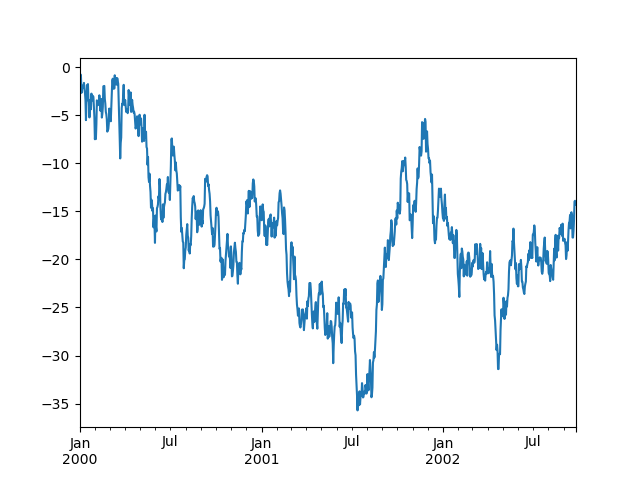
The plt.close method is used to close a figure window:
In [128]: ts = pd.Series(np.random.randn(1000), index=pd.date_range("1/1/2000", periods=1000))
In [129]: ts = ts.cumsum()
In [130]: ts.plot();
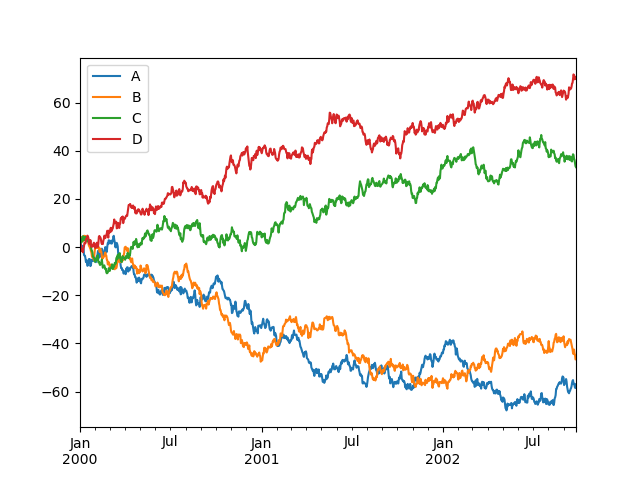
plot() plots all columns:
In [131]: df = pd.DataFrame( .....: np.random.randn(1000, 4), index=ts.index, columns=["A", "B", "C", "D"] .....: ) .....:
In [132]: df = df.cumsum()
In [133]: plt.figure();
In [134]: df.plot();
In [135]: plt.legend(loc='best');
Importing and exporting data#
See the IO Tools section.
CSV#
Writing to a csv file: using DataFrame.to_csv()
In [136]: df = pd.DataFrame(np.random.randint(0, 5, (10, 5)))
In [137]: df.to_csv("foo.csv")
Reading from a csv file: using read_csv()
In [138]: pd.read_csv("foo.csv") Out[138]: Unnamed: 0 0 1 2 3 4 0 0 4 3 1 1 2 1 1 1 0 2 3 2 2 2 1 4 2 1 2 3 3 0 4 0 2 2 4 4 4 2 2 3 4 5 5 4 0 4 3 1 6 6 2 1 2 0 3 7 7 4 0 4 4 4 8 8 4 4 1 0 1 9 9 0 4 3 0 3
Parquet#
Writing to a Parquet file:
In [139]: df.to_parquet("foo.parquet")
Reading from a Parquet file Store using read_parquet():
In [140]: pd.read_parquet("foo.parquet") Out[140]: 0 1 2 3 4 0 4 3 1 1 2 1 1 0 2 3 2 2 1 4 2 1 2 3 0 4 0 2 2 4 4 2 2 3 4 5 4 0 4 3 1 6 2 1 2 0 3 7 4 0 4 4 4 8 4 4 1 0 1 9 0 4 3 0 3
Excel#
Reading and writing to Excel.
Writing to an excel file using DataFrame.to_excel():
In [141]: df.to_excel("foo.xlsx", sheet_name="Sheet1")
Reading from an excel file using read_excel():
In [142]: pd.read_excel("foo.xlsx", "Sheet1", index_col=None, na_values=["NA"]) Out[142]: Unnamed: 0 0 1 2 3 4 0 0 4 3 1 1 2 1 1 1 0 2 3 2 2 2 1 4 2 1 2 3 3 0 4 0 2 2 4 4 4 2 2 3 4 5 5 4 0 4 3 1 6 6 2 1 2 0 3 7 7 4 0 4 4 4 8 8 4 4 1 0 1 9 9 0 4 3 0 3
Gotchas#
If you are attempting to perform a boolean operation on a Series or DataFrameyou might see an exception like:
In [143]: if pd.Series([False, True, False]): .....: print("I was true") .....:
ValueError Traceback (most recent call last) in ?() ----> 1 if pd.Series([False, True, False]): 2 print("I was true")
~/work/pandas/pandas/pandas/core/generic.py in ?(self) 1511 @final 1512 def bool(self) -> NoReturn: -> 1513 raise ValueError( 1514 f"The truth value of a {type(self).name} is ambiguous. " 1515 "Use a.empty, a.bool(), a.item(), a.any() or a.all()." 1516 )
ValueError: The truth value of a Series is ambiguous. Use a.empty, a.bool(), a.item(), a.any() or a.all().
See Comparisons and Gotchas for an explanation and what to do.