Advanced EDA (original) (raw)
Last Updated : 30 Apr, 2026
Advanced Exploratory Data Analysis (EDA) helps in understanding the structure and characteristics of a dataset before applying machine learning models. It involves analysing data to discover patterns, detect anomalies and study relationships between variables. This analysis provides insights that help in preparing the data for further modeling and analysis.
- Evaluates data quality by identifying missing values and inconsistencies
- Assists in selecting useful variables for model development
- Supports better decision-making during data preprocessing and model design
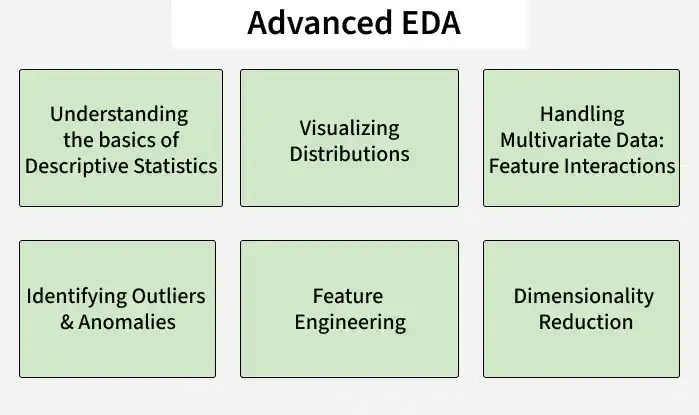
Advanced EDA
Understanding the Basics of Descriptive Statistics
Descriptive statistics give us a clear picture of the distribution, spread and central tendency of the data. These measures allow us to summarize the data in ways that make it easier to analyze and interpret. Below are some essential descriptive statistics used in EDA:
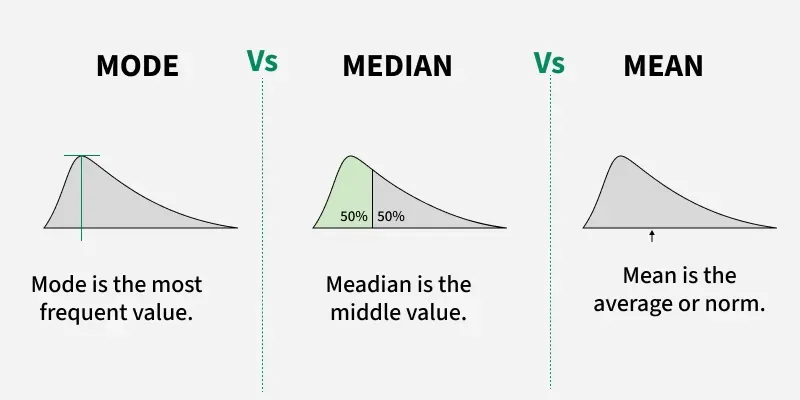
Mean, Median and Mode
1. Mean
The mean is the average of the data points, calculated by summing all values and dividing by the total number of observations.
- **Best used: The mean is useful for comparing datasets with similar distributions and no extreme values, such as comparing average income across regions or departments.
- ****Not suitable:**The mean is sensitive to outliers and skewed data extremely high or low values can distort the result and prevent it from representing the typical value of the dataset.
**Example: If we want to understand the average monthly sales of a store over the course of a year, we would calculate the mean sales to see the typical revenue generated each month.
2. Median
The median is the middle value of the dataset when arranged in ascending order. It is robust to outliers, meaning that extreme values do not significantly affect the median.
- **Best used: The median is useful for skewed datasets or those with outliers, as it better represents the typical value when the mean can be misleading.
- **Not suitable: The median may not be ideal for symmetric datasets when the exact average is needed, as it only represents the middle value and ignores the magnitude of other values.
**Example: In a dataset of household incomes, where a few individuals have very high incomes, the median provides a better representation of the typical household income than the mean would.
3. Mode
The mode is the most frequent value or category in the dataset.
- **Best used: The mode is useful for categorical or discrete data to identify the most frequently occurring value, such as the most popular product sold in a store.
- **Not suitable: The mode may not be useful for continuous data or datasets without repeated values, such as continuous measurements like height or weight that usually do not have a mode.
**Example: A company might want to know which product was sold the most during a promotional campaign. By calculating the mode, they can easily identify the most frequent product sold.
4. Standard Deviation
Standard deviation measures the amount of variation or dispersion from the mean. A low standard deviation means the data points are close to the mean, while a high standard deviation indicates a greater spread of data points.

Standard Deviation
- **Best used: Standard deviation is useful for understanding how spread out the data is for instance, in daily website traffic analysis, a high standard deviation indicates traffic varies greatly from day to day.
- **Not suitable: Standard deviation is sensitive to outliers and skewed data, so it may not always accurately represent the variability of the dataset.
**Example: If an e-commerce website experiences major traffic spikes on certain days, the standard deviation will indicate how much the daily traffic varies from the average, helping to identify whether the site’s traffic is consistent or highly variable.
5. Interquartile Range (IQR)
The IQR is the difference between the 75th percentile (Q3) and the 25th percentile (Q1) of the data. It represents the spread of the middle 50% of the data and is helpful for identifying outliers.
- **Best used: IQR helps detect outliers and understand the spread of the middle 50% of data, such as identifying students who performed significantly better or worse than most of the class when analyzing exam scores.
- **Not suitable: IQR is useful for all distributions but is especially helpful when outliers are present, where measures like mean or standard deviation may be more appropriate.
**Example: In a class of students, if we want to focus on the range of scores that represent the middle 50% of students and exclude extreme values (such as a few students who scored abnormally high or low), we would use the IQR.
6. Skewness
Skewness measures the asymmetry of the data distribution. It indicates whether the data leans toward the right (positive skew) or left (negative skew). In simple terms, it tells us whether the data is more on one side than the other.
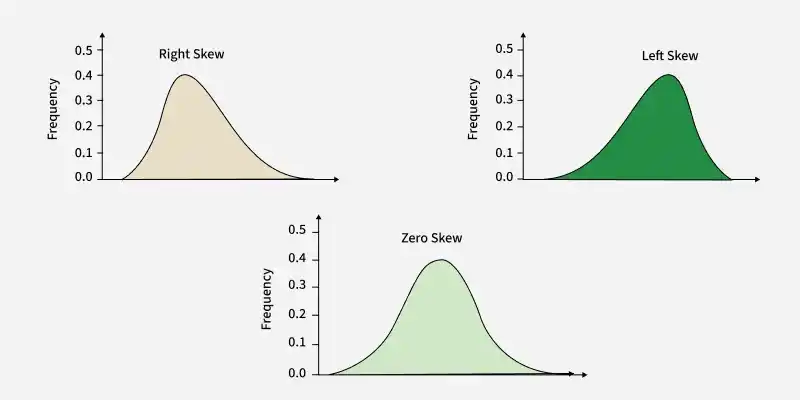
Skewness
- ****Best used:**Skewness helps determine if data transformation is needed when the distribution is highly skewed to make it suitable for algorithms like linear regression.
- **Not suitable: For symmetric data. If the data is already normally distributed, calculating skewness isn't necessary, as it will be close to zero, offering little additional information.
**Example scenario: A retail analyst might use skewness to analyze monthly sales data for a product. If the data is skewed (e.g., higher sales during holiday periods), the analyst may decide to use a log transformation to stabilize variance before applying machine learning models.
7. Kurtosis
Kurtosis measures the tailedness of a distribution, indicating whether data has heavy or light tails compared to a normal distribution. High kurtosis suggests more extreme outliers, while low kurtosis indicates fewer extreme values.
- **Best used: For identifying datasets with more outliers than expected. High kurtosis might signal that we need to pay attention to outliers or that the data might be prone to extreme values that could affect the performance of certain models.
- **Not suitable: For normal data, where the tails are not of particular interest. If a dataset is already fairly well-behaved with a near-normal distribution, kurtosis might not provide additional value.
**Example scenario: A risk manager analyzing daily stock returns might calculate kurtosis to identify potential for extreme loss days. If the kurtosis is high, the manager might use techniques to account for those outliers, such as robust statistics or adjusting risk models to reflect the volatility.
Visualizing Distributions
Visualization is a critical step in EDA, as it helps to identify patterns, trends and anomalies in the data. Selecting the right type of visualization is crucial to gaining meaningful insights.
1. Bar Plot
A bar plot displays the frequency or proportion of categories in categorical data, helping to compare the size of different categories.
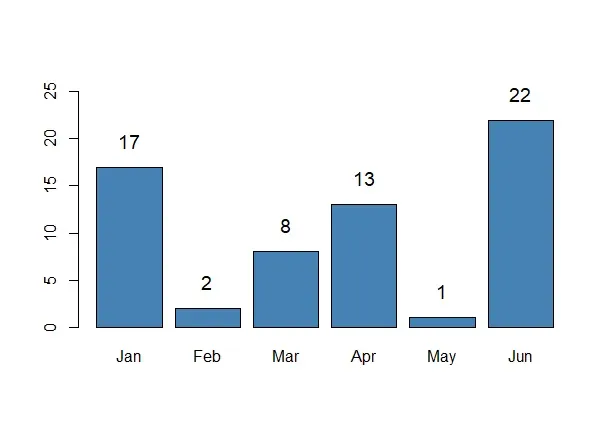
Bar Plot
- **Best used: When comparing the frequency of different categories, such as the number of products sold across various categories (e.g., electronics, clothing, or furniture).
- **Not suitable: For continuous data or when the categories have too many distinct values, which can clutter the plot and reduce clarity.
**Example scenario: A marketing department might use a bar plot to compare the number of purchases across different product types over a month, helping identify which product lines are most successful.
2. Stacked Bar Graph
A stacked bar chart shows the composition of categories, broken down into sub-categories. It helps to understand the proportion of each sub-category within a main category.
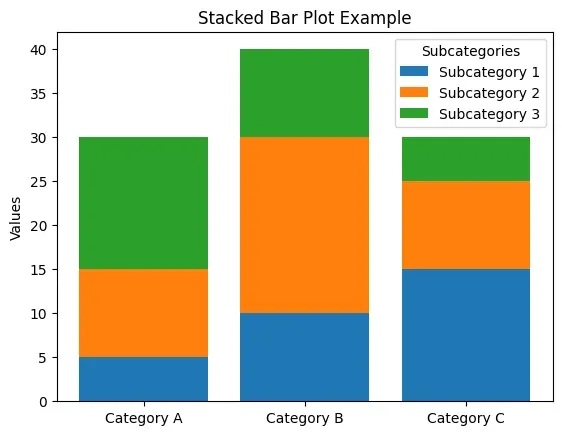
Stacked Bar Graph
- **Best used: To analyze the proportion of sub-categories across different main categories such as the breakdown of sales per product category across different countries or regions.
- **Not suitable: For datasets with too many categories or subcategories as the chart may become too complex to interpret clearly.
**Example scenario: A regional sales manager might use a stacked bar graph to break down product sales by region, enabling better strategic decision-making based on the regional performance of each product line.
3. Histogram
Histograms show the distribution of continuous data by grouping the data into bins. The height of each bar represents the number of data points in each bin.
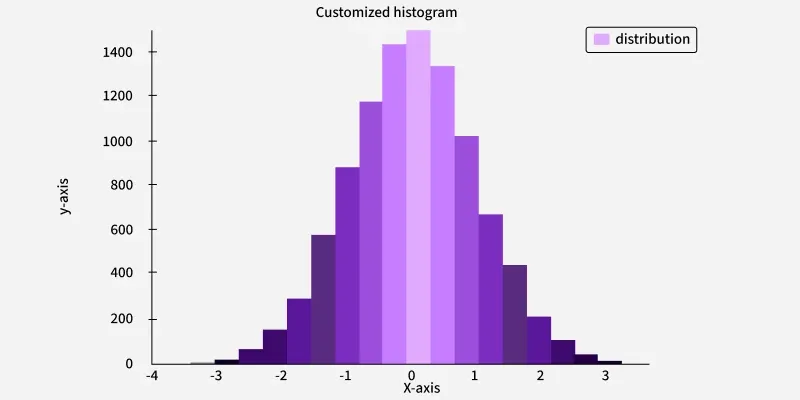
Histogram
- **Best used: To understand the frequency distribution of numerical data, such as the distribution of salaries, exam scores, or customer ages.
- **Not suitable: Outliers or heavy skew can distort data interpretation, such as a few extremely high incomes overshadowing the rest of an income dataset.
**Example scenario: A website could use a histogram to analyze the distribution of time spent on the site by visitors, helping identify trends such as how long users typically stay before leaving.
4. Box Plot
Box plots provide a graphical summary of the minimum, first quartile (25th percentile), median (50th percentile), third quartile (75th percentile) and maximum values of a dataset. They also help identify potential outliers.
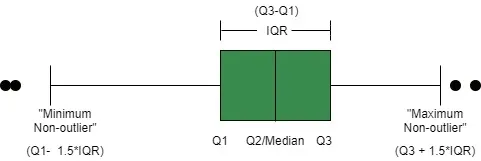
Box Plot
- **Best used: To compare distributions across multiple groups and to identify outliers in the dataset. It’s particularly useful when comparing the prices of different products or services in various markets.
- **Not suitable: For small datasets where the distribution may not be clear or when the data lacks variation.
**Example scenario: A real estate analyst might use a box plot to show the variation in home prices by region, helping identify markets that may be more volatile or have high-value properties.
5. Violin Plot
Violin plots combine aspects of both box plots and density plots. They display the distribution of data and its probability density, allowing us to compare distributions and the spread of data more thoroughly.
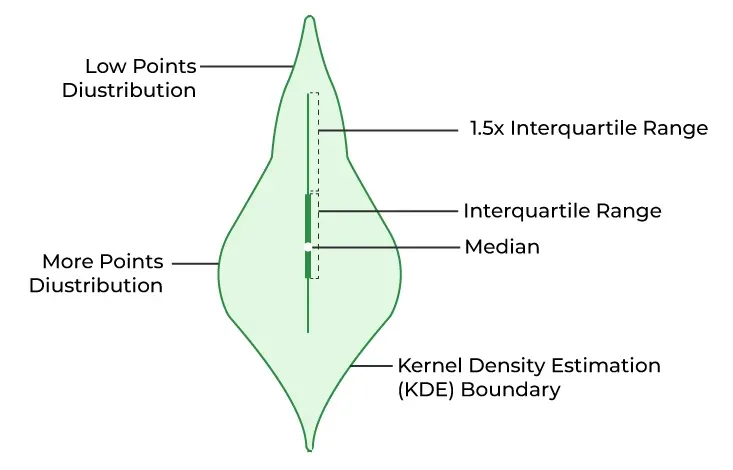
Violin Plot
- **Best used: For comparing distributions and densities across multiple groups or categories. It’s particularly useful when we want to understand the spread and the concentration of values across different groups.
- **Not suitable: When comparing only two groups, as it might be unnecessarily complex compared to simpler plots like box plots.
**Example scenario: A healthcare analyst might use a violin plot to compare the distribution of blood pressure readings in different age groups, revealing both the spread and density of the data.
6. Pie Chart
Pie charts show the proportion of a whole, where each segment represents a category's share of the total. They are best used when we want to show simple proportions.
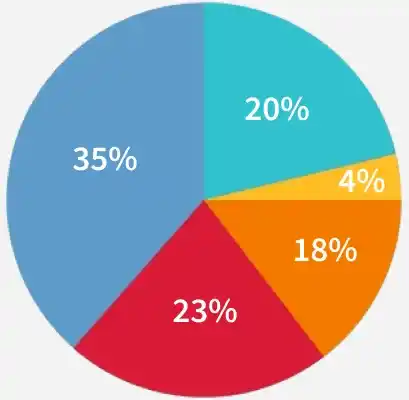
Pie cHart
- **Best used: To show simple proportions in small datasets like the market share of different products or the distribution of sales in a company.
- **Not suitable: For datasets with too many categories as the pie chart becomes cluttered and harder to read. It’s also less effective when precise comparisons are needed.
**Example scenario: A marketing team might use a pie chart to represent the share of each product category in the total sales helping stakeholders quickly understand the breakdown.
7. Correlation Heatmap
A heatmap is used to display the correlation between numerical features in a dataset. Each cell represents the correlation coefficient between two variables, with color intensity showing the strength of the correlation.
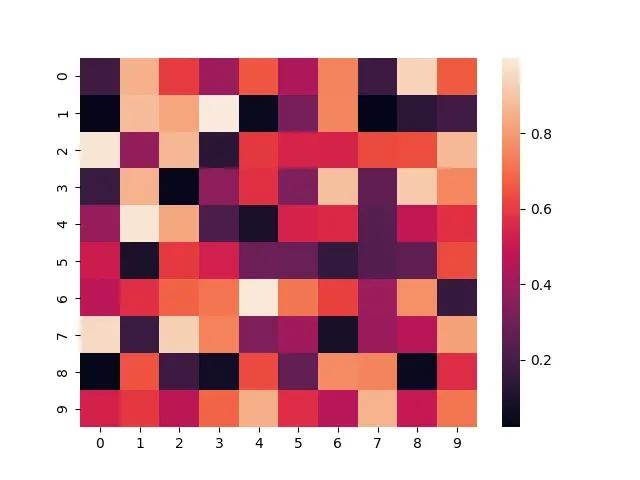
Correlation Heatmap
- **Best used: To check for multicollinearity in regression models and to identify which variables are highly correlated with the target variable.
- **Not suitable: When there are too many variables, as the heatmap can become cluttered and harder to interpret. In such cases, it may be better to select a subset of variables.
**Example scenario: A data analyst working on a customer satisfaction survey might use a correlation heatmap to see how different satisfaction metrics (such as product quality, customer service and delivery time) correlate with overall satisfaction.
8. Scatter Plot
A scatter plot visualizes the relationship between two continuous variables by plotting each data point as a dot on a two-dimensional plane. It’s especially useful for identifying trends or correlations.
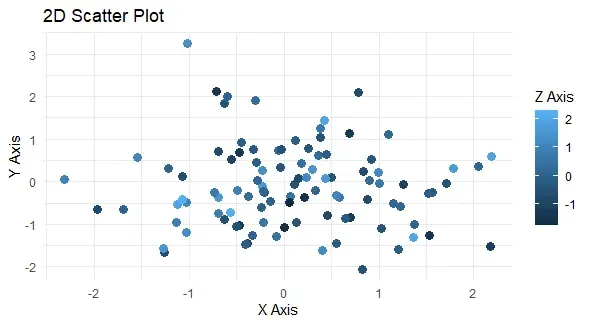
Scatter Plot
- **Best used: To explore linear relationships between two continuous variables and detect trends or patterns in the data.
- **Not suitable: For categorical variables or non-linear relationships without applying transformations (e.g., using polynomial terms).
**Example scenario: A real estate agent could use a scatter plot to compare square footage with price, helping visualize how larger homes tend to be priced higher.
Handling Multivariate Data: Feature Interactions
When dealing with multiple features, it’s important to understand how different variables interact with one another. Exploring these interactions can uncover relationships that aren’t obvious when looking at individual variables.
1. Facet Grids
Facet grids split the data into multiple subplots based on a particular feature, allowing us to compare different subsets of the data.
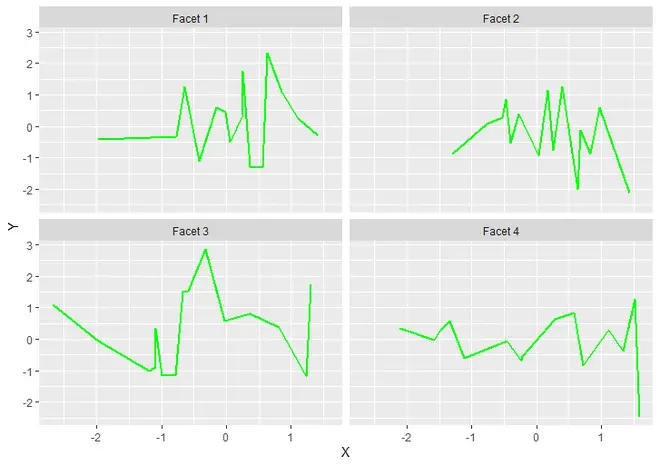
Facet Grids
- **Best used: Facet grids are useful for comparing variable relationships across categories, For example showing sales variations by region or time period with separate plots.
- **Not suitable: Facet grids can become cumbersome when dealing with a large number of categories, as the grid might become too cluttered and difficult to interpret.
**Example: A facet grid might be used to analyze how product sales differ across different seasons. Each facet could show a separate plot for each season, allowing us to see seasonal trends.
2. Pair Plots
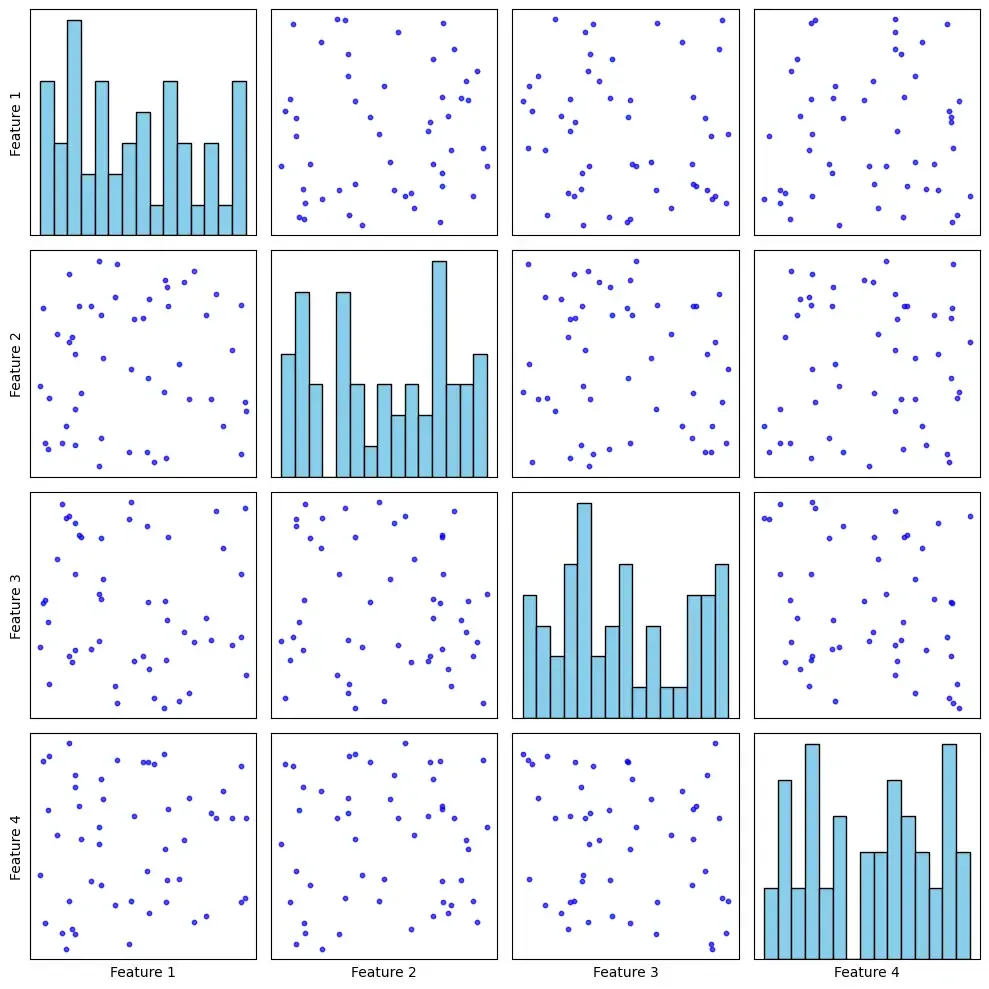
A pair plot creates a grid of scatterplots for every pair of variables in a dataset, which allows us to visualize potential relationships between them.
Pair Plot
- **Best used: Pair plots are great for examining relationships between several continuous variables. They help in identifying correlations, trends or patterns that might exist between different features.
- **Not suitable: Pair plots can become overwhelming when working with large datasets containing many variables, as the number of pairwise relationships increases exponentially.
**Example: A pair plot could be used to explore how different variables, like price, customer age and frequency of purchase, relate to each other in an e-commerce dataset.
Identifying Outliers and Anomalies
Outliers are data points that differ significantly from the rest of the data and can distort statistical analyses. Identifying these anomalies is a key part of EDA.
1. Z-Scores
A Z-score measures how many standard deviations a data point is away from the mean, helping us identify outliers in normally distributed data.
- **Best used: Z-scores are most useful when dealing with normally distributed data, as they help quantify how far each point is from the mean. A Z-score above 3 or below -3 typically indicates an outlier.
- **Not suitable: Z-scores are less useful when the data is not normally distributed, as they rely on the assumption that data follows a bell-shaped curve.
**Example: A company might use Z-scores to identify unusual sales days that deviate significantly from the average, such as a spike in sales caused by a special promotion.
2. Isolation Forest and LOF (Local Outlier Factor)
These machine learning algorithms identify outliers by analyzing data points' distance from others. They work well with high-dimensional data.
- **Best used: Isolation Forest and LOF are particularly useful when working with large, complex datasets. These algorithms can automatically detect outliers in high-dimensional spaces, such as fraud detection in financial transactions.
- **Not suitable: These methods might not perform well on smaller datasets or datasets with simple distributions, where traditional statistical methods like Z-scores or box plots might suffice.
**Example: An e-commerce platform could use Isolation Forest to detect fraudulent transactions, flagging those that deviate from typical purchase patterns.
Feature Engineering (Transformations and Interactions)
Feature engineering is the process of transforming or combining raw data into meaningful features that improve the performance of machine learning models. The goal is to enhance the model’s ability to understand patterns and make more accurate predictions.
1. Log Transformation
Log transformation helps to normalize data that is skewed, especially when the distribution has a large positive skew. It reduces the influence of extreme outliers by compressing large values.
- **Best used: The log transformation is particularly useful for data that exhibits large positive skew or exponential growth, such as income or population data. For example, applying a log transformation to income data can make the distribution more symmetric and reduce the effect of extreme income values.
- **Not suitable: It’s not effective for data that already follows a normal distribution or doesn’t exhibit strong skewness. For such data, applying a log transformation could unnecessarily distort the data.
**Example: If we have a dataset of household incomes, we might apply a log transformation to make the distribution more symmetric, as incomes are often highly skewed with a few extremely high-income outliers.
2. Polynomial Features
Polynomial features create new features by combining existing ones through polynomial terms, such as squares or cubes. This allows linear models to capture non-linear relationships.
- **Best used: Polynomial features are useful when there’s a non-linear relationship between the features and the target variable. For instance, if we're modeling house prices, adding polynomial features like square or cubic terms of the square footage can help capture non-linear relationships.
- **Not suitable: When the relationship between the features and the target is inherently linear. Polynomial features can lead to overfitting in such cases, especially if the degree of the polynomial is too high.
**Example: If we're predicting house prices and there’s a non-linear relationship between the square footage of a house and its price, adding polynomial features (e.g., square footage squared) can help capture that complexity.
3. Interaction Features
Interaction features are created by combining two or more features to capture the combined effect that they might have on the target variable. These features are valuable when we believe that the impact of one feature depends on the value of another feature.
- **Best used: Interaction features are particularly useful when we suspect that two features together have a joint effect on the target variable. For example, combining age and income might reveal an interaction effect on the likelihood of purchasing luxury items.
- **Not suitable: Overuse of interaction features can lead to overfitting, especially if we add too many combinations without proper justification. It's important to add only those interactions that have meaningful, interpretable impacts.
**Example: A retailer could create an interaction feature between age and income to model the likelihood of purchasing high-end electronics. Younger consumers with high incomes might behave differently from older consumers with similar incomes and the interaction term would capture this nuanced relationship.
Dimensionality Reduction
Dimensionality reduction techniques are essential when working with high-dimensional data, as they help simplify the data while preserving the most important patterns and structure. Reducing the number of features makes it easier to visualize data, remove noise and improve the efficiency of machine learning algorithms.
1. Principal Component Analysis (PCA)
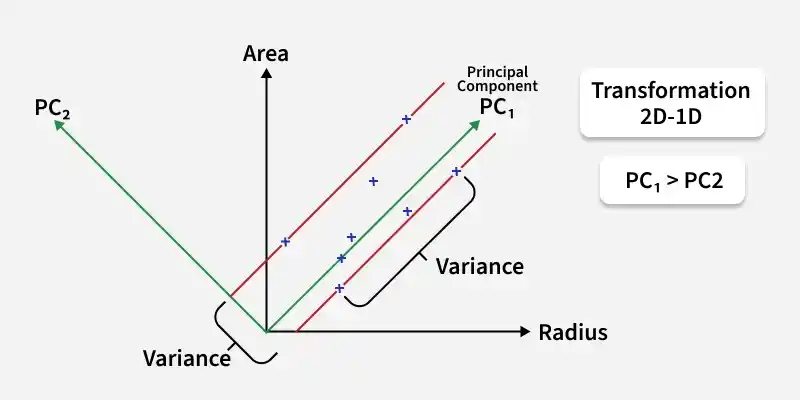
PCA is a linear technique that reduces the dimensionality of data by transforming the original features into a smaller set of uncorrelated features called principal components. These components capture the maximum variance in the data.
Principal Component Analysis (PCA)
- **Best used: PCA is useful for reducing the number of features in a dataset while retaining most variability, such as summarizing correlated financial variables like stock returns into fewer principal components that capture the majority of the variance.
- **Not suitable: PCA is not effective for datasets where the features are non-linearly related, as it only captures linear relationships. Additionally, it’s not ideal if the data contains categorical variables that can’t be easily represented in a continuous space.
**Example: In a dataset with a large number of features representing customer behavior in an e-commerce platform, PCA can help reduce the dimensions and create new features (principal components) that capture the main patterns in customer behavior.
2. t-SNE (t-Distributed Stochastic Neighbor Embedding)
t-SNE is a non-linear dimensionality reduction technique used to visualize high-dimensional data in two or three dimensions by preserving pairwise similarities between data points in a lower-dimensional space.

t-SNE
- **Best used: t-SNE is useful for visualizing high-dimensional data such as clustering results or complex datasets, helping reveal patterns or clusters that are hard to see in higher dimensions.
- **Not suitable: t-SNE is computationally expensive and can struggle with very large datasets. It also doesn’t preserve global relationships, so it might distort distances between data points, making it unsuitable for tasks requiring precise relationships.
**Example: In a dataset containing features like customer age, income and purchase history, t-SNE could be used to visualize how customers cluster based on purchasing behavior in a two-dimensional plot, helping us identify customer segments.
3. UMAP (Uniform Manifold Approximation and Projection)
UMAP is a non-linear dimensionality reduction technique similar to t-SNE, but it is faster and preserves both local and global data structures. It works by constructing a graph of the data and embedding it into a lower-dimensional space while retaining the original structure as much as possible.
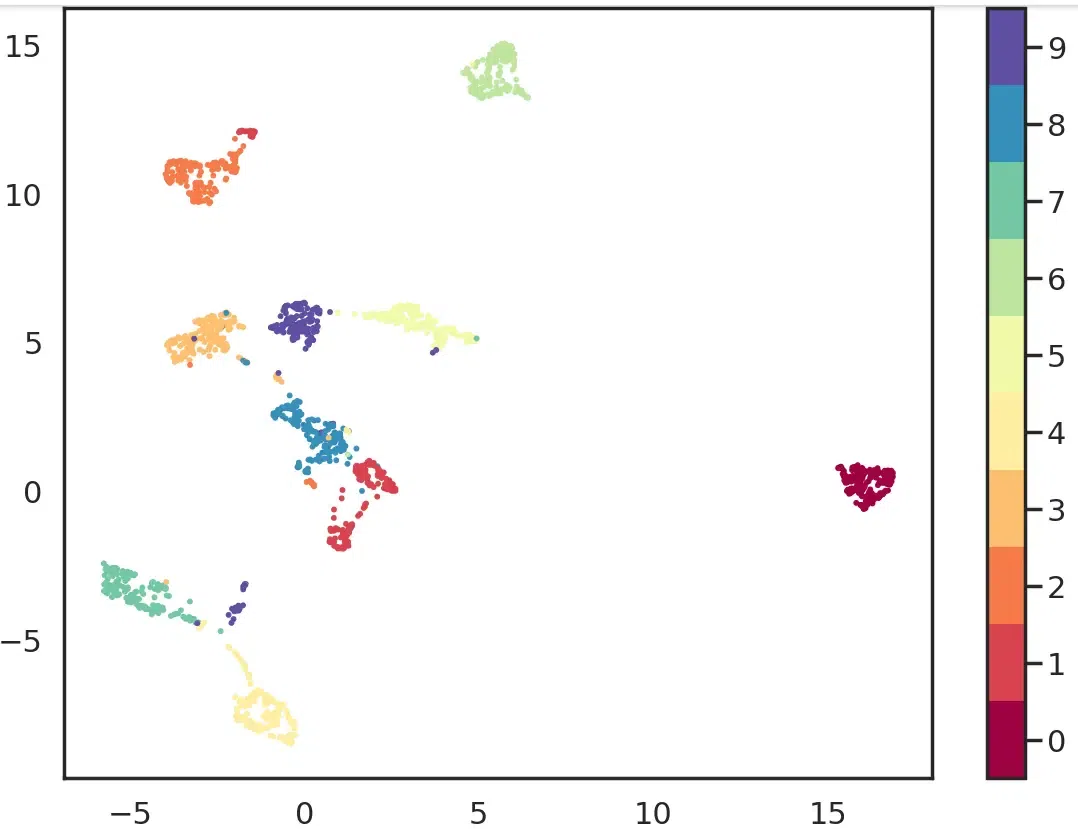
- **Best used: UMAP is useful for visualizing high-dimensional data, especially large datasets, as it preserves both local and global structure, making it suitable for clustering, classification, anomaly detection and applications like genomics or image feature analysis.
- **Not suitable: Like t-SNE, UMAP can distort data points’ exact distances, so it’s not suitable for tasks requiring precise distance metrics. It also requires careful tuning of hyperparameters to get optimal results.
**Example: A data scientist might use UMAP to visualize the features of customer interactions with an online store, reducing high-dimensional data into two or three dimensions to uncover trends or clusters that might indicate potential marketing strategies.