Guide to AWS Athena: Create, Manage, and Optimize Costs (original) (raw)
Last Updated : 23 Jul, 2025
AWS Athena is a powerful serverless query service provided by AWS for analyzing the data directly in Amazon S3 using standard SQL. It facilitates features like high scalability, cost-effectiveness, easy-to-use platform for running complex queries without the need for extensive infrastructure setup. In this article we will discuss on what is aws athena, its archtiecture, benefits, limitations, advantages, disadvantages and how it difference from Amazon Redshift, Amazon Glue and Microsoft SQL server effectively.
Table of Content
- What is AWS Athena?
- AWS Athena Architecture
- How to Setup AWS Athena? A Step-By-Step Guide
- How to Setup AWS Athena Using AWS CloudFormation Templates? A Step-By-Step Guide
- How to Run Amazon Athena Queries?
- How to Report Data to Other Resources?
- What are the benefits of using Amazon Athena?
- What are some Amazon Athena Limitations?
- Features of AWS Athena
- Advantages of AWS Athena
- Disadvantages of AWS Athena
- Amazon Athena Pricing: How Much Does Athena Cost?
- How Does Amazon Athena compares to AWS Redshift, Microsoft SQL Server and AWS Glue?
- How to Optimize AWS Athena Costs Quickly and Accurately?
- Use Cases of AWS Athena
- Conclusion
- AWS Athena Costs - FAQs
What is AWS Athena?
AWS Athena is a serverless interactive query service that enables normal SQL data analysis in Amazon S3. Athena is based on Presto, a distributed SQL query engine, and it can query data in Amazon S3 fast using conventional SQL syntax. There is no infrastructure to handle with Athena, so you can focus on analyzing data at scale. To have more idea of AWS Ethena, let us understand the architecture first.
AWS Athena Architecture
Apache Presto, an open-source distributed SQL query engine, serves as the foundation for Athena. When a query is submitted by a user, Athena generates a query plan and sends it to Presto for execution. Presto then distributes the query over numerous cluster nodes for parallel processing. The results are subsequently compiled and presented to the user. Athena stores table and partition metadata in a controlled Hive metastore.
When a query is run, Athena gets the metadata from the metastore to establish the data's location and format. Athena also interfaces with AWS Glue, a fully managed extract, transform, and load (ETL) service, allowing customers to create and manage data catalogs and ETL processes. Furthermore, we will go through the various components of AWS Athena.
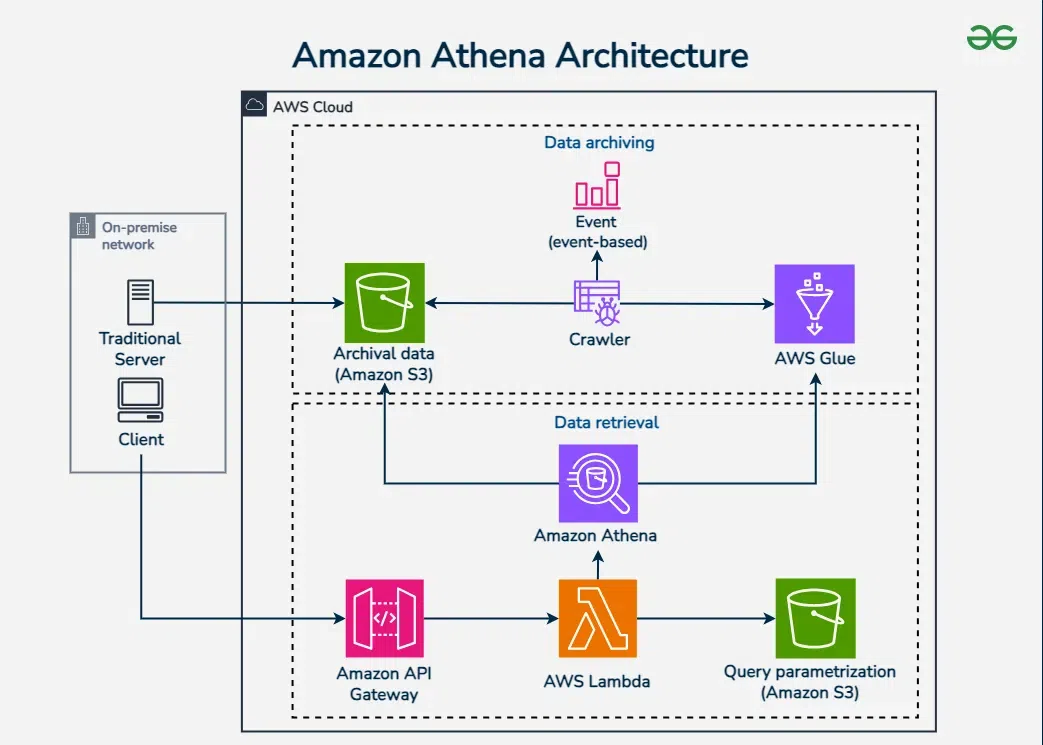
- **Amazon S3: Athena searches data stored in Amazon S3, an object storage service that is highly durable, highly accessible, and infinitely scalable.
- **Amazon Glue: Athena leverages AWS Glue, a fully managed extract, transform, and load (ETL) service, to catalog and query the data stored in S3.
- **Apache Presto: Apache Presto is Athena's distributed SQL query engine. Presto is well-suited for querying data stored in distributed systems and can handle queries that require data from numerous sources to be joined.
- **Amazon CloudWatch: Athena interacts with Amazon CloudWatch, a monitoring service that offers metrics and logs for all of your AWS account's resources. CloudWatch may be used to track the performance of your Athena queries and create alerts for specific query patterns.
- **Amazon VPC: Athena supports performing queries within an Amazon Virtual Private Cloud (VPC), which allows you to isolate your data and limit access to it using Amazon VPC security groups and network ACLs.
- **Encryption: Athena supports S3 server-side encryption with Amazon S3-managed keys (SSE-S3) or AWS Key Management Service-managed keys (SSE-KMS), as well as SSL/TLS encryption of data in transit.
How to Setup AWS Athena? A Step-By-Step Guide
Setting up of AWS Athena service is a straigtforward with involving some key steps. The following steps guides you to get started with querying your data in Amazon S3 using Athena.
Step 1: Sign in to AWS Management Console
- Navigate to AWS management console with providing your AWS credentials.
Step 2: Navigate to AWS Athena
- After login, you will landed on AWS management console, from their in the search box search Athena and navigate to that Athena page by clicking on it.
- On click on the Amazon Athena, you will directed to Amazon Athena main page.
Step 3: Set up a Query Result Location
- In the Athena console, click on "Get Started" if you are setting it for the first time.
- Specify the location of the Amazon S3 where to store the query results.
- Click on the settings on the top right options and enter the S3 bucket path where the query results will be saved eg: s3://your-bucket-name/athena-results/
- Click on save to confirm the settings.
Step 4: Create a Database
- In the Athena Query editor, type the following SQL commands to create a new database.
- Click on the run query to execute this command:
CREATE DATABASE mydatabase;
Step 5: Create a Table
- On using the following SQL command, we can create a table that is based on your data in Amazon S3. It customize and S3 location as needed:
- Click on the run query to execute it.
CREATE EXTERNAL TABLE mytable (
id INT,
name STRING,
age INT
)
ROW FORMAT SERDE 'org.apache.hadoop.hive.serde2.lazy.LazySimpleSerDe'
WITH SERDEPROPERTIES (
'serialization.format' = ','
) LOCATION 's3://your-bucket-name/data/';
Step 6: Query Your Data
- Now, you can query your data using the standard SQL. For example to select all the records from the table use:
SELECT * FROM mytable;
Step 7: Explore and Analyze Data
- On using various SQL queries to explore and analyze your data.
- It save the queires and results for future reference or reporting.
How to Setup AWS Athena Using AWS CloudFormation Templates? A Step-By-Step Guide
The following are the steps that guides in setting up the AWS Athena using AWS CloudFormation Templates to automate the process:
Step 1: Install and Configure AWS CLI
pip install awscli
- Configure AWS CLI with your credentials such as AWS Access Key ID, Secret Access Key, default Region and output format:
aws configure
Step 2: Create Amazon S3 Bucket
- Athena requires Amazon S3 where the query files are stored for that create a Amazon S3 bucket.
- The following command helps in creating the Amazon S3 with unique bucket name here we are using **my-athena-bucket as its name:
aws s3 mb s3://my-athena-bucket
Step 3: Write the CloudFormation Template
- Create a `template.yaml` file with the following content inside it:
AWSTemplateFormatVersion: '2010-09-09'
Resources:
AthenaWorkGroup:
Type: AWS::Athena::WorkGroup
Properties:
Name: MyWorkGroup
Description: "WorkGroup for Athena queries"
State: ENABLED
WorkGroupConfiguration:
ResultConfiguration:
OutputLocation: s3://my-athena-bucket/athena-results/
Step 4: Deploy the CloudFormation Stack
- Package the cloudformation template using nested stacks or local files with the following command:
aws cloudformation package --template-file template.yaml --output-template-file packaged-template.yaml --s3-bucket my-athena-bucket
- Deploy the cloudformation stack with the following command:
aws cloudformation deploy --template-file template.yaml --stack-name AthenaSetupStack --capabilities CAPABILITY_NAMED_IAM
Step 5: Verify the Deployment
- Check the status of the deployment with the following command and ensure the stack status is `CREATE_COMPLETE`
aws cloudformation describe-stacks --stack-name AthenaSetupStack
- List the Athena WorkGroups with the following command and verify that `MyWorkGroup` is listed.
aws athena list-work-groups
Step 6: Query the Data with Athena
- On using the AWS Management Console or AWS CLI to start the querying the data stored in Amazon S3.
aws athena start-query-execution --query-string "SELECT * FROM my_table;" --query-execution-context Database=my_database --result-configuration OutputLocation=s3://my-athena-bucket/query-results/
How to Run Amazon Athena Queries?
Amazon Athena facilitates in running the SQL Queries on your data that is stored in Amazon S3. Through this we can report the query results to other AWS services such as Amazon S3, Amazon QuickSight or sending the notifications via Amazon SNS. The following steps helps in guiding you to run the Amazon Athena Queries:
Step 1: Install and Configure AWS CLI
- Install the AWS CLI and configure with AWS credentials with running the following commands:
pip install awscli
aws configure
Step 2: Create a S3 Bucket for Query Results
- Create an Amazon S3 bucket for the purpose of querying the results with unique and relative bucket name. The command looks as follows:
aws s3 mb s3://my-athena-query-results
Step 3: Run a Query using AWS CLI
- Run the query from the AWS CLI using the following command:
aws athena start-query-execution --query-string "SELECT * FROM my_table;" --query-execution-context Database=my_database --result-configuration OutputLocation=s3://my-athena-query-results/
Step 4: Check Query Execution Status
- Check the query execution status with the following command and make sure to replace the with your ID returned by the start query execution and the status is `****SUCCEEDED**`
aws athena get-query-execution --query-execution-id
Step 5: Fetch Query Results
- Finally fetch the query results with the following commands:
aws athena get-query-results --query-execution-id
How to Report Data to Other Resources?
The following steps helps in how to report the data to other resources:
Step 1: Save Results to Amazon S3
- Athena itself automatically save the query results to the Amazon S3 location that is specified. You can access these results using Amazon S3 console or AWS CLI:
aws s3 cp s3://my-athena-query-results/.csv .
Step 2: Visualize the Data in Amazon QuickSight
- Try on sign in to the Amazon Quicksight service and try on creating a new data set.
- Choose the S3 bucket as the data source and ensure to specify the Amazon s3 bucket where the Athena query results.
- It helps in preparing and visualizing the data using QuickSight's visualization tools.
Step 3: Send Notifications via Amazon SNS
- It helps in creating the SNS Topic using the following command:
aws sns create-topic --name MyAthenaResultsTopic
- Execute the following command to subscribe to the topic and ensure to replace the with the ARN of the SNS Topic created.
aws sns subscribe --topic-arn --protocol email --notification-endpoint myemail@example.com
- Now, publish the results of the notifications with the following command:
aws sns publish --topic-arn --message "Athena query results are available at s3://my-athena-query-results/.csv"
What are the benefits of using Amazon Athena?
The following are the benefits of using Amazon Athena:
- **Serverless: For using Amazon Athena no infrastructure managment is needed as it automatically handles the scaling, patching and configuration.
- **Cost-Effective: It only charges for the queries you run with no upfront costs or resource provisioning.
- **Ease of Use: it query the data directly from the Amazon S3 using standard SQL that is accessbile to users familiar with SQL.
What are some Amazon Athena Limitations?
The following are the some limitations of Amazon Athena:
- **Comple Queries: It performance mya be degraded with highly complex queries or ery large datasets that requires multiple joins and aggregations.
- **Cold Start Latency: Its inital query exection may experience some delay due to its cold start latency, especially for the infrequently accessed data.
- **Limited Data Manipulation: Athena is primarily useful for querying and doesn't support any data modification operations like INSERT,, UPDATE, or DELETE.
Features of AWS Athena
The following are the features of AWS Athena:
- **Serverless architecture: Athena is a fully-managed service that does not require any infrastructure setup, management, or scaling.
- **Standard SQL support: Since the Athena supports of ANSI SQL, users can easily query the data in S3 through using their existing SQL knowledge and tools.
- **Connection with the AWS ecosystem: Athena interfaces with other AWS services such as Amazon S3, AWS Glue, and AWS Lambda, enabling customers to import and convert data from a variety of sources.
- **Cost-effective pricing model: Athena's pricing approach is cost-effective since it costs customers based on the amount of data scanned by their queries, making it ideal for ad-hoc and exploratory queries.
- **Integration with BI tools: Athena provides connectivity with major business intelligence tools like as Tableau, Power BI, and Amazon QuickSight, allowing users to build visualizations and reports.
Advantages of AWS Athena
The following are the advantages of AWS Athena:
- **No infrastructure setup: Athena is a serverless service that eliminates the need for users to set up and manage infrastructure, making data querying easier and faster.
- **Cost-effective: Athena charges customers solely for the quantity of data scanned by their searches, making it an affordable solution for ad hoc and exploratory queries.
- **Scalability: Athena is a fully-managed service that can automatically scale to accommodate massive amounts of data and queries.
- **SQL support: Since Athena supports ANSI SQL, users can query data in S3 using their existing SQL knowledge and tools.
Disadvantages of AWS Athena
The following are the disadvantages of AWS Athena:
- **Restricted query performance: The volume of data scanned and the intricacy of the query can limit Athena's speed, resulting in lengthier query times.
- **No real-time querying: Because Athena is intended for batch processing, it may not be ideal for real-time querying.
- **Limited data types: In comparison to other database systems, Athena only supports a restricted selection of data types.
Amazon Athena Pricing: How Much Does Athena Cost?
The following table discuss on Amazon Athena Pricing:
| Pricing Component | Description | Cost |
|---|---|---|
| **Query Execution | Charges are based on the amount of data scanned by your queries. | $5 per TB of data scanned |
| **Data Scanned | You can reduce costs by compressing data, partitioning data, and using columnar formats. | N/A |
| **Storage | Athena queries data directly in Amazon S3, so you only pay for S3 storage. | Based on Amazon S3 pricing |
| **Data Transfer | Data transfer within the same AWS region is free; cross-region data transfer costs apply. | Based on AWS Data Transfer pricing |
How Does Amazon Athena compares to AWS Redshift, Microsoft SQL Server and AWS Glue?
The following table details the comparisons of Amazon Athena with AWS Redshift, Microsoft SQL Server and AWS Glue:
| Features | Amazon Athena | AWS Redshift | Microsoft SQL Server | AWS Glue |
|---|---|---|---|---|
| Service Type | It is servless interactive query service | It is fully managed by data warehouse. | It is relational database management system | is is serverless data integration service. |
| Primary Use Case | It performs adhoc querying on Amzon S3 | It facilitates in Data warehousing and OLAP | It facilitates with transactional and analytical processing | It facilitates with ETL and data cataloging. |
| **Pricing Model | Pay per query based on data scanned ($5/TB) | Pay per node/hour and additional storage costs | Licensing costs and pay-per-usage for cloud | Pay per usage (job runs, data catalog storage) |
| **Data Storage | Amazon S3 | Redshift managed storage, integrates with S3 | Local or cloud storage, depends on setup | Amazon S3 and other data sources |
| **Performance | Optimized for quick queries on large datasets | High performance for complex queries and large datasets | High performance for transactional and analytical workloads | Optimized for ETL operations and data transformation |
| **Maintenance | Fully managed, no maintenance required | Managed service, but requires some administration | Requires regular maintenance and updates | Fully managed, minimal maintenance required |
| **Data Formats Supported | JSON, CSV, Parquet, ORC, Avro | JSON, CSV, Parquet, ORC, Avro, and more | Traditional RDBMS formats | JSON, CSV, Parquet, ORC, Avro, and more |
How to Optimize AWS Athena Costs Quickly and Accurately?
On following the below suggested practices you can can optimize the AWS Athena quickly and accurately:
- **Compress your Data: Try on using the data compresion formats like Gzip, snappy or Zstandard to reduce the amount of data scanned during queries, lowering the costs.
- **Use Columnar Storage: Store data in columnar formats like Parquet or ORC, which are optimized for scanning specific columns and reduce the amount of data processed.
- **Partition Your Data: Partition large datasets by relevant attributes (e.g., date, region) to limit the amount of data scanned in each query, improving performance and reducing costs.
Use Cases of AWS Athena
The following are the use cases of AWS Athena:
- **Ad hoc and exploratory querying: Athena is well suited for ad hoc and exploratory querying, where users need to quickly assess data without the need to set up and manage infrastructure.
- **Log analysis: Athena is extensively used for log analysis, allowing customers to query massive amounts of log data stored in S3.
- **Business intelligence: By querying data stored in S3 and viewing the results in popular BI tools such as Tableau and Power BI, Athena may be used to serve business intelligence applications.
Conclusion
In conclusion, Amazon Athena is a serverless query service that allows customers to run regular SQL queries to evaluate data in S3. Serverless design, standard SQL support, interaction with the AWS environment, cost-effective pricing, and integration with BI tools are among its primary characteristics. Its architecture is based on top of Apache Presto and interfaces with AWS Gl.