Embeddings in Machine Learning (original) (raw)
Last Updated : 1 May, 2026
In machine learning, embeddings are a way of representing data as numerical vectors in a continuous space. They capture the meaning or relationship between data points, so that similar items are placed closer together while dissimilar ones are farther apart. This makes it easier for algorithms to work with complex data such as words, images or audio.
- They convert categorical or high-dimensional data into dense vectors.
- They help machine learning models work with different types of data.
- These vectors help show what the objects mean and how they relate to each other.
- They are widely used in natural language processing, recommender systems and computer vision.
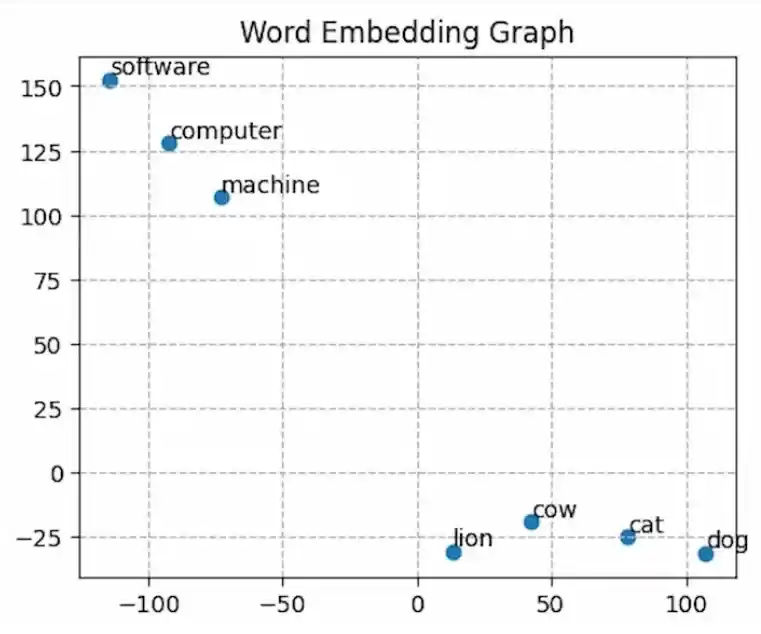
Word
In the above graph, we observe distinct clusters of related words.
- For instance "computer", "software" and "machine" are clustered together, indicating their semantic similarity.
- Similarly "lion", "cow" ,"cat" and "dog" form another cluster, representing their shared attributes.
- There exists a significant gap between these clusters highlighting their dissimilarity in meaning or context.
Important terms used for Embedding
These terms help understand how embeddings represent and organize data in machine learning.
1. Vector
- A vector is a list of numbers representing features or characteristics of data, often showing magnitude and direction.
- **Example: In 2D, the vector points 3 steps along the x-axis and 4 steps along the y-axis. Its total length (magnitude) is 5.
2. Dense Vector
- A vector in which most values are non-zero. In machine learning, it is commonly used to represent rich information such as words, images, or data points.
- **Example: [2000, 3, 5, 9.8] could describe a house, showing size, number of bedrooms, bathrooms and age.
3. Vector space
- A mathematical structure where vectors can be added and scaled, forming the basis for representing data.
- **Example: The set of all 3D vectors with real number coordinates forms a vector space like the vectors [1, 0, 0], [0, 1, 0] and [0, 0, 1] constitute a basis for the 3D vector space.
4. Continuous Vector space
- A vector space where values can take any real number, allowing smooth and precise representations.
- **Example: The color [0.9, 0.3, 0.1] in RGB shows a shade of red, where each number can be any value between 0 and 1.
Working
Embeddings convert data into numerical vectors that capture meaning and relationships, allowing models to compare and process different types of data effectively.
1. Define similarity signal
First, decide what we want the model to treat as “similar”.
- **Text: Words or sentences that appear in similar contexts.
- **Images: Pictures of the same object or scene.
- **Graphs: Nodes that are connected or related.
2. Choose dimensionality
Select how many numbers (dimensions) will describe each item, it could be 64, 384, 768 or more.
- **More dimensions: more detail but slower and uses more memory.
- **Fewer dimensions: faster but may lose detail.
3. Build the encoder
This is the model that turns our data into a list of numbers (vector):
- **Text: Language models like BERT.
- **Images: Vision models like CNN or ViT.
- **Audio: Models that process sound (e.g., turning it into spectrograms first).
- **Graphs: Methods like Node2Vec or graph neural networks.
- **Tabular data: Models that compress features into embeddings.
4. Train with a metric learning objective
- Show the model examples of things that are “similar” and “different.”
- Teach it to place similar ones close together and different ones far apart.
- This process is called metric learning.
5. Negative sampling and batching
Give the model tricky “hard negative” examples, things that seem alike but aren’t so it learns to tell them apart better.
6. Validate and Tune
Test how well our embeddings work by checking:
- How accurate search results are.
- How well items group into the right categories.
- How good automatic clustering is.
7. Index for Fast Retrieval
Store our vectors in a special database like Qdrant or FAISS to quickly find the closest matches, even from millions of items.
8. Use the embeddings
Once ready, embeddings can be used for:
- **Semantic search****:** finding by meaning, not exact words.
- **RAG (Retrieval-Augmented Generation)****:** feeding relevant facts to an AI model.
- **Classification****:** predicting the correct label or category.
- **Clustering****:** grouping similar items together.
- **Recommendations****:** suggesting similar products, content or users.
- **Monitoring: spotting unusual changes or patterns over time.
Importance
Embeddings are widely used because they represent data in a meaningful and efficient way, helping models understand relationships and perform better across tasks.
- Capture semantic relationships by placing similar items closer in vector space.
- Reduce dimensionality while preserving important patterns and features.
- Support transfer learning by reusing embeddings across different tasks.
- Automatically extract useful features, reducing manual effort.
- Provide interpretable representations through distances and directions between vectors.
Types of Data Represented with Embeddings
Embeddings can represent different types of data by converting them into dense vectors, making it easier for models to understand patterns, relationships and meaning.
1. Words
Word embeddings are numeric vectors which represent individual words as vectors where similar words are placed closer together, helping in tasks like sentiment analysis and translation.
2. Complete Text Document
Embedding models represent sentences or documents as vectors capturing overall meaning and context, useful for classification and semantic search.
3. Audio Data
Convert sound signals into vectors capturing acoustic features, enabling tasks like speech recognition and emotion detection. Some of the popular Audio embedding techniques may include Wav2Vec
4. Image Data
Represent images as vectors using CNN-based models, capturing visual features for tasks like classification and object detection.
5. Graph Data
Graph embeddings convert nodes and relationships into vectors, helping in tasks like link prediction and clustering.
6. Structured Data
Structured data such as feature vectors and tables can be embedded to help machine learning models capture underlying patterns. Common techniques include Autoencoders
Visualization using t-SNE
t-SNE is used to visualize high dimensional word embeddings by reducing them to 2D space, helping us understand how similar words are positioned relative to each other.
Step 1: Import Libraries
- **NumPy****:** Handles numerical data and array manipulation.
- **Matplotlib****:** Creates plots and visualizations.
- **scikit-learn****:** Reduces high-dimensional vectors to two dimensions for easy visualization.
- **Gensim****:** Downloads text datasets and trains word embedding models. Python `
import numpy as np import matplotlib.pyplot as plt from sklearn.manifold import TSNE import gensim.downloader as api from gensim.models import Word2Vec
`
Step 2: Load Data and Train Word2Vec Model
Loads a sample text dataset and uses it to train a Word2Vec model which creates word vectors.
Python `
corpus = api.load('text8') model = Word2Vec(corpus)
`
Step 3: Select Words and Get Their Embeddings
- Chooses a list of sample words.
- Extracts their vector representations from the model as NumPy arrays. Python `
words = ['cat', 'dog', 'elephant', 'lion', 'bird', 'rat', 'wolf', 'cow', 'goat', 'snake', 'rabbit', 'human', 'parrot', 'fox', 'peacock', 'lotus', 'roses', 'marigold', 'jasmine', 'computer', 'robot', 'software', 'vocabulary', 'machine', 'eye', 'vision', 'grammar', 'words', 'sentences', 'language', 'verbs', 'noun', 'transformer', 'embedding', 'neural', 'network', 'optimization'] words = [word for word in words if word in model.wv.key_to_index] word_embeddings = [model.wv[word] for word in words] embeddings = np.array(word_embeddings)
`
Step 4: Reduce Dimensionality with t-SNE
Uses t-SNE from scikit learn to shrink high dimensional word vectors into two dimensions for visualization.
Python `
tsne = TSNE(n_components=2, perplexity=2) embeddings_2d = tsne.fit_transform(embeddings)
`
Step 5: Plot Embedding
Displays a scatter plot of the words in 2D space, labels each point with its word and displays the plot.
Python `
plt.figure(figsize=(10, 7), dpi=1000) plt.scatter(embeddings_2d[:, 0], embeddings_2d[:, 1], marker='o') for i, word in enumerate(words): plt.text(embeddings_2d[i, 0], embeddings_2d[i, 1], word, fontsize=10, ha='left', va='bottom') plt.xlabel('t-SNE Dimension 1') plt.ylabel('t-SNE Dimension 2') plt.title('Word Embedding Graph (t-SNE with Word2Vec)') plt.grid(True) plt.savefig('embedding.png') plt.show()
`
**Output:
Original embedding vector shape (37, 100)
After applying t-SNE embedding vector shape (37, 2)
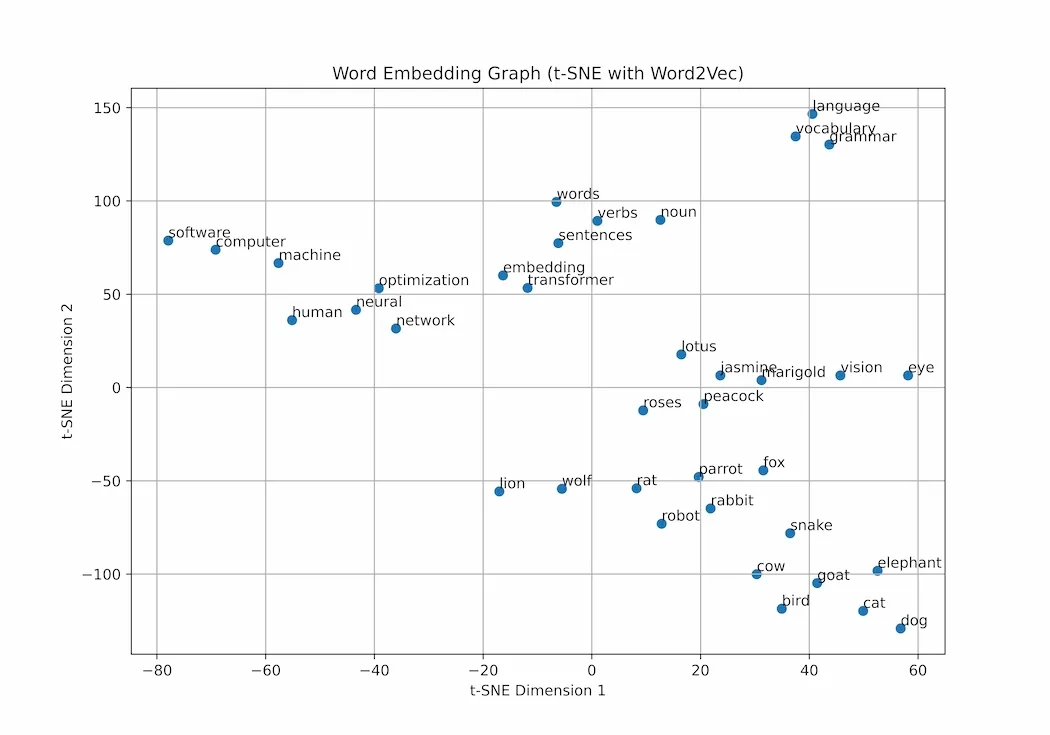
Output
Here we can see snake, cow, birds, etc are grouped together nearby showing similarity (all animals) whereas computer and machines are far away from animal cluster showing dissimilarity.
Download full code from here
Applications
- Helps visualize relationships between words, showing how similar words cluster together.
- Assists in model evaluation by checking if embeddings capture meaningful patterns.
- Useful in NLP tasks to understand semantic similarity between words or phrases.
- Supports debugging by identifying incorrect or unexpected groupings in embeddings.
- Enhances learning and interpretation by providing an intuitive view of high-dimensional data.
Limitations
- May distort global structure, so distances between far points are not always meaningful.
- Sensitive to parameters like perplexity, which can change the visualization significantly.
- Not suitable for large datasets due to high computational cost.
- Results can vary between runs, making it less stable and reproducible.
- Primarily useful for visualization only, not for actual model training or prediction.