Basic Linux Commands (original) (raw)
Last Updated : 12 May, 2026
Linux commands are used to interact with the operating system through the terminal and perform tasks like file management, navigation, and system monitoring. Learning basic Linux commands helps beginners understand how Linux works and use it efficiently for daily tasks.
- Helps beginners understand and use the Linux terminal effectively
- Covers commonly used commands for files, directories, and system tasks
- Useful for students, developers, and system administrators
- Builds a strong foundation for advanced Linux and server management
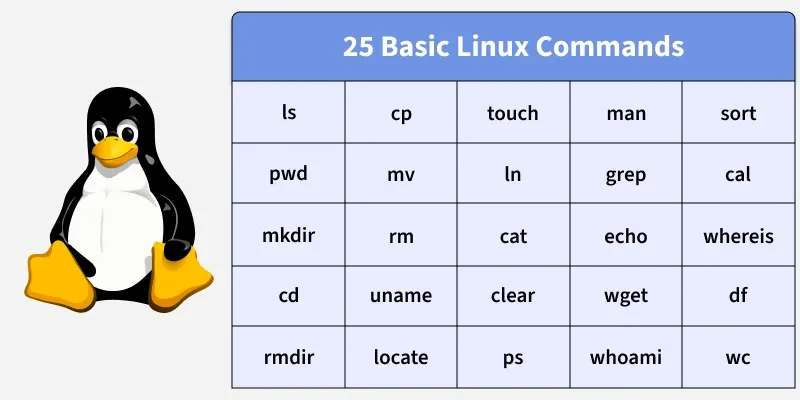
25 Basic Linux Commands
If you're looking to set up your own Linux server to practice these commands or host projects, Hostinger can be a great option. Hostinger provides affordable VPS hosting plans with full Linux support, including popular distributions like Ubuntu, Cent-OS, and Debian. Its VPS hosting offers full root access, scalable resources, and high-performance servers, making it an excellent choice for both beginners and experienced developers looking for reliable and cost-effective hosting solutions.
25 Basic Linux commands to help beginners start working with Linux confidently.
1. ls
The ls command in Linux is used to list files and directories present in the current working directory.
- Helps users quickly understand directory contents.
**Syntax:
ls [options] [directory]
**Example:
ls
**Output:

Output
- The ls command lists all the directories and files available in the current working directory.
2. pwd
The pwd command in Linux is used to display the full path of the current directory.
**Syntax:
pwd
**Example:
pwd
**Output:

Output
- The pwd command prints the absolute path of the current working directory.
**3. mkdir
The mkdir command in Linux is used to create new directories or folders.
**Syntax:
mkdir directory_name
**Example:
mkdir GeeksforGeeks
**Output:

Output
- The mkdir command creates a new directory named GeeksforGeeks.
4. cd
The cd command in Linux is used to change the current working directory.
- Allows navigation between directories.
- Moves the user to the home directory when used without arguments.
**Syntax:
cd directory_name
**Example:
cd GeeksforGeeks
**Output:

Output
- The cd command changes the current working directory to GeeksforGeeks.
5. rmdir
The rmdir command in Linux is used to delete empty directories.
**Syntax:
rmdir directory_name
**Example:
rmdir TestFolder
**Output:

Output
- The rmdir command deletes the empty directory TestFolder.
6. cat
The cat command in Linux is used to display file contents and combine multiple files.
**Syntax:
cat file_name
**Example:
cat test.txt
**Output:

Output
- The cat command displays the content of the file.
7. cp
The cp command in Linux is used to copy files or directories.
**Syntax:
cp source destination
**Example:
cp file1.txt file2.txt
**Output:

Output
- The cp command copies the contents of file1.txt into file2.txt.
8. mv
The mv command in Linux is used to move or rename files and directories.
**Syntax:
mv old_name new_name
**Example:
mv old.txt new.txt
**Output:

Output
- The mv command renames the file old.txt to new.txt.
9. rm
The rm command in Linux is used to delete files permanently.
**Syntax:
rm file_name
**Example:
rm demo.txt
**Output:

Output
- The rm command deletes the file demo.txt.
10. uname
The uname command in Linux is used to display system information.
- Shows operating system details.
- Helps identify the system.
**Syntax:
uname [OPTIONS]
**Example:
uname
**Output:

Output
- The uname command displays the operating system name.
11. locate
The locate command in Linux is used to find files using a database.
**Syntax:
locate file_name
**Example:
locate demo.txt
**Output:

Output
- The locate command shows the path of the searched file.
- Requires updatedb database
12. touch
The touch command in Linux is used to create empty files and updates file timestamps.
**Syntax:
touch file_name
**Example:
touch test.txt
**Output:

Output
- The touch command creates an empty file named test.txt.
13. ln
The ln command in Linux is used to create links between files.
- Supports hard and soft links.
**Syntax:
ln -s source link_name
**Example:
ln -s file1.txt link1.txt
**Output:

Output
- The ln command creates a symbolic link.
14. clear
The clear command in Linux is used to clear the terminal screen.
**Syntax:
clear
**Example:
clear
**Output:

Output
- The terminal screen is cleared.
15. ps
The ps command in Linux is used to display running processes.
- Helps monitor system activity.
**Syntax:
ps
**Example:
ps
**Output:

Output
- The ps command displays currently running processes.
- commonly used as "ps aux"
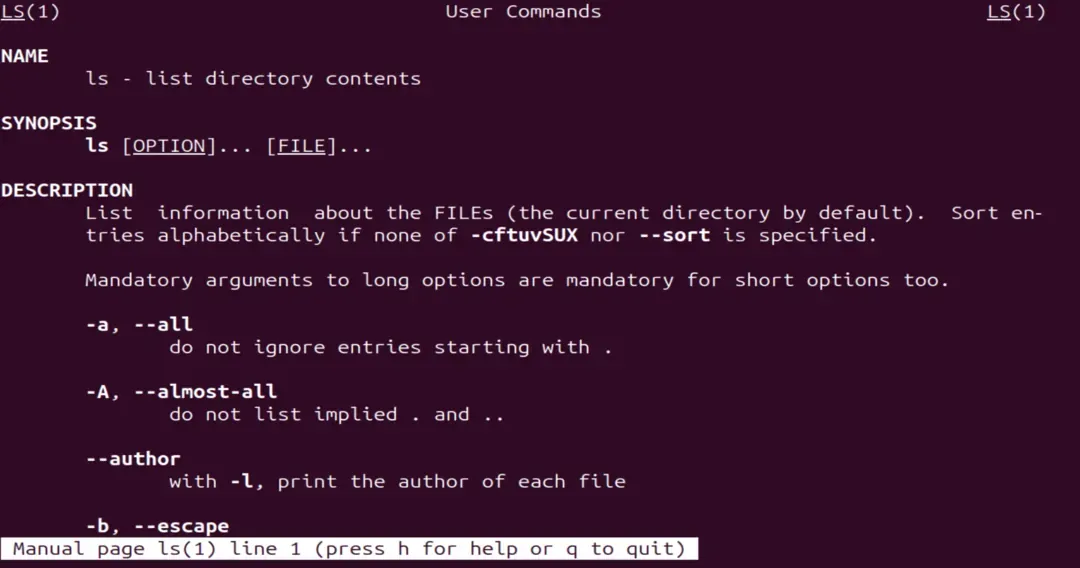
16. man
The man command in Linux is used to display command manuals.
- Explains options and usage of commands
**Syntax:
man command_name
**Example:
man ls
**Output:

Output
Output
- The manual page of the command is displayed.
17. grep
The grep command in Linux is used to search text patterns.
- Finds specific strings.
- Filters output.
**Syntax:
grep "text" file_name
**Example:
grep "Python" notes.txt
**Output:

Output
- The grep command displays matching lines.
18. echo
The echo command in Linux is used to display text in the terminal.
**Syntax:
echo "text"
**Example:
echo "Hello Linux"
**Output:

Output
- The text is printed on the terminal.
19. wget
The wget command in Linux is used to download files from the internet using URL
**Syntax:
wget url
**Example:
wget http://example.com/file.zip%3C/span>
**Output:

Output
- The file is downloaded successfully.
20. whoami
The whoami command in Linux is used to display the current user.
**Syntax:
whoami
**Example:
whoami
**Output:

Output
- The current username is displayed.
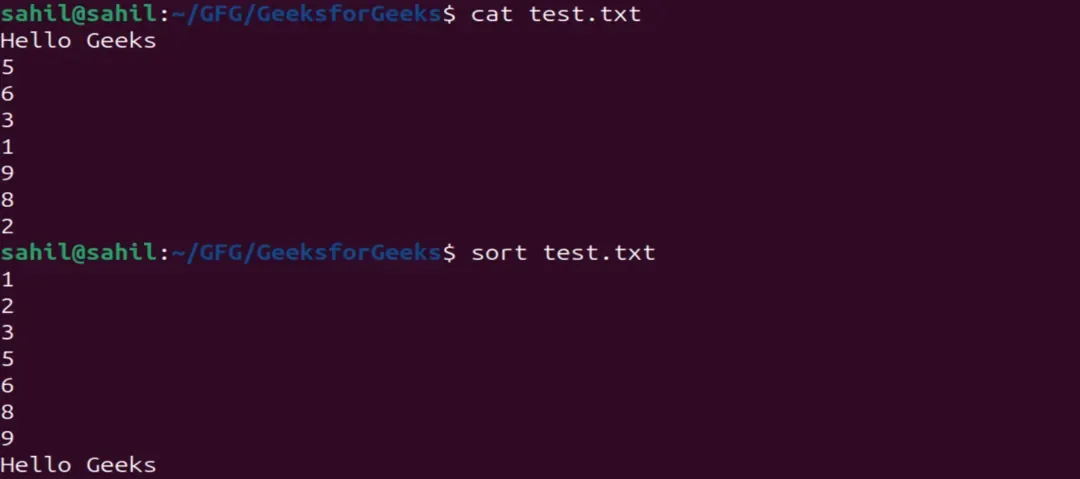
21. sort
The sort command in Linux is used to sort file contents.
**Syntax:
sort file_name
**Example:
sort test.txt
**Output:
Output
- The file content is displayed in sorted order.
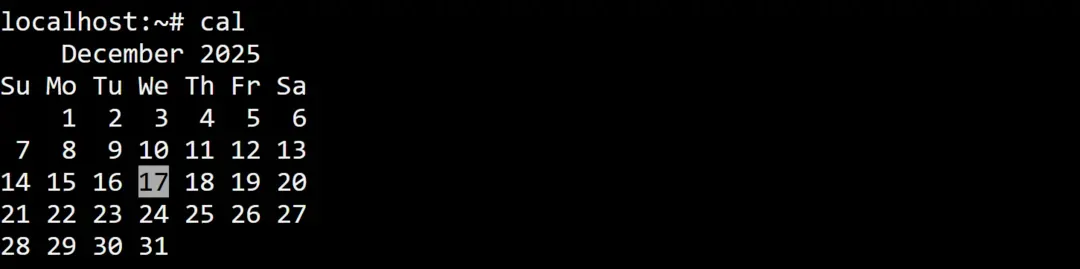
22. cal
The cal command in Linux is used to display the calendar.
**Syntax:
cal
**Example:
cal
**Output:
Output
The current month calendar is displayed.
23. whereis
The whereis command in Linux is used to locate command files.
- Shows binary location.
**Syntax:
whereis command_name
**Example:
whereis ls
**Output:

Output
- The location of the command is displayed.
24. df
The df command in Linux is used to display disk space usage.
**Syntax:
df [options]
**Example:
df -h
**Output:

Output
- Disk usage details are displayed.
25. wc
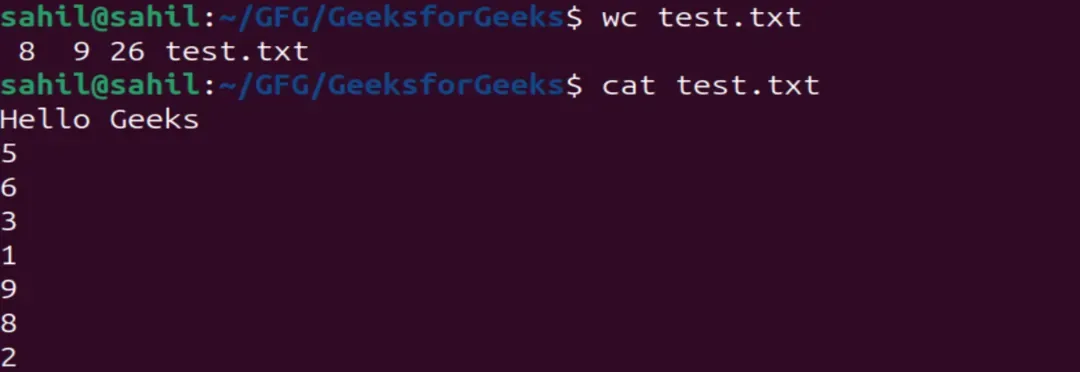
The wc command in Linux is used to count words, lines, and characters.
**Syntax:
wc [OPTION] file_name
**Example:
wc test.txt
**Output:
Output
- The number of words in the file is displayed.